Advice Request Firefox third-party cookies

Please provide comments and solutions that are helpful to the author of this topic.

simmerskool

Level 47
Thread author
Verified
Top Poster
Well-known
Forum Veteran
Apr 16, 2017
3,675
11,961
4,570
USA
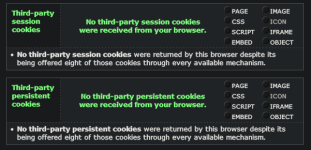
I've been using Edge & Chrome more recently, but also running FF 107.0.1 on win10 21H2. FF security is set to Strict following suggested settings link provided by @oldschool the other day. I then went to GRC (Gibson Research) cookie forensics, and it reports that FF is not blocking third-party cookies, even in Strict mode. Is this correct finding? Both Edge & Chrome passed this "test."
 
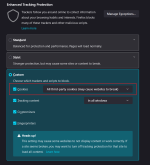
If you want a better "test result", FF users have to tweak on Browser Privacy => Enhanced Tracking Protection => Custom: Block all third-party cookies

FF.pngtest.png
 
If you want a better "test result", FF users have to tweak on Browser Privacy => Enhanced Tracking Protection => Custom: Block all third-party cookies

View attachment 271143View attachment 271144
yeah, I did try that last night but when you select Custom that disables Strict, and I was not sure exactly what to select or unselect in Custom to be as strict as Strict (if I'm making any sense...)
 
when you select Custom that disables Strict, and I was not sure exactly what to select or unselect in Custom to be as strict as Strict (if I'm making any sense...)
Custom provides the same protection as Strict, what Mozilla calls Enhanced Tracking Protection, unless you de-select individual options. In earlier FF versions, ETP was only enabled in Strict/Custom, but was later enforced in all modes. The documentation doesn't describe how Strict or Custom differ from Standard, other than "stronger protection but may cause some sites or content to break".
This explains in more detail:
 
Last edited:
LW only has Enhanced Tracking Protection and no others so it failed the 3rd-party cookie tests

I set uBO to block 3rd-party/3rd-party frames/3rd-party scripts and now it passed the 3rd-party cookie tests

For FF

I left it on Enhanced Tracking Protection and set uBO to block 3rd-party/3rd-party frames/3rd-party scripts and now it passed the 3rd-party cookie tests

Note:- Need to set blocking 3rd-party/3rd-party frames/3rd-party scripts in uBO to RED color
 
Last edited:
Custom provides the same protection as Strict, what Mozilla calls Enhanced Tracking Protection, unless you de-select individual options. In earlier FF versions, ETP was only enabled in Strict/Custom, but was later enforced in all modes. The documentation doesn't describe how Strict or Custom differ from Standard, other than "stronger protection but may cause some sites or content to break".
This explains in more detail:
Thanks for the explanation. I'll play with FF later tonight.

Edit: my FF is now blocking 3d party cookies, thank y'all
 
Last edited:
  • Like
Reactions: CyberTech and franz