Battle Firefox vs. Brave vs. Vivaldi

Which browser—Firefox, Brave, or Vivaldi—is your favorite?

  • Firefox

    Votes: 42 45.2%
  • Brave

    Votes: 38 40.9%
  • Vivaldi

    Votes: 13 14.0%

  • Total voters
    93
Compare list
Firefox vs. Brave vs. Vivaldi
Platform(s)
  1. Any platform
The only issue now is with this forum software, if I use a emoticon in a reply I can't get the cursor to the right of it to continue typing...I'm just going to have to leave them for the end of a post.
I had a similar problem with its fork, Zen.
I use the number pad’s “End” key after inserting emojis in Firefox, it moves the cursor past the emoji so I can keep typing. I’m so used to it that even when I use a Chromium browser, I still do it out of habit.
 
I use the number pad’s “End” key after inserting emojis in Firefox, it moves the cursor past the emoji so I can keep typing. I’m so used to it that even when I use a Chromium browser, I still do it out of habit.
Rats, I don't have a numbers keyboard, pad, but the end key on my laptop keyboard works 👏 Beers all around 🍻🍻 Thank you, @lokamoka820 🙂🙂
 
I use the number pad’s “End” key after inserting emojis in Firefox, it moves the cursor past the emoji so I can keep typing. I’m so used to it that even when I use a Chromium browser, I still do it out of habit.
Dark reader, of course, fix the problem of hidden icons of notifications and others when using dark mode flag, but it slows down the loading of other websites.

Beside, I like the concept of extension-less browsing; Brave with its shields for daily use and Edge without extensions for banking only.
 
Yep, you're right :) I was having a little chat with Google of the slower web page loading with FF compared to Brave. Mind you, it's not that drastic, but is noticeable.
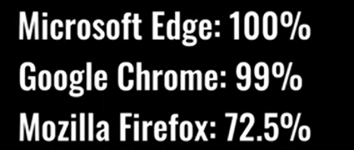
I mentioned my extensions, and Google pointed out that Dark Reader takes up a lot of resources. So, I ran Speedmeter 3.1 with these results.

With Brave and my extensions being, Proton Pass, F-Secure browser extension, Zoom, and Dark Reader with Brave Shield set to aggressively block trackers and ads.
With Dark Reader enabled, my result was 13.5. With Dark Reader disabled in Extensions, the result was 23.3

With Firefox and my extensions being the same as with Brave, but also using uBlock Origin (i.e. no "Brave Shield").
With Dark Reader enabled, the result was 9.93, with Dark Reader disabled in Extensions, was 19.4

I do realize with Brave I can go into Brave Flags and enable dark mode, but on this site it wipes out the upper right corner icons (they're there when I hover my mouse over that area) and some members Avatars look like a film negative, so I disabled it.

I'm sure most of you all knew that about Dark Reader, but just in case, I thought I'd mention it :)
Yeah, it was regularly discussed on Reddit how heavy Dark Reader is. I tried it and personally don't like it. I also don't use any website dark add-ons; if website has dark mode, I might switch it depends on how white and bright the design is.
After a break from Firefox for about 1–2 months, I came back recently with release 153. I didn’t notice any real speed difference compared to other Chromium-based browsers, and the issues I’d been having with Reddit and GitHub seem to have disappeared. YouTube also starts immediately now, though I don’t know what changed. It probably isn’t noticeable to most users, unlike what Speedometer 3.1 shows. I’m using uBlock Origin and Dark Reader, and I also added “Adaptive Tab Bar Color” which works with Dark Reader. Maybe that extension caused the improvement! 🤔
What specific problems did you have with Reddit and GitHub?

Regarding YouTube, the buffering appears when YouTube tries to load an ad and uBlock Origin doesn't let it. Not much you can do beside wait a bit. I prefer waiting rather than watching ads. I had the same experience with buffering in all browsers.
And I'm revisiting FF with it's easy to use and matured Containers (compared to Brave). That's why I talked with Google (as well as the slower FF browsing speed, at least for me), as within about the last week, I've been getting a lot of Google captcha prompts in Brave. It only works without the prompts in a Private window. With VPN off, Brave Shields disabled, clearing out Permissions/All sites, I still would get the captchas. With Chrome, no problems, with FF no problems, no captcha's

This morning in Brave it was fine, then about an hour ago, here we go again with the Google prompts, so I switched back to FF. And with using the Dark Background and Light Text extension, it's been great replacement for Dark Reader in FF, and doesn't slow the browsing down like Dark Reader did. It's now where I was at with Brave. The only issue now is with this forum software, if I use a emoticon in a reply I can't get the cursor to the right of it to continue typing...I'm just going to have to leave them for the end of a post.
I use 99.999998% of time Firefox as a web browser, Brave is installed just in case I stumble upon a website not working in Firefox (still haven't found one). Anyway, I opened Brave few days ago to see what's new and it greeted me with million captchas. I don't know why, but Brave somehow constantly triggers bot detection. I tried disabling Brave Shields like you, thinking it would solve an issue... there was no improvement. Surfing the web, at least for me, using Brave is insufferable.

I'd recommend installing Chrome Mask extension from AMO. Just in case you find a website not working in Firefox. Oh, and emoji bug? I type the emoji and just drag-and-drop it to the place where I want it.
 
Last edited:
Yeah, it was regularly discussed on Reddit how heavy Dark Reader is. I tried it and personally don't like it. I also don't use any website dark add-ons; if website has dark mode, I might switch it depends on how white and bright the design is.

What specific problems did you have with Reddit and GitHub?

Regarding YouTube, the buffering appears when YouTube tries to load an ad and uBlock Origin doesn't let it. Not much you can do beside wait a bit. I prefer waiting rather than watching ads. I had the same experience with buffering in all browsers.

I use 99.999998% of time Firefox as a web browser, Brave is installed just in case I stumble upon a website not working in Firefox (still haven't found one). Anyway, I opened Brave few days ago to see what's new and it greeted me with million captchas. I don't know why, but Brave somehow constantly triggers bot detection. I tried disabling Brave Shields like you, thinking it would solve an issue... there was no improvement. Surfing the web, at least for me, using Brave is insufferable.

I'd recommend installing Chrome Mask extension from AMO. Just in case you find a website not working in Firefox.

And that's how it was, did become for me as well, insufferable. But now with the dark mode change and the End key workaround, FF is now my favorite browser. The Containers which I "love" are fantastic. I now no longer have to bounce back and forth between Brave and my Chrome vaults, it can all be done in FF.

And thanks for the tip regarding Chrome Mask, I appreciate it :) :)
 
What specific problems did you have with Reddit and GitHub?
They both took too long to load, and sometimes they would load broken, so I had to refresh the page again.
Regarding YouTube, the buffering appears when YouTube tries to load an ad and uBlock Origin doesn't let it. Not much you can do beside wait a bit. I prefer waiting rather than watching ads. I had the same experience with buffering in all browsers.
Yes, I switched to Chromium-based browsers because I thought they might be faster, but that wasn’t my experience. Brave was the best for YouTube, but I’m happy to wait with Firefox.
 
  • +Reputation
Reactions: Parkinsond
They both took too long to load, and sometimes they would load broken, so I had to refresh the page again.
Never experienced this despite using Reddit and GitHub daily. Next time look at the console (Networking tab) and we'll see what is going on, why website resources weren't loading.