First Beta AdShield extra power tools for Brave (browser)

@Sampei.Nihira

Have you played with the Brave scriptlet creator? Have you tried transforming your essential 20 uBO rules into Brave sciptlet's using AI?


@ Jan Willy

Would a ¨Sandbox this website" be an option (in AdShield Extra) for people who occasionally use uMatrix Level 4 for websites?

By clicking on ¨Sandbox" (via icon click or context menu), the website in the active tab would be contained to 3P-Matrix-lite level 4 (blocking all frames and scripts, except for domains on the essential resources whitelist and scripts connecting to domains with CDN in domain name) and I could add the SCP download protection.

After the click the Dynamic DNR filtering would open for this websites showing which domains are blocked (so you can deblock/allow individual 3P-scripts for that website only) nice thing about the Sandbox SCP option is that it is possible to raise some site permission settings also for only that website).

I would only add this to AdShield Extra (ASE) extensions for Brave (and in future dor Firefox). The level 3 protection in UBS is fixed, in ASE you can add or remove TLD's in the worry free settings for level 3. My guess/hunch is that ASE would be more directed to power users.
 
in ASE you can add or remove TLD's in the worry free settings for level 3.
Yes, I saw. It's a very nice and clever feature. If someone wants to narrow it to pure 3p-code blocking, it's enough to remove all whitelisted TLD's. Such a setting comes close to level 4 in 3P-M extension. But for clarity it's maybe better to add a real level 4 option (not as a separated 'sandbox' but as part of the Worry-free settings). The now present 'level 3' option should be greyed out when 'level 4' is chosen (and vice versa). I should separate the download-blocking option.

I wrote in the uBlock-Stripped thread I missed the breakage warning in the 'Allowed' panel of Dynamid DNR filtering. Suggestion: grey out the block option at 3p's with high risk of breaking 1p.
 
Last edited:
  • Like
Reactions: LinuxFan58
I am testing this currently. Pages load without issue on all sites I visit. Page load seems to be noticeably faster thought I have not actually timed it. I am using the extra protection under "Security and Privacy" with no problems as of yet. Nothing negative to report at all.
 
I am testing this currently. Pages load without issue on all sites I visit. Page load seems to be noticeably faster thought I have not actually timed it. I am using the extra protection under "Security and Privacy" with no problems as of yet. Nothing negative to report at all.
@DotNet

Thanks for testing and providing feedback. Do not hesitate to post issues when you find them. Testing only makes software better.
 
  • Like
Reactions: Jan Willy
I added some extra Privacy & Security options in Version 1.1.6. (available in Github)

AI did not implement everything, because I hit my weekly maximum (and it is still beta), so will improve the user interface text this week.

I have to make clear that the following protections apply
1. the Contentl Security Policy (sorry I am dislectic, it says SCP below) - apply on first-party domains outside "safe zone region"
2. the DNR rules blocking scripts and frames - apply on third-party links outside "safe zone region"
1788813139318.png


Safe zone region is set in Filter (block) lists nd only apply when worry-free mode is active
1788814573122.png
 
Last edited:
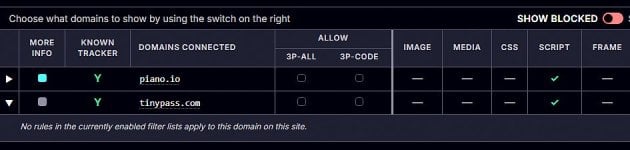
How should I interprete this? tinypass.com blocked (on cnn.com) without a filter rule. Doesn't show up when I uncheck all filters. Also not in the 'Allowed' panel.

tinypass.jpg

Nice to see you added the column 'known tracker'.

As I said before, removing all excluded TLD's in the 3p-code blocking rule doesn't lead to a stronger rule. Obviously the changed setting is not saved.
Edited: My approach is that I shouldn't see anything in the 'Alowed' panel. Or exists a hidden whitelist?
 
Last edited:
The files are missing on Git. I saw 1.1.6 earlier today and just got home to download it and all the files are goone.
Sorry, I moved them to GitHub - Kees1958/AdShield-Extra-Power-Tools

Reason: I made the extension generic: It can now work with every adblocker you use (e.g. for Brave's build-in to uBO-lite or AdGuard Mv3) it also is not limited to 5Eyes and Extended EU-zone anymore (the punycode block is removed).

1788931804194.png


This are the extra Privacy & Security protections (have a look at the safe region protections, they now include sandbox permission restrictions)!
1788931916756.png


You can set the "safe region" in the filter block list panel.
It checks you browser language and adds the country codes of the language enabled it your browser (plus some generic and 5 Eyes countries).

1788932015237.png


As said a few more minor UI tweaks (e.g. enable 5 Eyes only when language English is selected), but it nears it completion = now Release Candidate status.
 
  • Like
Reactions: Jan Willy
Obviously the changed setting is not saved.
Edited: My approach is that I shouldn't see anything in the 'Alowed' panel. Or exists a hidden whitelist?
Sorry missed that also, will have a look at it this evening. Yes there is a whitelist in all to prevent breaking stuff. Will have to check whether that is applied correctl alsoy. I will also publish the whitelist on Kees1958 Github repo to make ot more transparent.

Fun fact: Now Sweden has discovered 3P-Matrix-lite (I am not advertising it, must appear in forums I am not aware of)

With my free developers account I am only allowed 4 extensions. That is why I made AdShield generic. Of course some tweaking and balancing has to be done, but I am leaning towards developing three generic extenstions (Download Sentinel, 3P-Matrix-lite, AdShield Extra) and one specific (only for people living in 5eyes plus Extened EU-plus and focus on top 1 million websites).


@Jan Willy and @Morro
I have played with AdShield in combination 3P-Matrix-lite and I am considering changing level 2 in 3P-Matrix to being Level 1 with Hagezi's most used TLD blacklist enabled (including the exceptions) and user option to add more TLD blacklists (build-in whitelist overrules all)

Use case for people having both extensions installed with a Browser having a build-in adblocker or people preferring another adblocker.

Very very very low website breakage risk scenario:
1. Launch AdShield Extra with "enable Worry-free enabled" when you do sensitive stuff either temporarily pause AdShield or stop Worry-free mode.

2. Launch 3P-Matrix-lite with startup level 2 (when you don't add extra TLD's to blacklist it is should not break websites).
Lock specific websites on the levels you want (e.g. 3, 4 and 5) add allow exceptions using the matrix.
Tighten level 3 with only the TLD's you only use normally.
3P-Matrix is set and forget on level 2


Low website breakage risk scenario
1. Launch AdShield in normal mode, only start Worry-free when doing random surfing
Tighten the "safe regions" mode for TLD's you only use normally

2. Launch 3P-Matrix-lite in startup level 3 (but losen level 3 whitelist to continent)
Lock websites on level 2, 4 and 5 and add exceptions when needed.
3P-Matrix is now set and forget on level 3
 
Last edited: