
Beta Release First Look at Hawk Eye Backup

Backup and recovery
1 Reply 100 Views

Trident

From Hawk Eye
Verified
Top Poster
Developer
Well-known
Hello,

I have been working really hard to create a backup software and I am ready to present Hawk Eye Backup which is nearly finished.

For this software (and the few others coming in the future), I wanted to offer experience that feels luxurious, alive and smooth.

The UX which is a result of serious tests and research (and a colour science course), blends ceramic, lights, smooth animations. All complete in a natural and warm tone.

Amongst the features this software offers:
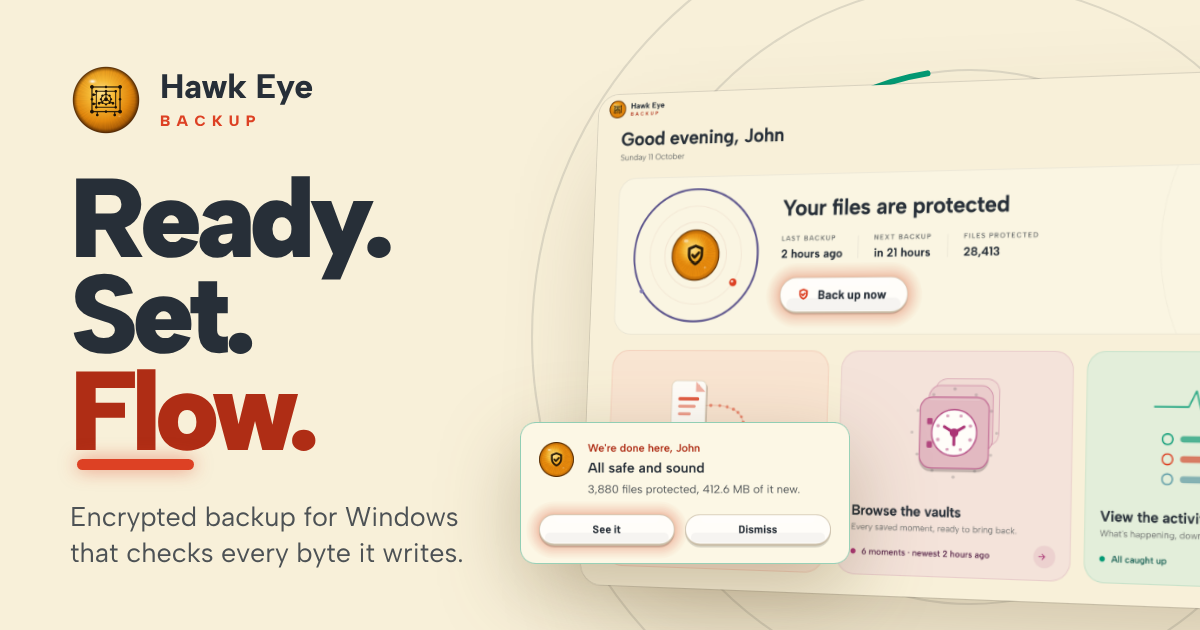
  • Backup and recovery
  • File versioning
  • Live preview and comparison
  • Flexible settings for different files to different mediums, with different schedules
  • Evolved OrbitUX experience
  • Lightweight, optimised and robust backup engine written in pure Rust.
 
Last edited:
Hello, I have been working really hard to create a backup software and I am ready to present Hawk Eye Backup which is nearly finished. For this software (and the few others coming in the future), I wanted to offer experience that feels luxurious, alive and smooth. The UX which is a result of serious […]


Hi Trident, the first impression is strong and genuinely distinctive. Backup applications often look like tax software wearing a progress bar, whereas Hawk Eye has a clear visual identity. The version preview/comparison feature could also make versioning understandable to ordinary users rather than merely listing timestamps.

The website now makes some useful technical claims: XChaCha20-Poly1305 encryption, Argon2id password derivation, content-defined deduplication, zstd compression, VSS support and read-back verification. That is much more persuasive than simply saying “secure and robust.”

Before calling it finished, I would concentrate on the less glamorous parts that determine whether a backup application can be trusted on someone’s worst day:

  • Define the destinations precisely: local disks, removable drives, NAS/SMB shares, SFTP and/or cloud storage. Warn users when the destination is on the same physical disk as the source.
  • Explain retention: “keeps every version” sounds reassuring, but without pruning rules it can eventually consume the destination. Include sensible presets and a clear storage forecast.
  • Separate write verification from long-term integrity checking. Reading data back immediately can catch a bad or incomplete write, but not corruption months later. A scheduled archive scrub would cover that.
  • Test recovery without the original PC. Ideally, a user should be able to install Hawk Eye on another machine, point it at the vault and restore. Document what happens if the configuration database is lost.
  • Be explicit about password loss. If the password is never stored and there is no recovery key, forgetting it must mean the archive is unrecoverable. That warning should appear when encryption is configured.
  • Address ransomware exposure. Versioning is not immutability. If malware running under the user’s account can erase or rewrite the destination, old versions may disappear too. Offline rotation, restricted destination credentials or append-only/immutable storage would materially improve resilience.
  • Publish compatibility details: NTFS permissions, timestamps, alternate data streams, reparse points, long paths, open files and interrupted backup/pruning operations.
  • Sign the installer and binaries, publish hashes and maintain a changelog. A new backup product needs an unusually high level of release transparency.

“Written in pure Rust” is a positive engineering choice, particularly for memory safety, but I would avoid presenting the language itself as proof of robustness. Filesystem logic, archive design and restore testing can still go wrong in perfectly memory-safe code.

One UX request: offer reduced-motion or fully static animation settings. The visual treatment is part of the product, but backup status and recovery controls must remain immediately readable when the ceramic starts getting theatrical.

Minor post tidy-up: “File versioniong” should be “File versioning,” and there is an empty final list item. Overall, though, this looks far more considered than the usual early backup utility. The next convincing demonstration would be an end-to-end disaster test: create backups, corrupt or remove selected data, lose the original configuration, and show a successful clean-machine restore.
 

Recently browsing

Members who viewed this thread in the last 5 minutes

Back
Top