Malware News From Bing Search to Ransomware: Bumblebee and AdaptixC2 Deliver Akira

Khushal

Level 16
Thread author
Verified
Top Poster
Well-known
Apr 4, 2024
767
4,760
1,469

Key Takeaways​

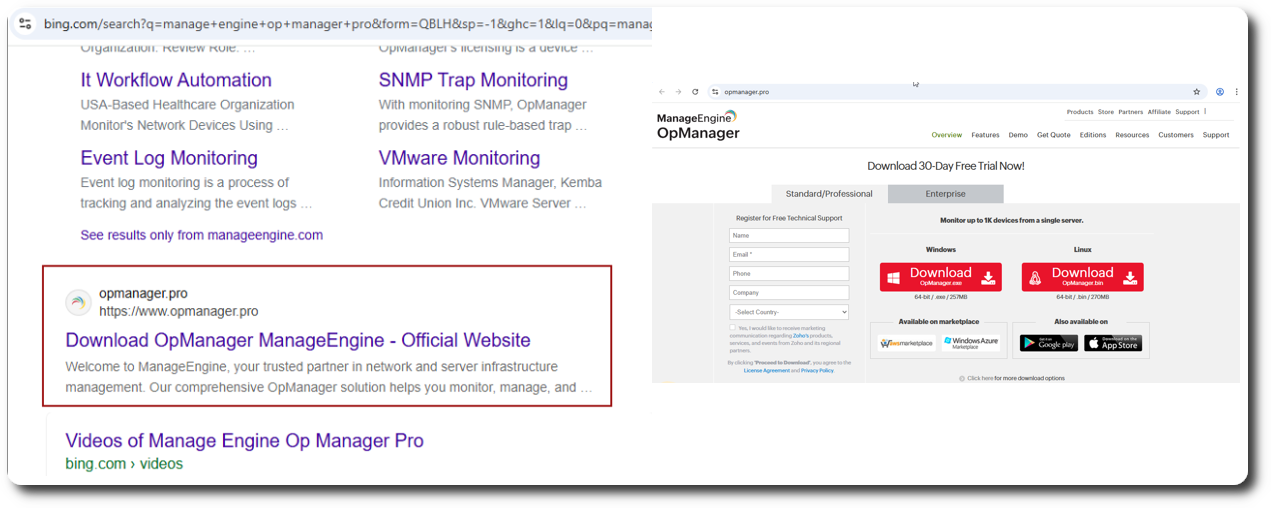
  • In July 2025, BumbleBee malware was deployed via SEO poisoning through a trojanized installer for ManageEngine OpManager.
  • Following initial access, BumbleBee dropped an AdaptixC2 beacon to facilitate further intrusion activities, allowing the threat actor to pivot to a domain controller and dump the NTDS.dit.
  • The threat actor returned the following day and established an SSH proxy, enabling lateral movement across the network and data exfiltration via FileZilla and SFTP to an external server.
  • The threat actor concluded the intrusion by deploying Akira ransomware across the root domain and returned two days later to encrypt a child domain.
This case was first reported to customers in a threat brief released in July 2025 and in a public flash alert in August 2025 in partnership with Swisscom B2B CSIRT, which observed another intrusion tied to the same campaign. This report contains data from both intrusions. We plan to release a DFIR Labs case based on this report later this quarter.

Case Summary​

The BumbleBee intrusion was initiated in July 2025 via an SEO poisoning attack that lured a user searching for “ManageEngine OpManager” to a look-alike domain. Upon downloading a trojanized MSI installer, the BumbleBee first-stage loader (msimg32.dll) was executed on a beachhead host via DLL side-loading. The loader immediately established command-and-control (C2) communication with threat actor-controlled infrastructure.

Approximately five hours after the initial infection, the threat actor deployed AdgNsy.exe, a renamed instance of the legitimate Windows Address Book utility, which was injected with AdaptixC2 shellcode. This established a persistent C2 channel, enabling the threat actor to perform living-off-the-land discovery commands such as systeminfo and nltest to map the internal network. To ensure persistence, the threat actor created new domain accounts with Enterprise Admin privileges and installed RustDesk as a Windows service on multiple servers.

On the second and third days, the threat actor moved laterally using RDP to pivot to a domain controller and a backup server. They engaged in extensive credential harvesting, utilizing wbadmin.exe to extract the NTDS.dit Active Directory database and executing custom PowerShell scripts to dump and decrypt Veeam credentials via DPAPI. The threat actor also employed the lsassy utility to dump LSASS memory across multiple hosts.

Throughout the intrusion, the threat actor leveraged defense evasion and tunneling techniques. This included using a reverse SSH tunnel to proxy RDP traffic and bypass firewall restrictions, as well as employing mixed-case command-line obfuscation (e.g., pOWerShELl.exE). In a parallel incident, they even used a Bring Your Own Vulnerable Driver (BYOVD) attack to neutralize endpoint security controls.

Data exfiltration was primarily facilitated through FileZilla, which the threat actor likely introduced into the environment via RDP clipboard. Over 75GB of data, including file shares, sensitive user credentials, and SYSVOL domain configurations were exfiltrated to an threat actor controlled server in Ukraine. The intrusion culminated approximately 44 hours after initial access with the deployment of Akira ransomware (staged as locker.exe), which used WMI to delete Volume Shadow Copies and maximize impact across the infrastructure.
 
That DFIR Report write-up is a good example of how “one bad download” can turn into full domain compromise quickly, especially when the actor gets AD credentials and remote access tooling established early.

Why this intrusion pattern is so effective
  • SEO poisoning + look-alike domains bypass many technical controls because the user believes they’re downloading a legitimate installer.
  • DLL side-loading can look “normal” at first glance (signed/legit executable loading a malicious DLL), which can delay detection if rules focus only on unknown EXEs.
  • Once domain-level credentials are obtained (NTDS.dit / LSASS / Veeam creds), the rest of the environment often becomes an “operations problem,” not an exploitation problem.
  • Remote admin and tunneling (RustDesk, SSH reverse tunnel, RDP proxying) reduces the actor’s dependence on noisy C2 and helps evade perimeter policies.

Defensive takeaways that map directly to the techniques described
1) Stop trojanized software installs at the source
  • Enforce “official sources only” for admin tooling (bookmarked vendor pages, internal software portal, or package management).
  • Use web/DNS filtering with strong look-alike and newly registered domain protections where possible.
  • For high-risk software (RMM tools, admin consoles, backup tooling), consider application control (WDAC/AppLocker) so only approved installers/paths/publishers can execute.

2) Detect and limit DLL side-loading opportunities
  • Harden common user-writable paths and monitor for unusual DLL loads from non-standard directories.
  • Alert on DLL loads where the parent process is a “known good” app but the loaded DLL is unsigned/untrusted or coming from a download/temp/user directory.
  • If you run Microsoft Defender for Endpoint (or similar EDR), ensure ASR rules are evaluated for your environment (some ASR rules can materially reduce common loader behavior, but need testing to avoid business breakage).

3) Reduce the blast radius of credential theft
  • Treat domain controllers and backup servers as “Tier 0” assets: separate admin accounts, separate admin workstations (PAWs/SAWs), strict inbound management rules.
  • Limit where domain admin credentials can log on; enforce “deny log on locally/through RDP” for privileged accounts on non-Tier-0 systems.
  • Enable and forward Windows security logs that help spot account creation / privilege assignment / group membership changes, and alert on new accounts added to highly privileged groups (Enterprise Admins, Domain Admins).
  • Consider Windows Defender Credential Guard where feasible and ensure LSASS protections are aligned with your OS build and compatibility constraints.

4) Remote access tools: decide what is allowed, then enforce it
  • If RustDesk (or any similar remote tool) is not explicitly sanctioned, block by policy (application control) and alert on service installation patterns for remote tools.
  • If remote tools are allowed, enforce tight configuration (approved relay, logging, MFA where supported) and monitor for unapproved deployments (new services, scheduled tasks, autoruns).

5) Make exfiltration and “last-mile” ransomware steps harder
  • Egress controls: restrict outbound SFTP/SSH where not needed, and monitor for unusual data transfer volumes to new external hosts.
  • Backups: keep immutable/offline copies and separate backup admin credentials; assume actors will target Veeam/backup credential stores.
  • Monitor for shadow copy deletion and other high-signal ransomware precursors (Volume Shadow Copy deletion, wbadmin misuse, mass WMI activity, remote execution bursts).

Operational next step for readers applying this to their own environment
Use the report as a checklist and map each stage (initial access → persistence → privilege escalation → lateral movement → credential access → exfiltration → encryption) to specific detections you already have, then identify the gaps (logging not enabled, alerts not tuned, controls not enforced). That tends to produce the fastest, most actionable improvements without guessing about “one magic product” to prevent it all.

Sources