

L
LabZero
Thread author
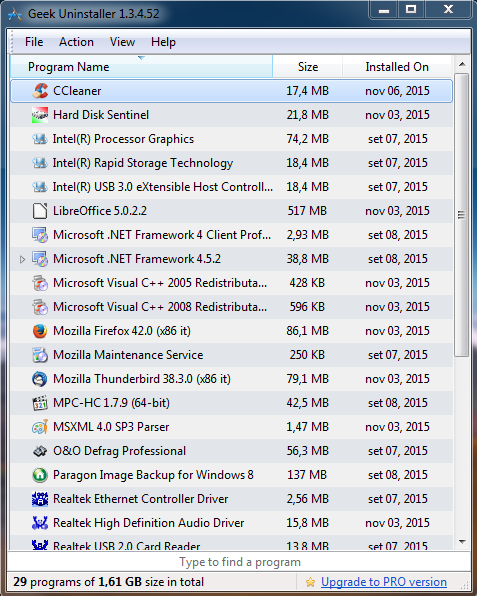
After starting, the program will show a window, which lists all the software present on your system:
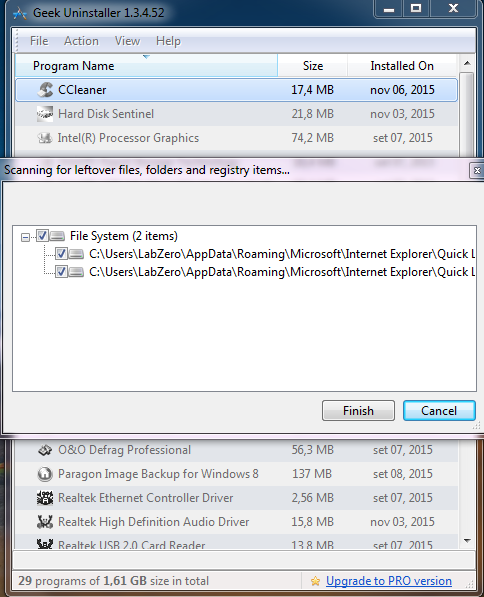
Geek Uninstaller first starts the standard uninstall procedure of the program then performs a scan for unnecessary items that may still be present on your system (Ccleaner in this case):
If the program removing requires, to the end, the reboot of PC, you must answer NO, so GeekUninstaller scans unnecessary elements.
After it has finished its scan operations and removing files and registry entries that are no longer necessary, you can manually restart the operating system.
The command Force removal, also contained in the Action menu allows you to delete a Control Panel uninstall entry, for example, to a program that no longer exists. It may happen that despite having deleted a software, this will continue to be listed in the window for uninstalling applications contained in the Windows Control Panel. Force removal feature not only allows you to remove uninstall entries that are no longer needed but also to check for any unnecessary elements.
Thanks everyone for reading
Geek Uninstaller first starts the standard uninstall procedure of the program then performs a scan for unnecessary items that may still be present on your system (Ccleaner in this case):
If the program removing requires, to the end, the reboot of PC, you must answer NO, so GeekUninstaller scans unnecessary elements.
After it has finished its scan operations and removing files and registry entries that are no longer necessary, you can manually restart the operating system.
The command Force removal, also contained in the Action menu allows you to delete a Control Panel uninstall entry, for example, to a program that no longer exists. It may happen that despite having deleted a software, this will continue to be listed in the window for uninstalling applications contained in the Windows Control Panel. Force removal feature not only allows you to remove uninstall entries that are no longer needed but also to check for any unnecessary elements.
Thanks everyone for reading
Last edited by a moderator:


