Open MalwareTips in Safari and tap Share. You may need to open the Page Menu first.
Choose Add to Home Screen. If it is not listed, use Edit Actions to add it.
Keep Open as Web App enabled if shown, then tap Add.
Android
Open MalwareTips in Chrome or another browser that supports app installation.
Open the browser menu and look for Install app, Install and create shortcut, or Add to Home screen.
Choose Install and confirm. Wording varies by browser.
Desktop
Chrome: use the install icon in the address bar, or the menu under Cast, save and share.
Edge: open the menu, then More tools, Apps and Install this site as an app.
Safari on Mac: choose Share or File, then Add to Dock. Firefox on Windows: look for the web apps button in the address bar.
If you cannot find an install option, update your browser or use its bookmark option to keep MalwareTips close.
Keep up with your conversations
After installation, open the app and sign in. Enable push notifications in Preferences if you want alerts. On iPhone and iPad, push requires a Home Screen web app and iOS or iPadOS 16.4 or later.
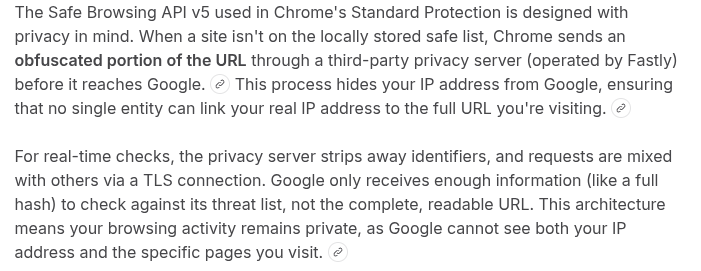
You can get the URL filter protection of advanced security without the privacy concerns by enabling this flag in Chrome
(keep the standard protection enabled in the security section of the Chrome settings):
Thanks @Mods for removing Bots comments. Enabling V5 s a tip for members not using advanced protection because of privacy concerns.
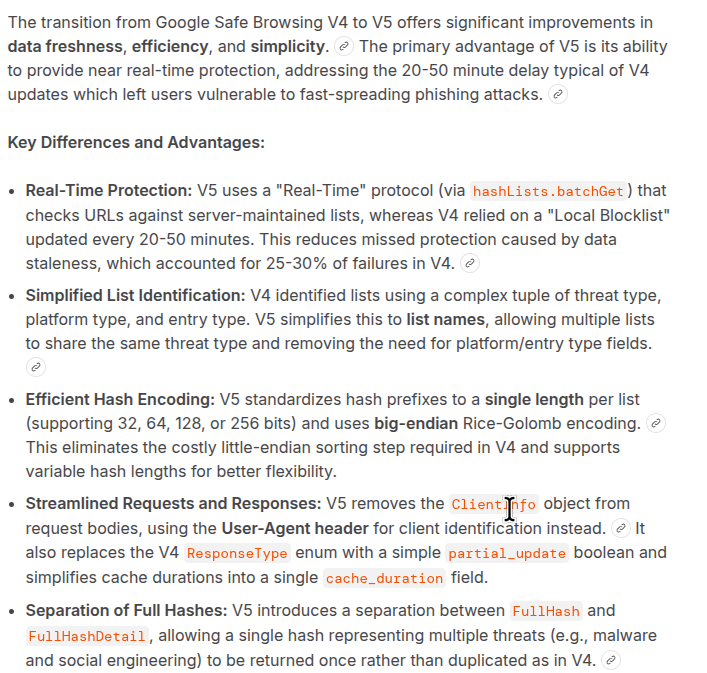
Standard + APIv5 provides similar (real time) protection as Google advanced protection, with the following exceptions (because less data is used)
- Google advanced protection should provide (a little) better protection against phishing websites (because advanced receives more data about page content)
- Google advanced protection should provide (a little) better download protection (because advanced receives more context data to assess the download reputation).
But it is an improvement compared to standard on v4 API (realtime V5 compared to on average 15 minute old downloaded fingerprint batches of V4)
Last edited:
Recently browsing
Members who viewed this thread in the last 5 minutes