Serious Discussion Google Chrome silently installs a 4 GB AI model on your device without consent. At a billion-device scale the climate costs are insane.

Khushal

Level 15
Thread author
Verified
Top Poster
Well-known
Apr 4, 2024
738
4,614
1,369

What is on the disk and how it got there
On any machine that has Chrome installed, in the user profile, sits a directory whose name is OptGuideOnDeviceModel. Inside it is a file called weights.bin. The file is approximately 4 GB. It is the weights file for Gemini Nano. Chrome uses it to power features Google has marketed under names like "Help me write", on-device scam detection, and other AI-assisted browser functions.

The file appeared with no consent prompt. There is no checkbox in Chrome Settings labelled "download a 4 GB AI model". The download triggers when Chrome's AI features are active, and those features are active by default in recent Chrome versions. On any machine that meets the hardware requirements, Chrome treats the user's hardware as a delivery target and writes the model.
 
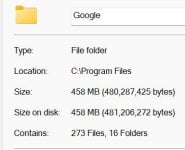
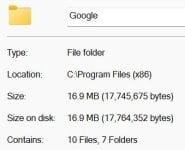
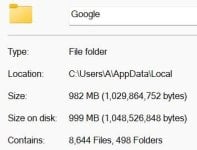
The whole Chrome disk footprint: 458 MB + 16.9 MB + 982 MB = 1456.9 MB
1.JPG2.JPG3.JPG
 
Maybe it's a little more complicated than it seems.:unsure:
And I assume it requires specific hardware.
I found this policy in Chrome that, when enabled, blocks any local downloads:

Chrome Enterprise Policy List & Management | Documentation

It is worth noting that any template downloaded when the policy is activated is deleted.

P.S.

According to ChatGPT, Edge might do the same in the future.
The blocking policy would also work in Edge:

Microsoft Edge Browser Policy Documentation GenAILocalFoundationalModelSettings

P.S.1

And it doesn't seem like you need an account, as I had hypotized.
You just need to meet certain hardware requirements.
 
Last edited:
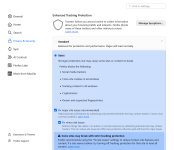
Does Firefox do this type of thing where they add unwanted or unneeded features, AI or otherwise? I tried to Google it but did not find much of an answer. I have not used FF on Windows in a long time but I downloaded it again yesterday. I saw where FF allows you to turn off all AI features in the settings now. I did that and removed AI from the sidebar then closed the sidebar out, I don't need it. I have been using FF since yesterday, so far it is pretty good. Seems to operate about the same as Chrome. I might make FF my default browser if it really is not as invasive as Chrome or Edge.

C.H.
 
I spoke too soon. FF was good for web browsing but still had problems playing audio in Windows. Pandora and YouTube both sounded terrible and the volume was way too low. I remember having the same problem when I tried FF last year. I tried to fix it, read a lot about it on Reddit and Google, none of the solutions I tried worked. Chrome and Edge both have normal sound quality. I removed FF and turned off the AI Innovations and On-Device AI settings in Chrome and will have to trust that Chrome will leave them alone. I already had all the AI settings I could find in Edge turned off, but we all know there is no guarantee they will stay that way. The next MS update will force whatever changes MS thinks are best.

C.H.
 
I spoke too soon. FF was good for web browsing but still had problems playing audio in Windows. Pandora and YouTube both sounded terrible and the volume was way too low. I remember having the same problem when I tried FF last year. I tried to fix it, read a lot about it on Reddit and Google, none of the solutions I tried worked. Chrome and Edge both have normal sound quality. I removed FF and turned off the AI Innovations and On-Device AI settings in Chrome and will have to trust that Chrome will leave them alone. I already had all the AI settings I could find in Edge turned off, but we all know there is no guarantee they will stay that way. The next MS update will force whatever changes MS thinks are best.

C.H.
Volume too low? Are you sure Firefox doesn't have reduced volume in volume mixer?

Also, have you tried to completely reinstall/update sound card drivers?

I bet it's some dumb solution similar to what I had with Firefox. YouTube 4K videos would stutter a lot; turned out I just needed to install AV1 and VP9 video extensions from Microsoft Store and restart Firefox. That was it.

VIsit about:support page too and see which codecs are available for use on Firefox. Because this is the first time I'm hearing about volume issues on Firefox.
 
Volume too low? Are you sure Firefox doesn't have reduced volume in volume mixer?

Also, have you tried to completely reinstall/update sound card drivers?

I bet it's some dumb solution similar to what I had with Firefox. YouTube 4K videos would stutter a lot; turned out I just needed to install AV1 and VP9 video extensions from Microsoft Store and restart Firefox. That was it.

VIsit about:support page too and see which codecs are available for use on Firefox. Because this is the first time I'm hearing about volume issues on Firefox.
I will tinker with it as soon as I have the time. I was thinking the problem could be outdated drivers for my blue tooth headphones but it sounds bad on my wired Sony earbuds too. Right now I am kind of out of ideas. Thanks for mentioning about: support. I will take a look in there too.

C.H.
 
I may have found a solution to my FF audio problem. Several solutions really. I removed the Realtek audio drivers in Device Manager, also removed the Bluetooth drivers for my OneOdio headphones, restarted my laptop so Windows would reinstall the drivers. Then I went on the Lenovo Support site and manually downloaded two Realtek drivers and one Bluetooth audio driver. I restarted twice after that and the sound is back to normal. Other than the sound problem FF seems to be working fine here.

Thanks everyone for your help on this.

C.H.
 
According to ChatGPT, Edge might do the same in the future.
The blocking policy would also work in Edge:
Thanks, though MS makes it difficult on purpose, 0 for Enabled and 1 for Disabled? Just like LNA flag Enabled for Disabled. 🤔
MS has also added the ability to disable Copilot, I wonder, how it pans out?! I expect it works like: Copilot disabled, unless ...
Code:
rem =================================== Windows Policies ===================================
rem ------------------------------------ Microsoft Edge ------------------------------------
rem .................................... Copilot and AI ....................................

rem 1 - Enable Browse with Copilot
reg add "HKLM\Software\Policies\Microsoft\Edge" /v "AllowBrowsingWithCopilot" /t REG_DWORD /d "0" /f

rem 1 - Enable the Copilot new tab page
reg add "HKLM\Software\Policies\Microsoft\Edge" /v "CopilotNewTabPageEnabled" /t REG_DWORD /d "0" /f

rem ________________________________________________________________________________________
rem 1 - Enables DALL-E themes generation
reg add "HKLM\Software\Policies\Microsoft\Edge" /v "AIGenThemesEnabled" /t REG_DWORD /d "1" /f

rem 1 - Disabled / 0 - The model is downloaded automatically and used for inference
reg add "HKLM\Software\Policies\Microsoft\Edge" /v "GenAILocalFoundationalModelSettings" /t REG_DWORD /d "1" /f

rem 1 -  Microsoft 365 Copilot Chat shows in the Microsoft Edge for Business toolbar
reg add "HKLM\Software\Policies\Microsoft\Edge" /v "Microsoft365CopilotChatIconEnabled" /t REG_DWORD /d "0" /f

rem 1 - Allow sharing tenant-approved browsing history with Microsoft 365 Copilot Search
reg add "HKLM\Software\Policies\Microsoft\Edge" /v "ShareBrowsingHistoryWithCopilotSearchAllowed" /t REG_DWORD /d "0" /f
Edge is a different story tho.
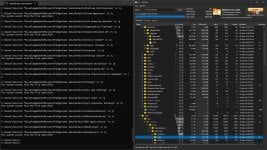
Indeed, I clean it's profile manually, which leaves about 50MB, even though MS put a readme into the folder warning me, not to do it, as if that would stop me. 😁
MS Edge settings and storage represent user-selected preferences and information and MUST not be extracted, overwritten or modified except through Microsoft Edge defined APIs.
Code:
rem Trim Some Edges - edge://settings/privacy/cookies/AllCookies
rd "%ProgramFiles(x86)%\Microsoft\EdgeUpdate\Download" /s /q
del "%LocalAppData%\Microsoft\Edge\User Data\Default\*history*." /s /f /q
del "%LocalAppData%\Microsoft\Edge\User Data\Default\AccountBookmarks" /s /f /q
del "%LocalAppData%\Microsoft\Edge\User Data\Default\Affiliation Database" /s /f /q
del "%LocalAppData%\Microsoft\Edge\User Data\Default\Affiliation Database-journal" /s /f /q
del "%LocalAppData%\Microsoft\Edge\User Data\Default\arbitration_service_config.json" /s /f /q
del "%LocalAppData%\Microsoft\Edge\User Data\Default\BookmarkMergedSurfaceOrdering" /s /f /q
del "%LocalAppData%\Microsoft\Edge\User Data\Default\BrowsingTopicsSiteData" /s /f /q
del "%LocalAppData%\Microsoft\Edge\User Data\Default\BrowsingTopicsSiteData-journal" /s /f /q
del "%LocalAppData%\Microsoft\Edge\User Data\Default\BrowsingTopicsState" /s /f /q
del "%LocalAppData%\Microsoft\Edge\User Data\Default\Custom Dictionary.txt" /s /f /q
del "%LocalAppData%\Microsoft\Edge\User Data\Default\DashTrackerDatabase" /s /f /q
del "%LocalAppData%\Microsoft\Edge\User Data\Default\DashTrackerDatabase-journal" /s /f /q
del "%LocalAppData%\Microsoft\Edge\User Data\Default\default_cloud_config.json" /s /f /q
del "%LocalAppData%\Microsoft\Edge\User Data\Default\DIPS" /s /f /q
del "%LocalAppData%\Microsoft\Edge\User Data\Default\DIPS-journal" /s /f /q
del "%LocalAppData%\Microsoft\Edge\User Data\Default\Extension Cookies" /s /f /q
del "%LocalAppData%\Microsoft\Edge\User Data\Default\ExtensionActivityComp" /s /f /q
del "%LocalAppData%\Microsoft\Edge\User Data\Default\ExtensionActivityComp-journal" /s /f /q
del "%LocalAppData%\Microsoft\Edge\User Data\Default\ExtensionActivityEdge" /s /f /q
del "%LocalAppData%\Microsoft\Edge\User Data\Default\ExtensionActivityEdge-journal" /s /f /q
del "%LocalAppData%\Microsoft\Edge\User Data\Default\HubApps" /s /f /q
del "%LocalAppData%\Microsoft\Edge\User Data\Default\HubApps Icons" /s /f /q
del "%LocalAppData%\Microsoft\Edge\User Data\Default\HubApps Icons-journal" /s /f /q
del "%LocalAppData%\Microsoft\Edge\User Data\Default\InterestGroups" /s /f /q
del "%LocalAppData%\Microsoft\Edge\User Data\Default\LOCK" /s /f /q
del "%LocalAppData%\Microsoft\Edge\User Data\Default\LOG" /s /f /q
del "%LocalAppData%\Microsoft\Edge\User Data\Default\LOG.old" /s /f /q
del "%LocalAppData%\Microsoft\Edge\User Data\Default\Login Data" /s /f /q
del "%LocalAppData%\Microsoft\Edge\User Data\Default\Login Data-journal" /s /f /q
del "%LocalAppData%\Microsoft\Edge\User Data\Default\Login Data For Account" /s /f /q
del "%LocalAppData%\Microsoft\Edge\User Data\Default\Login Data For Account-journal" /s /f /q
del "%LocalAppData%\Microsoft\Edge\User Data\Default\MediaDeviceSalts" /s /f /q
del "%LocalAppData%\Microsoft\Edge\User Data\Default\MediaDeviceSalts-journal" /s /f /q
del "%LocalAppData%\Microsoft\Edge\User Data\Default\Network Action Predictor" /s /f /q
del "%LocalAppData%\Microsoft\Edge\User Data\Default\Network Action Predictor-journal" /s /f /q
del "%LocalAppData%\Microsoft\Edge\User Data\Default\Network Persistent State" /s /f /q
del "%LocalAppData%\Microsoft\Edge\User Data\Default\PreferredApps" /s /f /q
del "%LocalAppData%\Microsoft\Edge\User Data\Default\PrivateAggregation" /s /f /q
del "%LocalAppData%\Microsoft\Edge\User Data\Default\PrivateAggregation-journal" /s /f /q
del "%LocalAppData%\Microsoft\Edge\User Data\Default\Reporting and NEL" /s /f /q
del "%LocalAppData%\Microsoft\Edge\User Data\Default\Reporting and NEL-journal" /s /f /q
del "%LocalAppData%\Microsoft\Edge\User Data\Default\QuotaManager" /s /f /q
del "%LocalAppData%\Microsoft\Edge\User Data\Default\QuotaManager-journal" /s /f /q
del "%LocalAppData%\Microsoft\Edge\User Data\Default\SharedStorage" /s /f /q
del "%LocalAppData%\Microsoft\Edge\User Data\Default\Shortcuts" /s /f /q
del "%LocalAppData%\Microsoft\Edge\User Data\Default\Shortcuts-journal" /s /f /q
del "%LocalAppData%\Microsoft\Edge\User Data\Default\Top Sites" /s /f /q
del "%LocalAppData%\Microsoft\Edge\User Data\Default\Top Sites-journal" /s /f /q
del "%LocalAppData%\Microsoft\Edge\User Data\Default\uu_host_config" /s /f /q
del "%LocalAppData%\Microsoft\Edge\User Data\Default\Visited Links" /s /f /q
del "%LocalAppData%\Microsoft\Edge\User Data\Default\Vpn Tokens" /s /f /q
del "%LocalAppData%\Microsoft\Edge\User Data\Default\Vpn Tokens-journal" /s /f /q
del "%LocalAppData%\Microsoft\Edge\User Data\Default\WebAssistDatabase" /s /f /q
del "%LocalAppData%\Microsoft\Edge\User Data\Default\WebAssistDatabase-journal" /s /f /q
del "%LocalAppData%\Microsoft\Edge\User Data\Default\Web Data" /s /f /q
del "%LocalAppData%\Microsoft\Edge\User Data\Default\Web Data-journal" /s /f /q
rd "%LocalAppData%\Microsoft\Edge\User Data\Default\Asset Store" /s /q
rd "%LocalAppData%\Microsoft\Edge\User Data\Default\AssistanceHome" /s /q
rd "%LocalAppData%\Microsoft\Edge\User Data\Default\AutofillAiModelCache" /s /q
rd "%LocalAppData%\Microsoft\Edge\User Data\Default\AutofillStrikeDatabase" /s /q
rd "%LocalAppData%\Microsoft\Edge\User Data\Default\blob_storage" /s /q
rd "%LocalAppData%\Microsoft\Edge\User Data\Default\BudgetDatabase" /s /q
rd "%LocalAppData%\Microsoft\Edge\User Data\Default\Cache" /s /q
rd "%LocalAppData%\Microsoft\Edge\User Data\Default\ClientCertificates" /s /q
rd "%LocalAppData%\Microsoft\Edge\User Data\Default\Code Cache" /s /q
rd "%LocalAppData%\Microsoft\Edge\User Data\Default\Collections" /s /q
rd "%LocalAppData%\Microsoft\Edge\User Data\Default\commerce_subscription_db" /s /q
rd "%LocalAppData%\Microsoft\Edge\User Data\Default\Continuous Migration" /s /q
rd "%LocalAppData%\Microsoft\Edge\User Data\Default\databases" /s /q
rd "%LocalAppData%\Microsoft\Edge\User Data\Default\DawnGraphiteCache" /s /q
rd "%LocalAppData%\Microsoft\Edge\User Data\Default\DawnWebGPUCache" /s /q
rd "%LocalAppData%\Microsoft\Edge\User Data\Default\DNR Extension Rules" /s /q
rd "%LocalAppData%\Microsoft\Edge\User Data\Default\discount_infos_db" /s /q
rd "%LocalAppData%\Microsoft\Edge\User Data\Default\discounts_db" /s /q
rd "%LocalAppData%\Microsoft\Edge\User Data\Default\Download Service" /s /q
rd "%LocalAppData%\Microsoft\Edge\User Data\Default\DualEngine" /s /q
rd "%LocalAppData%\Microsoft\Edge\User Data\Default\EdgeCoupons" /s /q
rd "%LocalAppData%\Microsoft\Edge\User Data\Default\EdgeEDrop" /s /q
rd "%LocalAppData%\Microsoft\Edge\User Data\Default\EdgeHubAppUsage" /s /q
rd "%LocalAppData%\Microsoft\Edge\User Data\Default\EdgeJourneys" /s /q
rd "%LocalAppData%\Microsoft\Edge\User Data\Default\EdgePassageEmbeddings" /s /q
rd "%LocalAppData%\Microsoft\Edge\User Data\Default\EdgePushStorageWithConnectTokenAndKey" /s /q
rd "%LocalAppData%\Microsoft\Edge\User Data\Default\EdgePushStorageWithWinRt" /s /q
rd "%LocalAppData%\Microsoft\Edge\User Data\Default\EdgeTravel" /s /q
rd "%LocalAppData%\Microsoft\Edge\User Data\Default\EdgeUserUsage" /s /q
rd "%LocalAppData%\Microsoft\Edge\User Data\Default\EdgeWallet" /s /q
rd "%LocalAppData%\Microsoft\Edge\User Data\Default\EntityExtraction" /s /q
rd "%LocalAppData%\Microsoft\Edge\User Data\Default\Extensions" /s /q
rd "%LocalAppData%\Microsoft\Edge\User Data\Default\Extension Rules" /s /q
rd "%LocalAppData%\Microsoft\Edge\User Data\Default\Extension Scripts" /s /q
rd "%LocalAppData%\Microsoft\Edge\User Data\Default\Extension State" /s /q
rd "%LocalAppData%\Microsoft\Edge\User Data\Default\Feature Engagement Tracker" /s /q
rd "%LocalAppData%\Microsoft\Edge\User Data\Default\GPUCache" /s /q
rd "%LocalAppData%\Microsoft\Edge\User Data\Default\Feedback Reports" /s /q
rd "%LocalAppData%\Microsoft\Edge\User Data\Default\File System" /s /q
rd "%LocalAppData%\Microsoft\Edge\User Data\Default\IndexedDB" /s /q
rd "%LocalAppData%\Microsoft\Edge\User Data\Default\JumpListIconsRecentClosed" /s /q
rd "%LocalAppData%\Microsoft\Edge\User Data\Default\JumpListIconsRecentWorkspacesV2" /s /q
rd "%LocalAppData%\Microsoft\Edge\User Data\Default\JumpListIconsTopSites" /s /q
rd "%LocalAppData%\Microsoft\Edge\User Data\Default\Local Extension Settings" /s /q
rd "%LocalAppData%\Microsoft\Edge\User Data\Default\Local Storage" /s /q
rd "%LocalAppData%\Microsoft\Edge\User Data\Default\Managed Extension Settings" /s /q
rd "%LocalAppData%\Microsoft\Edge\User Data\Default\MediaFoundationCdmStore" /s /q
rd "%LocalAppData%\Microsoft\Edge\User Data\Default\Nurturing" /s /q
rd "%LocalAppData%\Microsoft\Edge\User Data\Default\optimization_guide_hint_cache_store" /s /q
rd "%LocalAppData%\Microsoft\Edge\User Data\Default\optimization_guide_model_metadata_store" /s /q
rd "%LocalAppData%\Microsoft\Edge\User Data\Default\OptimizationGuideAssetStore.db" /s /q
rd "%LocalAppData%\Microsoft\Edge\User Data\Default\parcel_tracking_db" /s /q
rd "%LocalAppData%\Microsoft\Edge\User Data\Default\Password_Diagnostics" /s /q
rd "%LocalAppData%\Microsoft\Edge\User Data\Default\Pdf" /s /q
rd "%LocalAppData%\Microsoft\Edge\User Data\Default\PDF Restore Data" /s /q
rd "%LocalAppData%\Microsoft\Edge\User Data\Default\PersistentOriginTrials" /s /q
rd "%LocalAppData%\Microsoft\Edge\User Data\Default\Platform Notifications" /s /q
rd "%LocalAppData%\Microsoft\Edge\User Data\Default\PriceComparison" /s /q
rd "%LocalAppData%\Microsoft\Edge\User Data\Default\Safe Browsing Network" /s /q
rd "%LocalAppData%\Microsoft\Edge\User Data\Default\Segmentation Platform" /s /q
rd "%LocalAppData%\Microsoft\Edge\User Data\Default\SemanticEncoder.db" /s /q
rd "%LocalAppData%\Microsoft\Edge\User Data\Default\Service Worker" /s /q
rd "%LocalAppData%\Microsoft\Edge\User Data\Default\Session Storage" /s /q
rd "%LocalAppData%\Microsoft\Edge\User Data\Default\Sessions" /s /q
rd "%LocalAppData%\Microsoft\Edge\User Data\Default\Settings Search" /s /q
rd "%LocalAppData%\Microsoft\Edge\User Data\Default\Shared Dictionary" /s /q
rd "%LocalAppData%\Microsoft\Edge\User Data\Default\shared_proto_db" /s /q
rd "%LocalAppData%\Microsoft\Edge\User Data\Default\Site Characteristics Database" /s /q
rd "%LocalAppData%\Microsoft\Edge\User Data\Default\Storage" /s /q
rd "%LocalAppData%\Microsoft\Edge\User Data\Default\Sync App Settings" /s /q
rd "%LocalAppData%\Microsoft\Edge\User Data\Default\Sync Data" /s /q
rd "%LocalAppData%\Microsoft\Edge\User Data\Default\Sync Extension Settings" /s /q
rd "%LocalAppData%\Microsoft\Edge\User Data\Default\VideoDecodeStats" /s /q
rd "%LocalAppData%\Microsoft\Edge\User Data\Default\WebrtcVideoStats" /s /q
rd "%LocalAppData%\Microsoft\Edge\User Data\Default\Web Applications" /s /q
rd "%LocalAppData%\Microsoft\Edge\User Data\Default\WebStorage" /s /q
rd "%LocalAppData%\Microsoft\Edge\User Data\Default\Workspaces" /s /q
 

Attachments

  • capture_05092026_085632.jpg
    capture_05092026_085632.jpg
    387.4 KB · Views: 50
I may have found a solution to my FF audio problem. Several solutions really. I removed the Realtek audio drivers in Device Manager, also removed the Bluetooth drivers for my OneOdio headphones, restarted my laptop so Windows would reinstall the drivers. Then I went on the Lenovo Support site and manually downloaded two Realtek drivers and one Bluetooth audio driver. I restarted twice after that and the sound is back to normal. Other than the sound problem FF seems to be working fine here.

Thanks everyone for your help on this.

C.H.
Just make sure to install uBlock Origin now and enable ETP.

Screenshot_4.png
 

You may also like...