Serious Discussion Google Chrome silently installs a 4 GB AI model on your device without consent. At a billion-device scale the climate costs are insane.

I'm surprised that it's in the news now because I had this 2-3 months ago when I installed Chrome for testing. I always use a network monitor app on the taskbar on my PC, as well as on my phone (included by default on many phones) so nothing big usually gets downloaded without me noticing.
Everyone should use this or an equivalent app.
But at that time, turning off that writing related feature and removing the file didn't make Chrome redownload it. I don't have Chrome installed at the moment so I don't know what has changed recently.
 
I'm surprised that it's in the news now because I had this 2-3 months ago when I installed Chrome for testing. I always use a network monitor app on the taskbar on my PC, as well as on my phone (included by default on many phones) so nothing big usually gets downloaded without me noticing.
Everyone should use this or an equivalent app.
But at that time, turning off that writing related feature and removing the file didn't make Chrome redownload it. I don't have Chrome installed at the moment so I don't know what has changed recently.
I have the latest version of Chrome; the mentioned folder is absent in user data folder; the total size of Chrome installation (Prog files, Prog files 86, and users) is less than 2 GB!
 
I have the latest version of Chrome; the mentioned folder is absent in user data folder; the total size of Chrome installation (Prog files, Prog files 86, and users) is less than 2 GB!
It's downloaded if the "Help me write" feature is enabled. I enabled that out of curiosity which made Chrome download the LLM model.
 
It's downloaded if the "Help me write" feature is enabled. I enabled that out of curiosity which made Chrome download the LLM model.
That explains why it is not here; as a rule when dealing with Chrome settings, I enable the bare minimum features just to let the browser work; no page preloading, no advanced protection.
 
@TairikuOkami
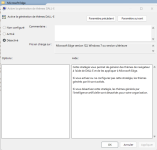
Here i have it set to 0, because no string value if activated unlike GenAILocalFoundationalModelSettings on 1 deactivate.
Yes funny story MS say "please activate the unactivated for activate the desactivate if it's activate by unactivate:ROFLMAO::ROFLMAO::ROFLMAO::devilish:

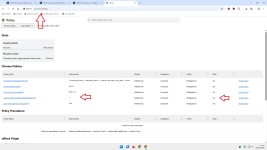
2026-05-09_153152.png2026-05-09_153235.png
 
Thanks, though MS makes it difficult on purpose, 0 for Enabled and 1 for Disabled? Just like LNA flag Enabled for Disabled. 🤔
MS has also added the ability to disable Copilot, I wonder, how it pans out?! I expect it works like: Copilot disabled, unless ...
Code:
rem =================================== Windows Policies ===================================
rem ------------------------------------ Microsoft Edge ------------------------------------
rem .................................... Copilot and AI ....................................

rem 1 - Enable Browse with Copilot
reg add "HKLM\Software\Policies\Microsoft\Edge" /v "AllowBrowsingWithCopilot" /t REG_DWORD /d "0" /f

rem 1 - Enable the Copilot new tab page
reg add "HKLM\Software\Policies\Microsoft\Edge" /v "CopilotNewTabPageEnabled" /t REG_DWORD /d "0" /f

rem ________________________________________________________________________________________
rem 1 - Enables DALL-E themes generation
reg add "HKLM\Software\Policies\Microsoft\Edge" /v "AIGenThemesEnabled" /t REG_DWORD /d "1" /f

rem 1 - Disabled / 0 - The model is downloaded automatically and used for inference
reg add "HKLM\Software\Policies\Microsoft\Edge" /v "GenAILocalFoundationalModelSettings" /t REG_DWORD /d "1" /f

rem 1 -  Microsoft 365 Copilot Chat shows in the Microsoft Edge for Business toolbar
reg add "HKLM\Software\Policies\Microsoft\Edge" /v "Microsoft365CopilotChatIconEnabled" /t REG_DWORD /d "0" /f

rem 1 - Allow sharing tenant-approved browsing history with Microsoft 365 Copilot Search
reg add "HKLM\Software\Policies\Microsoft\Edge" /v "ShareBrowsingHistoryWithCopilotSearchAllowed" /t REG_DWORD /d "0" /f

Indeed, I clean it's profile manually, which leaves about 50MB, even though MS put a readme into the folder warning me, not to do it, as if that would stop me. 😁

Code:
rem Trim Some Edges - edge://settings/privacy/cookies/AllCookies
rd "%ProgramFiles(x86)%\Microsoft\EdgeUpdate\Download" /s /q
del "%LocalAppData%\Microsoft\Edge\User Data\Default\*history*." /s /f /q
del "%LocalAppData%\Microsoft\Edge\User Data\Default\AccountBookmarks" /s /f /q
del "%LocalAppData%\Microsoft\Edge\User Data\Default\Affiliation Database" /s /f /q
del "%LocalAppData%\Microsoft\Edge\User Data\Default\Affiliation Database-journal" /s /f /q
del "%LocalAppData%\Microsoft\Edge\User Data\Default\arbitration_service_config.json" /s /f /q
del "%LocalAppData%\Microsoft\Edge\User Data\Default\BookmarkMergedSurfaceOrdering" /s /f /q
del "%LocalAppData%\Microsoft\Edge\User Data\Default\BrowsingTopicsSiteData" /s /f /q
del "%LocalAppData%\Microsoft\Edge\User Data\Default\BrowsingTopicsSiteData-journal" /s /f /q
del "%LocalAppData%\Microsoft\Edge\User Data\Default\BrowsingTopicsState" /s /f /q
del "%LocalAppData%\Microsoft\Edge\User Data\Default\Custom Dictionary.txt" /s /f /q
del "%LocalAppData%\Microsoft\Edge\User Data\Default\DashTrackerDatabase" /s /f /q
del "%LocalAppData%\Microsoft\Edge\User Data\Default\DashTrackerDatabase-journal" /s /f /q
del "%LocalAppData%\Microsoft\Edge\User Data\Default\default_cloud_config.json" /s /f /q
del "%LocalAppData%\Microsoft\Edge\User Data\Default\DIPS" /s /f /q
del "%LocalAppData%\Microsoft\Edge\User Data\Default\DIPS-journal" /s /f /q
del "%LocalAppData%\Microsoft\Edge\User Data\Default\Extension Cookies" /s /f /q
del "%LocalAppData%\Microsoft\Edge\User Data\Default\ExtensionActivityComp" /s /f /q
del "%LocalAppData%\Microsoft\Edge\User Data\Default\ExtensionActivityComp-journal" /s /f /q
del "%LocalAppData%\Microsoft\Edge\User Data\Default\ExtensionActivityEdge" /s /f /q
del "%LocalAppData%\Microsoft\Edge\User Data\Default\ExtensionActivityEdge-journal" /s /f /q
del "%LocalAppData%\Microsoft\Edge\User Data\Default\HubApps" /s /f /q
del "%LocalAppData%\Microsoft\Edge\User Data\Default\HubApps Icons" /s /f /q
del "%LocalAppData%\Microsoft\Edge\User Data\Default\HubApps Icons-journal" /s /f /q
del "%LocalAppData%\Microsoft\Edge\User Data\Default\InterestGroups" /s /f /q
del "%LocalAppData%\Microsoft\Edge\User Data\Default\LOCK" /s /f /q
del "%LocalAppData%\Microsoft\Edge\User Data\Default\LOG" /s /f /q
del "%LocalAppData%\Microsoft\Edge\User Data\Default\LOG.old" /s /f /q
del "%LocalAppData%\Microsoft\Edge\User Data\Default\Login Data" /s /f /q
del "%LocalAppData%\Microsoft\Edge\User Data\Default\Login Data-journal" /s /f /q
del "%LocalAppData%\Microsoft\Edge\User Data\Default\Login Data For Account" /s /f /q
del "%LocalAppData%\Microsoft\Edge\User Data\Default\Login Data For Account-journal" /s /f /q
del "%LocalAppData%\Microsoft\Edge\User Data\Default\MediaDeviceSalts" /s /f /q
del "%LocalAppData%\Microsoft\Edge\User Data\Default\MediaDeviceSalts-journal" /s /f /q
del "%LocalAppData%\Microsoft\Edge\User Data\Default\Network Action Predictor" /s /f /q
del "%LocalAppData%\Microsoft\Edge\User Data\Default\Network Action Predictor-journal" /s /f /q
del "%LocalAppData%\Microsoft\Edge\User Data\Default\Network Persistent State" /s /f /q
del "%LocalAppData%\Microsoft\Edge\User Data\Default\PreferredApps" /s /f /q
del "%LocalAppData%\Microsoft\Edge\User Data\Default\PrivateAggregation" /s /f /q
del "%LocalAppData%\Microsoft\Edge\User Data\Default\PrivateAggregation-journal" /s /f /q
del "%LocalAppData%\Microsoft\Edge\User Data\Default\Reporting and NEL" /s /f /q
del "%LocalAppData%\Microsoft\Edge\User Data\Default\Reporting and NEL-journal" /s /f /q
del "%LocalAppData%\Microsoft\Edge\User Data\Default\QuotaManager" /s /f /q
del "%LocalAppData%\Microsoft\Edge\User Data\Default\QuotaManager-journal" /s /f /q
del "%LocalAppData%\Microsoft\Edge\User Data\Default\SharedStorage" /s /f /q
del "%LocalAppData%\Microsoft\Edge\User Data\Default\Shortcuts" /s /f /q
del "%LocalAppData%\Microsoft\Edge\User Data\Default\Shortcuts-journal" /s /f /q
del "%LocalAppData%\Microsoft\Edge\User Data\Default\Top Sites" /s /f /q
del "%LocalAppData%\Microsoft\Edge\User Data\Default\Top Sites-journal" /s /f /q
del "%LocalAppData%\Microsoft\Edge\User Data\Default\uu_host_config" /s /f /q
del "%LocalAppData%\Microsoft\Edge\User Data\Default\Visited Links" /s /f /q
del "%LocalAppData%\Microsoft\Edge\User Data\Default\Vpn Tokens" /s /f /q
del "%LocalAppData%\Microsoft\Edge\User Data\Default\Vpn Tokens-journal" /s /f /q
del "%LocalAppData%\Microsoft\Edge\User Data\Default\WebAssistDatabase" /s /f /q
del "%LocalAppData%\Microsoft\Edge\User Data\Default\WebAssistDatabase-journal" /s /f /q
del "%LocalAppData%\Microsoft\Edge\User Data\Default\Web Data" /s /f /q
del "%LocalAppData%\Microsoft\Edge\User Data\Default\Web Data-journal" /s /f /q
rd "%LocalAppData%\Microsoft\Edge\User Data\Default\Asset Store" /s /q
rd "%LocalAppData%\Microsoft\Edge\User Data\Default\AssistanceHome" /s /q
rd "%LocalAppData%\Microsoft\Edge\User Data\Default\AutofillAiModelCache" /s /q
rd "%LocalAppData%\Microsoft\Edge\User Data\Default\AutofillStrikeDatabase" /s /q
rd "%LocalAppData%\Microsoft\Edge\User Data\Default\blob_storage" /s /q
rd "%LocalAppData%\Microsoft\Edge\User Data\Default\BudgetDatabase" /s /q
rd "%LocalAppData%\Microsoft\Edge\User Data\Default\Cache" /s /q
rd "%LocalAppData%\Microsoft\Edge\User Data\Default\ClientCertificates" /s /q
rd "%LocalAppData%\Microsoft\Edge\User Data\Default\Code Cache" /s /q
rd "%LocalAppData%\Microsoft\Edge\User Data\Default\Collections" /s /q
rd "%LocalAppData%\Microsoft\Edge\User Data\Default\commerce_subscription_db" /s /q
rd "%LocalAppData%\Microsoft\Edge\User Data\Default\Continuous Migration" /s /q
rd "%LocalAppData%\Microsoft\Edge\User Data\Default\databases" /s /q
rd "%LocalAppData%\Microsoft\Edge\User Data\Default\DawnGraphiteCache" /s /q
rd "%LocalAppData%\Microsoft\Edge\User Data\Default\DawnWebGPUCache" /s /q
rd "%LocalAppData%\Microsoft\Edge\User Data\Default\DNR Extension Rules" /s /q
rd "%LocalAppData%\Microsoft\Edge\User Data\Default\discount_infos_db" /s /q
rd "%LocalAppData%\Microsoft\Edge\User Data\Default\discounts_db" /s /q
rd "%LocalAppData%\Microsoft\Edge\User Data\Default\Download Service" /s /q
rd "%LocalAppData%\Microsoft\Edge\User Data\Default\DualEngine" /s /q
rd "%LocalAppData%\Microsoft\Edge\User Data\Default\EdgeCoupons" /s /q
rd "%LocalAppData%\Microsoft\Edge\User Data\Default\EdgeEDrop" /s /q
rd "%LocalAppData%\Microsoft\Edge\User Data\Default\EdgeHubAppUsage" /s /q
rd "%LocalAppData%\Microsoft\Edge\User Data\Default\EdgeJourneys" /s /q
rd "%LocalAppData%\Microsoft\Edge\User Data\Default\EdgePassageEmbeddings" /s /q
rd "%LocalAppData%\Microsoft\Edge\User Data\Default\EdgePushStorageWithConnectTokenAndKey" /s /q
rd "%LocalAppData%\Microsoft\Edge\User Data\Default\EdgePushStorageWithWinRt" /s /q
rd "%LocalAppData%\Microsoft\Edge\User Data\Default\EdgeTravel" /s /q
rd "%LocalAppData%\Microsoft\Edge\User Data\Default\EdgeUserUsage" /s /q
rd "%LocalAppData%\Microsoft\Edge\User Data\Default\EdgeWallet" /s /q
rd "%LocalAppData%\Microsoft\Edge\User Data\Default\EntityExtraction" /s /q
rd "%LocalAppData%\Microsoft\Edge\User Data\Default\Extensions" /s /q
rd "%LocalAppData%\Microsoft\Edge\User Data\Default\Extension Rules" /s /q
rd "%LocalAppData%\Microsoft\Edge\User Data\Default\Extension Scripts" /s /q
rd "%LocalAppData%\Microsoft\Edge\User Data\Default\Extension State" /s /q
rd "%LocalAppData%\Microsoft\Edge\User Data\Default\Feature Engagement Tracker" /s /q
rd "%LocalAppData%\Microsoft\Edge\User Data\Default\GPUCache" /s /q
rd "%LocalAppData%\Microsoft\Edge\User Data\Default\Feedback Reports" /s /q
rd "%LocalAppData%\Microsoft\Edge\User Data\Default\File System" /s /q
rd "%LocalAppData%\Microsoft\Edge\User Data\Default\IndexedDB" /s /q
rd "%LocalAppData%\Microsoft\Edge\User Data\Default\JumpListIconsRecentClosed" /s /q
rd "%LocalAppData%\Microsoft\Edge\User Data\Default\JumpListIconsRecentWorkspacesV2" /s /q
rd "%LocalAppData%\Microsoft\Edge\User Data\Default\JumpListIconsTopSites" /s /q
rd "%LocalAppData%\Microsoft\Edge\User Data\Default\Local Extension Settings" /s /q
rd "%LocalAppData%\Microsoft\Edge\User Data\Default\Local Storage" /s /q
rd "%LocalAppData%\Microsoft\Edge\User Data\Default\Managed Extension Settings" /s /q
rd "%LocalAppData%\Microsoft\Edge\User Data\Default\MediaFoundationCdmStore" /s /q
rd "%LocalAppData%\Microsoft\Edge\User Data\Default\Nurturing" /s /q
rd "%LocalAppData%\Microsoft\Edge\User Data\Default\optimization_guide_hint_cache_store" /s /q
rd "%LocalAppData%\Microsoft\Edge\User Data\Default\optimization_guide_model_metadata_store" /s /q
rd "%LocalAppData%\Microsoft\Edge\User Data\Default\OptimizationGuideAssetStore.db" /s /q
rd "%LocalAppData%\Microsoft\Edge\User Data\Default\parcel_tracking_db" /s /q
rd "%LocalAppData%\Microsoft\Edge\User Data\Default\Password_Diagnostics" /s /q
rd "%LocalAppData%\Microsoft\Edge\User Data\Default\Pdf" /s /q
rd "%LocalAppData%\Microsoft\Edge\User Data\Default\PDF Restore Data" /s /q
rd "%LocalAppData%\Microsoft\Edge\User Data\Default\PersistentOriginTrials" /s /q
rd "%LocalAppData%\Microsoft\Edge\User Data\Default\Platform Notifications" /s /q
rd "%LocalAppData%\Microsoft\Edge\User Data\Default\PriceComparison" /s /q
rd "%LocalAppData%\Microsoft\Edge\User Data\Default\Safe Browsing Network" /s /q
rd "%LocalAppData%\Microsoft\Edge\User Data\Default\Segmentation Platform" /s /q
rd "%LocalAppData%\Microsoft\Edge\User Data\Default\SemanticEncoder.db" /s /q
rd "%LocalAppData%\Microsoft\Edge\User Data\Default\Service Worker" /s /q
rd "%LocalAppData%\Microsoft\Edge\User Data\Default\Session Storage" /s /q
rd "%LocalAppData%\Microsoft\Edge\User Data\Default\Sessions" /s /q
rd "%LocalAppData%\Microsoft\Edge\User Data\Default\Settings Search" /s /q
rd "%LocalAppData%\Microsoft\Edge\User Data\Default\Shared Dictionary" /s /q
rd "%LocalAppData%\Microsoft\Edge\User Data\Default\shared_proto_db" /s /q
rd "%LocalAppData%\Microsoft\Edge\User Data\Default\Site Characteristics Database" /s /q
rd "%LocalAppData%\Microsoft\Edge\User Data\Default\Storage" /s /q
rd "%LocalAppData%\Microsoft\Edge\User Data\Default\Sync App Settings" /s /q
rd "%LocalAppData%\Microsoft\Edge\User Data\Default\Sync Data" /s /q
rd "%LocalAppData%\Microsoft\Edge\User Data\Default\Sync Extension Settings" /s /q
rd "%LocalAppData%\Microsoft\Edge\User Data\Default\VideoDecodeStats" /s /q
rd "%LocalAppData%\Microsoft\Edge\User Data\Default\WebrtcVideoStats" /s /q
rd "%LocalAppData%\Microsoft\Edge\User Data\Default\Web Applications" /s /q
rd "%LocalAppData%\Microsoft\Edge\User Data\Default\WebStorage" /s /q
rd "%LocalAppData%\Microsoft\Edge\User Data\Default\Workspaces" /s /q

Yes, 1 = not allowed.
On the other hand, 0 and “policy not set” should mean the same thing.

I read on WSF that there’s also a flag that serves the same purpose, but I never trust flags for tasks like this.
Furthermore, policies can rarely be removed without a prior warning, unlike flags.

So I would recommend simply setting this policy.
 
Just make sure to install uBlock Origin now and enable ETP.

View attachment 297591
I am glad to be able to use the original full-strength version of Ublock. I remember reading somewhere back when all the fuss was going on about MV3 that Mr. Gorhill himself said the original Ublock works best in FF.


I will keep using FF to make sure it works for me but so far I think it will work out fine. FF may not be absolutely perfect but it seems to me that FF is the least invasive and sneaky one of the three.

C.H.
 
As @Sampei.Nihira guessed, MS Edge will do the same too, to check if you have it in your device the AI file or folder should be found in this location on Windows:

C:\Users\Your_username\AppData\Local\Microsoft\Edge\User Data\OptGuideOnDeviceModel

to disable it use this string with the Command Prompt as Admin to stop Microsoft Edge:

reg add "HKLM\SOFTWARE\Policies\Microsoft\Edge" /v "GenAILocalFoundationalModelSettings" /t REG_DWORD /d 1 /f

for more details:

 
As @Sampei.Nihira guessed, MS Edge will do the same too, to check if you have it in your device the AI file or folder should be found in this location on Windows:

C:\Users\Your_username\AppData\Local\Microsoft\Edge\User Data\OptGuideOnDeviceModel

to disable it use this string with the Command Prompt as Admin to stop Microsoft Edge:

reg add "HKLM\SOFTWARE\Policies\Microsoft\Edge" /v "GenAILocalFoundationalModelSettings" /t REG_DWORD /d 1 /f

for more details:


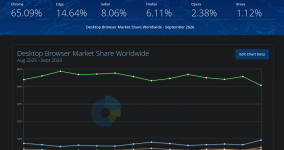
All chromium browsers will do the same?
 
I am still pretty happy with Firefox here. I turned off its AI settings and since then it has not even once mentioned AI or bothered me about anything to do with AI. I have not found anything sneaky going on in the background either. For these reasons alone I can definitely see myself staying with FF, unless they make changes in the opposite direction. I am using the original version of Ublock and Bitdefender Free with FF. They all seem to work very well together.


C.H.
 

You may also like...