Serious Discussion Google Chrome Stable Channel Updates

Google Chrome 134.0.6998.117/.118 Stable Channel Update for Desktop
The Stable channel has been updated to 134.0.6998.117/.118 for Windows, Mac and 134.0.6998.117 for Linux which will roll out over the coming days/weeks.

This update includes 2 security fixes. Below, we highlight fixes that were contributed by external researchers.

[TBD][401029609] Critical CVE-2025-2476: Use after free in Lens. Reported by SungKwon Lee of Enki Whitehat on 2025-03-05
 
Google Chrome 134.0.6998.165/.166 Stable Channel Update for Desktop
The Stable channel has been updated to 134.0.6998.165/.166 for Windows, Mac and 134.0.6998.165 for Linux which will roll out over the coming days/weeks.
 
Google Chrome 134.0.6998.177/.178 Stable Channel Update for Desktop
The Stable channel has been updated to 134.0.6998.177/.178 for Windows which will roll out over the coming days/weeks.

This update includes 1 security fix. Below, we highlight fixes that were contributed by external researchers. Please see the Chrome Security Page for more information.

[TBD][405143032] High CVE-2025-2783: Incorrect handle provided in unspecified circumstances in Mojo on Windows. Reported by Boris Larin (@oct0xor) and Igor Kuznetsov (@2igosha) of Kaspersky on 2025-03-20

Google is aware of reports that an exploit for CVE-2025-2783 exists in the wild.
 
Google Chrome 135.0.7049.41/42/52 Stable Channel Update for Desktop
The Chrome team is delighted to announce the promotion of Chrome 135 to the stable channel for Windows, Mac and Linux. This will roll out over the coming days/weeks.

Chrome 135.0.7049.52 (Linux) 135.0.7049.41/42 Windows and Mac contains a number of fixes and improvements -- a list of changes is available in the log. Watch out for upcoming Chrome and Chromium blog posts about new features and big efforts delivered in 135.

This update includes 14 security fixes. Below, we highlight fixes that were contributed by external researchers.

[TBD][405140652] High CVE-2025-3066: Use after free in Navigations. Reported by Sven Dysthe (@svn-dys) on 2025-03-21
[$10000][376491759] Medium CVE-2025-3067: Inappropriate implementation in Custom Tabs. Reported by Philipp Beer (TU Wien) on 2024-10-31
[$2000][401823929] Medium CVE-2025-3068: Inappropriate implementation in Intents. Reported by Simon Rawet on 2025-03-09
[$1000][40060076] Medium CVE-2025-3069: Inappropriate implementation in Extensions. Reported by NDevTK on 2022-06-26
[$1000][40086360] Medium CVE-2025-3070: Insufficient validation of untrusted input in Extensions. Reported by Anonymous on 2017-01-01
[$2000][40051596] Low CVE-2025-3071: Inappropriate implementation in Navigations. Reported by David Erceg on 2020-02-23
[$1000][362545037] Low CVE-2025-3072: Inappropriate implementation in Custom Tabs. Reported by Om Apip on 2024-08-27
[$500][388680893] Low CVE-2025-3073: Inappropriate implementation in Autofill. Reported by Hafiizh on 2025-01-09
[$500][392818696] Low CVE-2025-3074: Inappropriate implementation in Downloads. Reported by Farras Givari on 2025-01-28
 
Stable Channel Update for Desktop
Tuesday, April 8, 2025
This update includes 2 security fixes. Below, we highlight fixes that were contributed by external researchers. Please see the Chrome Security Page for more information.

[$4000][405140652] High CVE-2025-3066: Use after free in Site Isolation. Reported by Sven Dysthe (@svn-dys) on 2025-03-21
Chrome Releases
 

Stable Channel Update for Desktop

Tuesday, April 15, 2025
The Stable channel has been updated to 135.0.7049.95/.96 for Windows, Mac and 135.0.7049.95 for Linux which will roll out over the coming days/weeks. A full list of changes in this build is available in the Log.
Security Fixes and Rewards
Note: Access to bug details and links may be kept restricted until a majority of users are updated with a fix. We will also retain restrictions if the bug exists in a third party library that other projects similarly depend on, but haven’t yet fixed.

This update includes 2 security fixes. Below, we highlight fixes that were contributed by external researchers. Please see the Chrome Security Page for more information.

[TBD][409619251] Critical CVE-2025-3619: Heap buffer overflow in Codecs. Reported by Elias Hohl on 2025-04-09
[TBD][405292639] High CVE-2025-3620: Use after free in USB. Reported by @retsew0x01 on 2025-03-21
 
My Chrome Canary version 137.0.1733.0 just started showing this:
1745095514963.png

It's the first implementation of tab search on any Chromium browser that I actually like.
 
Google Chrome 135.0.7049.114 / .115 Stable Channel Update for Desktop
The Stable channel has been updated to 135.0.7049.114/.115 for Windows, Mac and 135.0.7049.114 for Linux which will roll out over the coming days/weeks.

This update includes 1 security fix. Please see the Chrome Security Page for more information.

Our ongoing internal security work was responsible for a wide range of fixes:
  • [412443038] Various fixes from internal audits, fuzzing and other initiatives
 

Stable Channel Update for Desktop

Tuesday, April 29, 2025
The Chrome team is delighted to announce the promotion of Chrome 136 to the stable channel for Windows, Mac and Linux. This will roll out over the coming days/weeks.

Chrome 136.0.7103.59 (Linux) 136.0.7103.48/49 Windows and Mac contains a number of fixes and improvements -- a list of changes is available in the log. Watch out for upcoming Chrome and Chromium blog posts about new features and big efforts delivered in136.
 

Stable Channel Update for Desktop

Tuesday, May 6, 2025
The Stable channel has been updated to 136.0.7103.92/.93 for Windows, Mac and 136.0.7103.92 for Linux which will roll out over the coming days/weeks. A full list of changes in this build is available in the Log.

This update includes 2 security fixes. Below, we highlight fixes that were contributed by external researchers. Please see the Chrome Security Page for more information. [$7000][412057896] Medium CVE-2025-4372: Use after free in WebAudio. Reported by Huang Xilin of Ant Group Light-Year Security Lab on 2025-04-20
 
Last edited:
Google has begun integrating Gemini Nano, its on-device large language model (LLM), into the latest version of the Chrome browser to combat online spam, scams and phishing campaigns.
As it released its latest version of its browser, Chrome 137, Google announced that it was experimenting with the on-device LLM as an additional layer of protection in the Enhanced Protection mode of the new browser version’s Safe Browsing service.
Chrome's Enhanced Protection mode is the highest level of Google Safe Browsing and the company claims it provides twice the safeguard against phishing and scams compared to Standard Protection mode.
While the use of Gemini Nano is currently restricted to combating tech support scams on Chrome desktop, Google plans to expand this feature to detect other types of scams, including package tracking and unpaid toll scams.
The feature is also expected to be rolled out to Chrome on Android later in 2025.

Gemini Nano to Combat Tech Support Scams

Using Gemini Nano in the Chrome Safe Browsing service leverages the LLM to generate signals that are used by Safe Browsing to deliver higher-confidence verdicts about potentially dangerous sites, such as tech support scams.
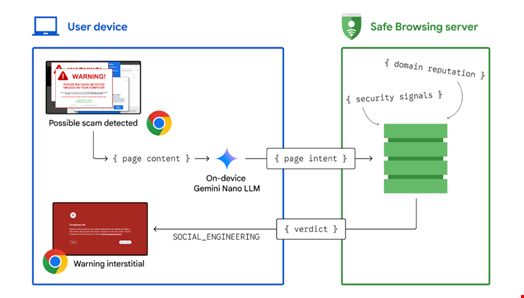
When a user visits a potentially malicious page, Chrome's on-device Gemini Nano LLM evaluates the page's content to extract security signals, such as intent. This information is sent to Safe Browsing, which makes a final determination on whether the page is a scam. If deemed a threat, Chrome displays a warning.
The process is designed to preserve performance and privacy. The LLM is triggered sparingly and runs locally on the device, with resource consumption carefully managed.
Overview of how on-device LLM assistance scam mitigation works. Source: Google
Only users with Enhanced Protection mode enabled have their LLM-generated security signals sent to Safe Browsing, while Standard Protection users benefit indirectly from updated blocklists.

Jasika Bawa, Google’s Group Product Manager for Chrome and Phiroze Parakh, Senior Director for Engineering at Google Search, commented in a public statement on May 8: “Gemini Nano's LLM is perfect for this use because of its ability to distill the varied, complex nature of websites, helping us adapt to new scam tactics more quickly.”

Benefits of Running On-Device LLM

According to a more detailed report on the Google Security blog, leveraging LLMs on-device has several benefits, aside from being less demanding than hosting the LLM remotely.

First, this feature, when running locally, enables Google to detect threats when users encounter them.

“We’ve found that the average malicious site exists for less than 10 minutes, so on-device protection allows us to detect and block attacks that haven't been crawled before,” the Google Chrome Security team wrote.

“The on-device approach also empowers us to see threats the way users see them. Sites can render themselves differently for different users, often for legitimate purposes (e.g. to account for device differences, offer personalization, provide time-sensitive content), but sometimes for illegitimate purposes (e.g. to evade security crawlers) – as such, having visibility into how sites are presenting themselves to real users enhances our ability to assess the web.”

Alongside this announcement, Google is also launching new AI-powered warnings for Chrome on Android.

When the on-device machine learning model flags a notification, users will receive a warning that allows them to unsubscribe or view the blocked content. It also provides an option to enable future notifications from the website if users believe the warning was incorrect.

These features follow Google's introduction of AI-powered scam detection in the Android Messages app just over two months ago, as well as its unveiling of scam call flagging capabilities last year.

Google’s Fighting Scams in Search Report

Finally, Google launched its latest Fighting Scams in Search report on May 8.

In this document, the company asserts that the investments the company has made in its AI-powered scam detection systems and improvements to its classifiers have enabled it to catch 20 times more scammy pages than before.

Google also stated that it has observed a significant increase in scammers impersonating airline customer service providers and claims to have successfully reduced such scams by over 80% in its search results.
 
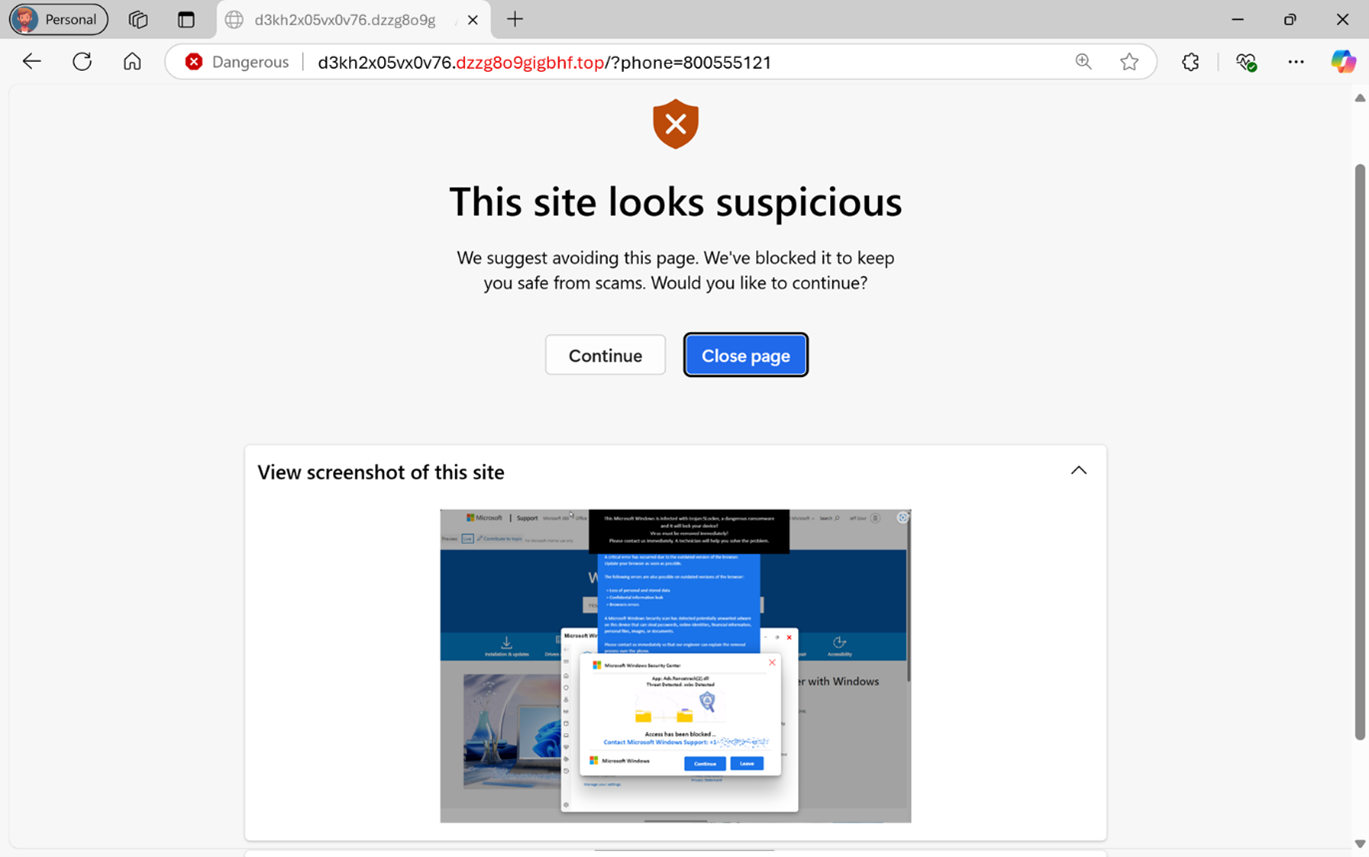
Seems very similar to Edge's Scareware blocker
 
Google Chrome 136.0.7103.113/.114 Stable Channel Update for Desktop
The Stable channel has been updated to 136.0.7103.113/.114 for Windows, Mac and 136.0.7103.113 for Linux which will roll out over the coming days/weeks.

This update includes 4 security fixes.
Below, we highlight fixes that were contributed by external researchers.
[N/A][415810136] High CVE-2025-4664: Insufficient policy enforcement in Loader. Source: X post from @slonser_ on 2025-05-05
[TBD][412578726] High CVE-2025-4609: Incorrect handle provided in unspecified circumstances in Mojo. Reported by Micky on 2025-04-22
 
Stable Channel Update for Desktop
The Chrome team is delighted to announce the promotion of Chrome 137 to the stable channel for Windows, Mac and Linux. This will roll out over the coming days/weeks.

Chrome 137.0.7151.55 (Linux) 137.0.7151.55/56 Windows and Mac contains a number of fixes and improvements -- a list of changes is available in the log. Watch out for upcoming Chrome and Chromium blog posts about new features and big efforts delivered in 137.
..
..
This update includes 11 security fixes.
 
It appears that Chrome has implemented a form of storage partitioning, somewhat similar to Firefox and Safari, this being one example of a package that have appeared in recent releases.
This is available also as a Chrome flag, e.g., to disable due to website breakage: Block Cross Partition Blob URL Fetching
It's somewhat surprising that Google wouldn't announce these privacy improvements on their "What's new in Chrome" page, but I suppose that "features" like tab groups, etc. take precedence.
 
Last edited:
It appears that Chrome has implemented a form of storage partitioning, somewhat similar to Firefox and Safari, this being one example of a package that have appeared in recent releases.
This is available also as a Chrome flag, e.g., to disable due to website breakage: Block Cross Partition Blob URL Fetching
It's somewhat surprising that Google wouldn't announce these privacy improvements on their "What's new in Chrome" page, but I suppose that "features" like tab groups, etc. take precedence.

According to AI

The "Block Cross Partition Blob URL Fetching" flag in Chrome is designed to enhance privacy by preventing the fetching of Blob URLs across different storage partitions. This means that if a Blob URL is created in one context, it cannot be accessed from another context that is considered a different partition, helping to reduce tracking across sites.

I have it enabled in my Ungoogled Chromium v137.0.7151.55
 
Last edited:
  • Like
Reactions: Sammo and oldschool
Google Chrome 137.0.7151.68/.69 Stable Channel Update for Desktop
The Stable channel has been updated to 137.0.7151.68/.69 for Windows, Mac and 137.0.7151.68 for Linux which will roll out over the coming days/weeks. A full list of changes in this build is available in the Log.

This update includes 3 security fixes. Below, we highlight fixes that were contributed by external researchers. Please see the Chrome Security Page for more information.

[N/A][420636529] High CVE-2025-5419: Out of bounds read and write in V8. Reported by Clement Lecigne and Benoît Sevens of Google Threat Analysis Group on 2025-05-27. This issue was mitigated on 2025-05-28 by a configuration change pushed out to Stable across all Chrome platforms.

[$1000][409059706] Medium CVE-2025-5068: Use after free in Blink. Reported by Walkman on 2025-04-07

Google is aware that an exploit for CVE-2025-5419 exists in the wild.