Hi Khushal, this looks like a genuine and rather ugly Microsoft Store vetting failure. The headline is broadly accurate, with one technical nuance:
Vinci RAT was apparently retrieved after installation rather than embedded directly in the Store package. That distinction offers users very little comfort.
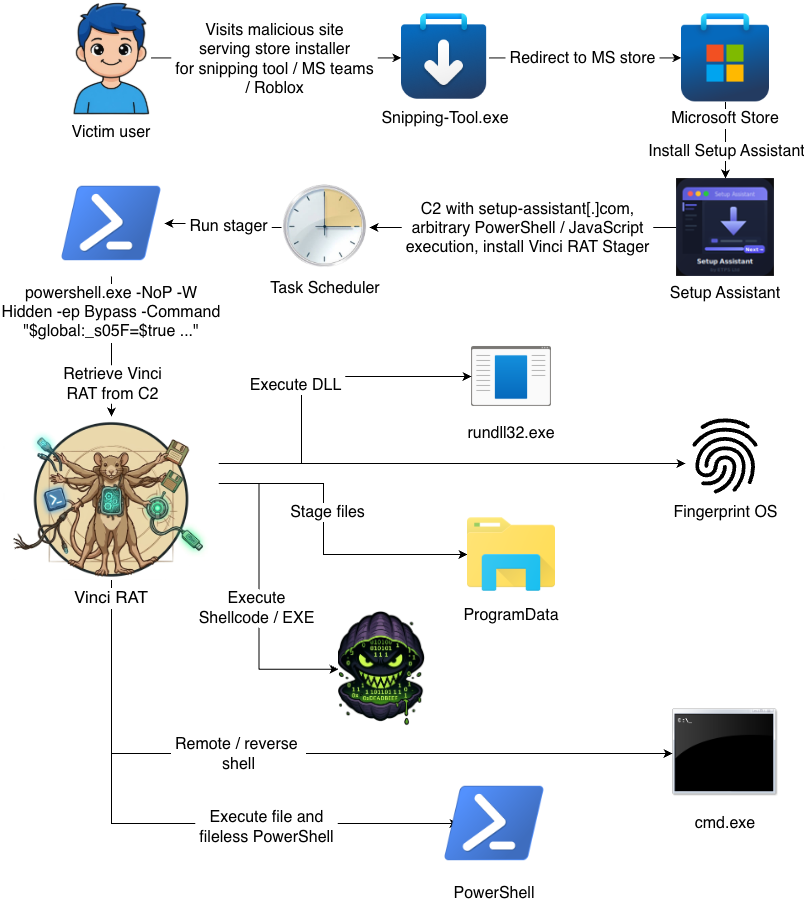
The reported chain was:
- A fake Snipping Tool site delivered a Microsoft-signed Store installer named
Snipping-Tool.exe.
- It installed Setup Assistant, an Electron application published by ETPS Ltd in the official Store.
- According to eSentire’s analysis, Setup Assistant was heavily obfuscated, contacted command-and-control infrastructure, monitored the Downloads folder and could execute remotely supplied PowerShell and JavaScript.
- It was then used to create scheduled-task persistence and retrieve the PowerShell-based Vinci RAT.
Vinci RAT supports system and security-tool discovery, remote shells, payload delivery, DLL execution, in-memory shellcode and fileless PowerShell execution. In other words, Setup Assistant was not an innocent app later abused through some unrelated vulnerability—it reportedly provided the attacker-controlled execution channel itself.
The “Microsoft refused” part should be stated precisely. eSentire says it reported the application on November 10 and received a response that it
did not violate Microsoft’s terms. That is reasonably described as an initial rejection of the report, although it does not prove Microsoft knowingly approved malware after a full technical investigation. Nevertheless, the decision is difficult to reconcile with Microsoft’s own Store rules: sections 10.2.2 and 10.2.3 prohibit inappropriate remote-script execution and apps that contain or enable malware. IT Pro reported on November 25 that the listing was still available at its time of writing; that does not establish its current status.
This also illustrates the limitation of Store certification. Microsoft says submitted packages undergo malware scanning, but a program whose important behaviour is obfuscated or activated through later C2 instructions can evade a largely static inspection. A Microsoft signature verifies the package’s signing and integrity—it is
not a certificate of good character.
For anyone who encountered this campaign:
- Merely seeing the fake page or Store listing does not execute Vinci RAT.
- If
Snipping-Tool.exe was run or Setup Assistant was installed, treat the machine as potentially compromised. Uninstalling the app alone would not necessarily remove the scheduled task, downloaded RAT or anything else executed through it.
- Disconnect it from the network and open a free malware-removal case through Get help. A clean antivirus scan would not, by itself, settle an incident involving remote code execution.
- Organizations should hunt for the exact package/publisher identity and the report’s indicators, along with unexpected scheduled tasks launching hidden PowerShell, suspicious
rundll32.exe activity and staging under ProgramData.
The Store remains safer than blindly running random downloads, but this case neatly kills the assumption that “official Store” means “safe without further thought.”
Sources



www.esentire.com

 Thread starter
Khushal

