You mean if he/she was using for example ControlD DoH instead of Google dns, they would not be vulnerable?
Actually, Google Public DNS would prevent this attack if it was used through DoH, DoT or DoQ protocol because it supports DNSSEC standard. Unfortunately, only small number of people use secure DNS protocols which makes attacks like this possible.
Even if the person used Control D, over regular DNS port 53, attack would still be successful as the hackers would have ability to see and modify your network requests because they aren't encrypted.
DoH, DoT and DoQ encrypt DNS requests so instead of seeing domain names of the websites you visit, they'd only see hostname of DNS you're use.
For example, when you're using regular DNS over port 53, hackers and anyone who monitors network sees following:
Code:
Date and time       |         IP address           |         Domain            |        Port
25/07/2026 12:02    |        xxx.xxx.xx.xxx        |         bbc.com           |        53
25/07/2026 12:03    |        xxx.xxx.xx.xxx        |         facebook.com      |        53
25/07/2026 12:05    |        xxx.xxx.xx.xxx        |         instagram.com     |        53
25/07/2026 12:08    |        xxx.xxx.xx.xxx        |         x.com             |        53
If, let's Control D Free DNS was used over DoH, hacker would see following:
Code:
Date and time       |         IP address           |         Domain                         |        Port
25/07/2026 12:02    |        xxx.xxx.xx.xxx        |         freedns.controld.com           |        443
25/07/2026 12:03    |        xxx.xxx.xx.xxx        |         freedns.controld.com           |        443
25/07/2026 12:05    |        xxx.xxx.xx.xxx        |         freedns.controld.com           |        443
25/07/2026 12:08    |        xxx.xxx.xx.xxx        |         freedns.controld.com           |        443
The
source research article also mentions
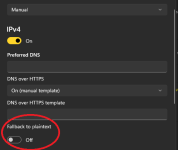
not configuring plain-text fallbacks for the DNS resolutions.
This is exact reason why I use YogaDNS with Control D. If DoQ fails for some reason, there won't be any traffic to plain-text DNS and I basically lose internet access. If I used DoH built into Windows, it would automatically fall back to plain-text port 53. For me, it's either surfing securely, or no surfing at all.
The source article doesn't mention how the redirection manages to defeat the HTTPS certificate (for the authentication landing page). But perhaps configuring the browser with strict HTTPS connection would have defeated this redirection as well.
They had to pass authentication page in order to access the internet. So I think attack likely happened after the authentication.
Overall, checking the domain you are about to provide credentials for would have worked too. So does usage of a password manager extension that you don't override, or a passkey authentication that you get careful about when the site claims it needs to drop back to passwords and such.
This wouldn't help.
DNS poisoning is fancy name for DNS records manipulation. When hackers manipulate DNS records, they change the IP addresses where that domain leads to. In other words, you can type
microsoft.com in the browser and believe you're on authentic Microsoft website. What you won't see is the IP address behind domain not leading to Microsoft's server rather than an IP address used by hackers.
So even if you used a password manager, it will also think you're on legit Microsoft site because it reads what it says in the address bar.
Generally, I do not recommend log in using any public wifi; only at home.
Public Wi-Fi isn't an issue as long as you know how to protect yourself. That means using DNS resolver with DNSSEC support over secure protocol (DoH, DoT, DoQ). This is usually enough, but you can always opt for even better protection and use free Cloudflare WARP to encrypt your whole traffic.





www.bleepingcomputer.com