

The MalwareTips app
Your community, one tap away.
Open MalwareTips from your Home Screen or desktop. Follow discussions, find answers and pick up where you left off.
- Home Screen access
- Optional push alerts
- Your community
You're ready to explore.Explore what's new
Installation instructions
iPhone & iPad
- Open MalwareTips in Safari and tap Share. You may need to open the Page Menu first.
- Choose Add to Home Screen. If it is not listed, use Edit Actions to add it.
- Keep Open as Web App enabled if shown, then tap Add.
Android
- Open MalwareTips in Chrome or another browser that supports app installation.
- Open the browser menu and look for Install app, Install and create shortcut, or Add to Home screen.
- Choose Install and confirm. Wording varies by browser.
Desktop
- Chrome: use the install icon in the address bar, or the menu under Cast, save and share.
- Edge: open the menu, then More tools, Apps and Install this site as an app.
- Safari on Mac: choose Share or File, then Add to Dock. Firefox on Windows: look for the web apps button in the address bar.
If you cannot find an install option, update your browser or use its bookmark option to keep MalwareTips close.
Keep up with your conversations
After installation, open the app and sign in. Enable push notifications in Preferences if you want alerts. On iPhone and iPad, push requires a Home Screen web app and iOS or iPadOS 16.4 or later.
Sign in to manage notificationsInstallation is optional. Your notification settings stay under your control.
You are using an out of date browser. It may not display this or other websites correctly.
You should upgrade or use an alternative browser.
You should upgrade or use an alternative browser.
Serious Discussion how do i block words on google & my PC?
- Thread starter Brie
- Start date
General Privacy Discussions
25 Replies
5,451 Views

To block specific words on Google and your Windows 10 computer, you can follow these steps:
1. Blocking words on Google:
- Open your web browser and go to google.com.
- Click on the "Settings" icon (three vertical dots) in the top-right corner.
- From the dropdown menu, select "Search settings."
- Scroll down to find the "SafeSearch Filters" section.
- Enable the "Turn on SafeSearch" option to filter explicit content from your search results.
- Click on "Save" at the bottom of the page.
2. Blocking words on your Windows 10 computer:
- Unfortunately, Windows Firewall Control does not provide a feature to block specific words. It is primarily used to manage the Windows Firewall settings.
- However, you can use third-party software or parental control tools to achieve this. One popular option is OpenDNS, which allows you to block specific websites and filter content based on categories or keywords. You can set it up on your router to apply the filtering to all devices on your network.
- Another alternative is to use software like Net Nanny, which provides comprehensive content filtering and monitoring capabilities.
Remember that these methods can help filter explicit content, but they may not be foolproof. It's always a good idea to monitor and supervise internet usage, especially for younger users.
1. Blocking words on Google:
- Open your web browser and go to google.com.
- Click on the "Settings" icon (three vertical dots) in the top-right corner.
- From the dropdown menu, select "Search settings."
- Scroll down to find the "SafeSearch Filters" section.
- Enable the "Turn on SafeSearch" option to filter explicit content from your search results.
- Click on "Save" at the bottom of the page.
2. Blocking words on your Windows 10 computer:
- Unfortunately, Windows Firewall Control does not provide a feature to block specific words. It is primarily used to manage the Windows Firewall settings.
- However, you can use third-party software or parental control tools to achieve this. One popular option is OpenDNS, which allows you to block specific websites and filter content based on categories or keywords. You can set it up on your router to apply the filtering to all devices on your network.
- Another alternative is to use software like Net Nanny, which provides comprehensive content filtering and monitoring capabilities.
Remember that these methods can help filter explicit content, but they may not be foolproof. It's always a good idea to monitor and supervise internet usage, especially for younger users.
Upvote
0

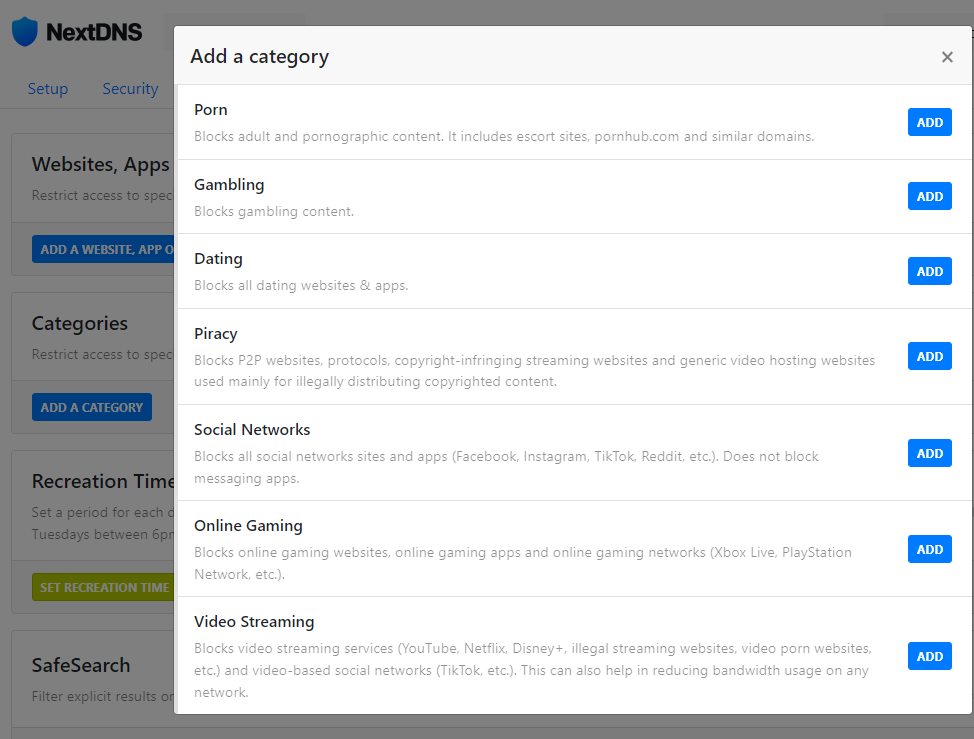
I don't know of any such tool that can do that. At most, some firewalls can block websites based on specific words in their URL, but it becomes problematic if such words are very common thus blocking websites which you didn't want blocked. Also blocking based on content won't achieve what you are looking for. Eg. NextDNS can block gambling, adult websites etc.

 www.makeuseof.com
OP is asking for something like the Great Firewall of China that can block a website after scanning for specific words inside it.Maybe I'm dense or simply too old, but I'm not sure what you're asking. Never heard of blocking words. Do you want to prevent porn sites, etc. from appearing in search results?
What Is the Great Firewall of China and How Does It Work?
How did China create a virtual wall to protect the internet inside its border?
www.makeuseof.com
Upvote
0
Maybe it's for religious reasons? Or maybe it's just so the wife doesn't find his porn searches. Scratching my head about this question really.
Upvote
0
Could you explain the criteria you are after in more detail?how do i block words on google.com and my computer? it is a windows 10. i have 'windows firewall control'.
thank you in advance.
Will it be for 1 device running Windows 10 and Google Chrome?
Upvote
0

yesCould you explain the criteria you are after in more detail?
Will it be for 1 device running Windows 10 and Google Chrome?
Upvote
0

I read that for Chrome there's the addon Filter Anything Everywhere and for Firefox addons like Web Site Filter, FoxFilter, and Advanced Profanity Filter. Depending on the addon, they might be able to block sites from showing up or mask words in web pages, etc., but I've not used any of them.
Upvote
0
Thank you for your reply.I read that for Chrome there's the addon Filter Anything Everywhere and for Firefox addons like Web Site Filter, FoxFilter, and Advanced Profanity Filter. Depending on the addon, they might be able to block sites from showing up or mask words in web pages, etc., but I've not used any of them.
Upvote
0
How did you find out about these searches? Are you using separate User Accounts, or a single account with Multiple Chrome profiles?my sister went off on me for no reason.
she googled 'how to move me in with a shnook [bad black person] on her account. we are both white.
I would like to stop this sort of search.
Browser extensions can be easily disabled or removed when installed as a normal user. Using the Enterprise policy (Managed by an organisation) would make these extensions harder to bypass.
A controversial question, did you talk to her about her online behaviour?
Upvote
0
i set up separate User Accounts,How did you find out about these searches? Are you using separate User Accounts, or a single account with Multiple Chrome profiles?
Browser extensions can be easily disabled or removed when installed as a normal user. Using the Enterprise policy (Managed by an organisation) would make these extensions harder to bypass.
A controversial question, did you talk to her about her online behaviour?
she knows very little about the computer.
she angrily yelled at me. i wrote up a paper tactfully refuting what she said. i happened to find her search while cleaning her ' browser history'.
thank you for replying.
Upvote
0
Since this is in the privacy (like personal privacy) section of the forum I would yell a lot more if somebody would find my search history and would comment on it (if I would be a pc novice).she angrily yelled at me. i wrote up a paper tactfully refuting what she said. i happened to find her search while cleaning her ' browser history'.
As long as the searches weren't life threatening (e.g suicide thoughts) or bring any police force down my doorsteps I would expect it to be "never" seen and mentioned at all.
Most browsers should have options to clean browsing stuff on close (set once for her and be done with it).
Upvote
0
I can not trust her. her and my mother robbed me of my life savings with knives. her and her boyfriend are radical right wing nationalists. she is angry at the world and me.Since this is in the privacy (like personal privacy) section of the forum I would yell a lot more if somebody would find my search history and would comment on it (if I would be a pc novice).
As long as the searches weren't life threatening (e.g suicide thoughts) or bring any police force down my doorsteps I would expect it to be "never" seen and mentioned at all.
Most browsers should have options to clean browsing stuff on close (set once for her and be done with it).
Upvote
0

Why are you letting her use your computer?I can not trust her. her and my mother robbed me of my life savings with knives. her and her boyfriend are radical right wing nationalists. she is angry at the world and me.
 Lock her out.
Upvote
0
she does me favors, but for every favor she does for me, I have to do 4 or 5 favors for her.Why are you letting her use your computer?
Upvote
0

So as far as I understand you and your sister have 2 separate user accounts and somehow you are spying on her by snooping in her browsing and search history?
Despite the other thing you've said about her political views and criminal behaviors (which we suppose to believe because you've said so) you are doing more wrong than right by spying on her.
And if all you've said is true, then your problem is way more complex and you should ask authorities for help and not members of this forum.
This is just my humble opinion.
Despite the other thing you've said about her political views and criminal behaviors (which we suppose to believe because you've said so) you are doing more wrong than right by spying on her.
And if all you've said is true, then your problem is way more complex and you should ask authorities for help and not members of this forum.
This is just my humble opinion.
Upvote
0
You are wrong because you are spying on her.it is my word against hers as per the police.
she may be causing trouble to me right now. I am not wrong for taking precautions and protecting myself.
And now you are asking here for methods to restrict her freedom and censor her online experience - in certain cases authorities are allowed to do so, not you.
Upvote
0
Recently browsing
Members who viewed this thread in the last 5 minutes


