Question How many browsers do you use, and why do you use each one?

Please provide comments and solutions that are helpful to the author of this topic.
There is a browser called 'Edge'?? .. I'm looking but can't find it :p:p:p
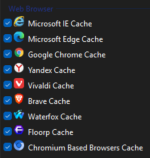
I currently have the following browsers installed for testing:

2026-02-12 18_13_27-Advanced Cleaner.png

Yesterday I tried using Microsoft Edge as my main browser throughout the day, and it was good. It has the best built-in translator and spell checker currently available, so perhaps other Microsoft Edge users have discovered hidden features that I am not yet aware of.
 
I currently have the following browsers installed for testing:

View attachment 295594

Yesterday I tried using Microsoft Edge as my main browser throughout the day, and it was good. It has the best built-in translator and spell checker currently available, so perhaps other Microsoft Edge users have discovered hidden features that I am not yet aware of.
You have a browser lab.
Yes, Edge and Chrome the most reliable, but Chrome has less bugs; both are my first choice.
 
Only one, ungoogled chromium Marmaduke (Download latest stable Chromium binaries (64-bit and 32-bit) as i don't need google stuff
When I started using Linux Mint I opted for Ungoogled (running in flatpak sandbox), but after an update (more than half year ago), the Speedometer benchmark dropped suddenly with 3 points. I think it has something to do with new Google javascript API. So I tried Brave, which I had used to copy the widevine extension and to my surprise Brave became faster nearly 2 points, that is why I switched to Brave (in flatpak)
 
Why did you choose Microsoft Edge as your main browser?
Using paid MSA365, Edge syncs well with Android, it offers a simple login to MS and other services via Windows passkeys and UAC.
Edge removed most of Google features, it improved security. I use 300 polices, 35 flags to customize it, it is not perfect, but it will do.
 
I currently have the following browsers installed for testing:

View attachment 295594

Yesterday I tried using Microsoft Edge as my main browser throughout the day, and it was good. It has the best built-in translator and spell checker currently available, so perhaps other Microsoft Edge users have discovered hidden features that I am not yet aware of.

It is the only browser in Windows where RenderAppContainer = true.
Unfortunately, the bloat, which forces me, at least for my taste, to use too many policies, outweighs this one benefit.
 
Last edited:
When I started using Linux Mint I opted for Ungoogled (running in flatpak sandbox), but after an update (more than half year ago), the Speedometer benchmark dropped suddenly with 3 points. I think it has something to do with new Google javascript API. So I tried Brave, which I had used to copy the widevine extension and to my surprise Brave became faster nearly 2 points, that is why I switched to Brave (in flatpak)
I've been researching Linux as I prepare (hopefully) to switch over, and I thought back on how you've been using Flatpak for Brave. There seems to be a substantial consensus that running Chromium in Flatpak actually diminishes the strength of the powerful built-in sandbox, contrary to other apps without a sandbox. Have you looked into it?

Brave explicitly advises against using the Flatpak package because it doesn't work as well as their native packages and "modifies Chromium sandboxing in ways which have not been vetted by the Brave or Chromium security teams."

Different forum discussions around the web touch on reasons it compromises the built-in sandboxing. This is from a contributor on the official Flatpak GitHub: Issue #5921 · flatpak/flatpak
On Linux, Chromium's sandbox was initially implemented using a SetUID helper but nowadays prefers unprivileged user namespaces and PID namespaces. However, it is well-known that Chromium does not work out of the box with Flatpak since Flatpak disallows applications from creating user namespaces. Flatpaks of Chromium and its derivatives work around this by patching the Chromium sandbox. This modification not only has not undergone any formal design process or upstream security review but also empirically weakens Chromium's security compared to the usual RPM/DEB distributions of Chromium. Until this is resolved, users of RPM/DEB-based Linux distributions would be ill-served by being advised to adopt the Flatpak versions of Chrome and Firefox because web browsers have the largest attack surface of all user-facing applications.

This is the same stance of Ruarí Ødegaard, long-time Vivaldi developer and Linux packaging lead: Flatpak support
In short, Flatpak doesn't allow important parts of the Chromium sandbox to work as intended by the Chromium team, when running under Flatpak. So you either end up with no internal (interprocess) sandbox or one which is replaced with something potentially weaker and certainly less well understood and tested. Zypak is maintained by a single person. Those responsible for the Chromium sandbox are a whole team.
 
I've been researching Linux as I prepare (hopefully) to switch over, and I thought back on how you've been using Flatpak for Brave. There seems to be a substantial consensus that running Chromium in Flatpak actually diminishes the strength of the powerful built-in sandbox, contrary to other apps without a sandbox. Have you looked into it?

Brave explicitly advises against using the Flatpak package because it doesn't work as well as their native packages and "modifies Chromium sandboxing in ways which have not been vetted by the Brave or Chromium security teams."

Different forum discussions around the web touch on reasons it compromises the built-in sandboxing. This is from a contributor on the official Flatpak GitHub: Issue #5921 · flatpak/flatpak


This is the same stance of Ruarí Ødegaard, long-time Vivaldi developer and Linux packaging lead: Flatpak support
Since Brave is the company that developed and maintains the Flatpak version, I don't think they meant to imply that it isn't secure. Instead, I believe they meant that they didn't test the effectiveness of the Flatpak sandboxing.

As far as I'm aware, DEP/RPM packages are granting root system privileges, but Flatpak/Snaps are isolated, so theoretically, they should be safer. You can use tools like Flatseal to modify Flatpak permissions, granting access to local files if necessary (which is not permitted by default for security reasons).

Since you favor Fedora Linux, this could be useful:
 
Since Brave is the company that developed and maintains the Flatpak version, I don't think they meant to imply that it isn't secure. Instead, I believe they meant that they didn't test the effectiveness of the Flatpak sandboxing.

As far as I'm aware, DEP/RPM packages are granting root system privileges, but Flatpak/Snaps are isolated, so theoretically, they should be safer. You can use tools like Flatseal to modify Flatpak permissions, granting access to local files if necessary (which is not permitted by default for security reasons).

Since you favor Fedora Linux, this could be useful:
Native packages (like RPM) do not inherently grant root privileges. The advantage of Flatpak is isolation from the rest of your system, but the developers I quoted tell you why it isn't secure: Flatpak's sandbox compromises the most important security in Chromium, the renderer sandbox and site isolation. Flatpak doesn't actually support Chromium—its strong sandboxing needs to be unofficially patched and messed with (Zypak) to make it "fit" Flatpak, and this is done without any genuine scrutiny by security experts. This unofficial patching is maintained by a single person who doesn't have the credentials of the original Chromium developers who ensure that the sandbox is held to the highest security standards possible.

It's for this reason that Vivaldi has no confidence in shipping a Flatpak package: "Flatpak doesn't allow important parts of the Chromium sandbox to work as intended." Despite Brave preparing one at the request of the community, they don't recommend it because of the security implications. They just said it very nicely, whereas Vivaldi's senior QA engineer and Linux expert (Ruarí) didn't put it so lightly when asked.
 
Last edited by a moderator:
For me, on Apple devices running iOS and iPadOS, all browsers—including Chrome, Firefox, Edge, Brave, and others—are required to use WebKit as their rendering engine, the same one Safari uses.

This is due to Apple's App Store policies, which mandate that any browser app distributed on iOS/iPadOS must use WebKit. So while those browsers may have different interfaces, features, or sync capabilities, the underlying engine that renders web pages is fundamentally the same as Safari's.
A few important implications of this:
  1. Performance parity: Since all browsers use WebKit, there's no significant performance advantage one browser has over another in terms of page rendering speed on iOS/iPadOS.
  2. Feature limitations: Browser-specific features that rely on different engines (like Firefox's Gecko or Chrome's Blink on desktop) aren't available on iOS versions of those browsers.
  3. Privacy differences: While the engine is the same, browsers can still differ in privacy features, tracking protection, and data collection practices since those are implemented at the application level, not the engine level.
So I use Safari, but with enhanced security settings.