

The most popular file sharing service “Torrent” has upgraded its client with new features and started showing ads. I know that everyone does not like ads being shown above there downloads. So here I’ll be sharing a method for disabling the ads in uTorrent. This method does not require any external software. Disabling of ads can be done by minor tweaks in the setting of the Utorrent client.
Its begins with opening your uTorrent client. Click on options and open preferences.
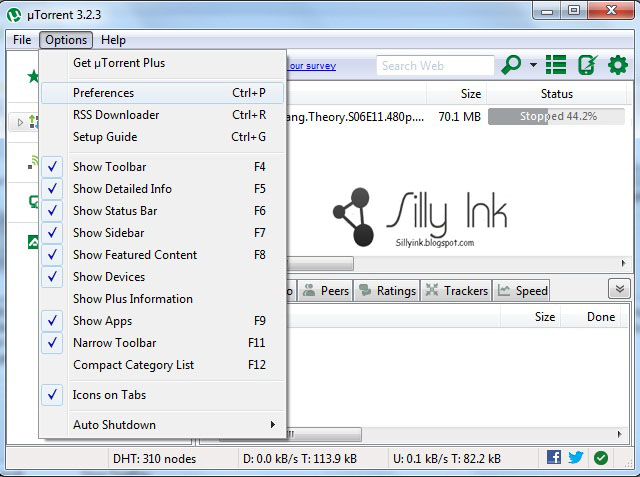
Now got to advanced in the left panel of the uTorrent client.
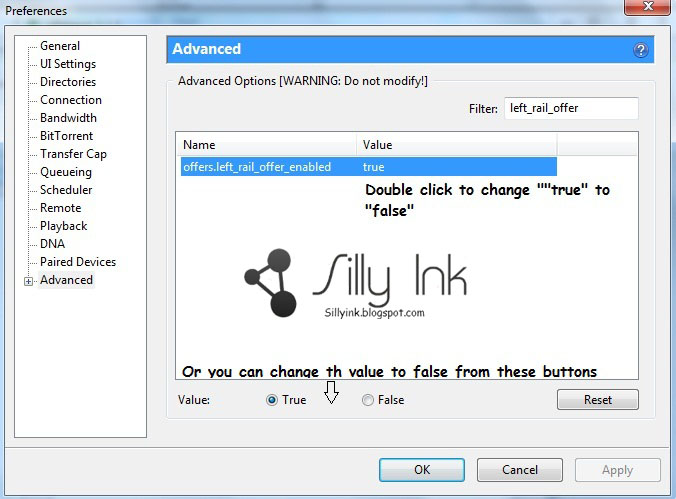
In the search bar found in the right panel of the advanced tab, start typing the following text to access the settings for it.
left_rail_offer
Read complete tutorial at here
Its begins with opening your uTorrent client. Click on options and open preferences.
Now got to advanced in the left panel of the uTorrent client.
In the search bar found in the right panel of the advanced tab, start typing the following text to access the settings for it.
left_rail_offer
Read complete tutorial at here


