

Hello I have a problem I have no idea how to make a link for the new member site and the security confuguration to the giveaway post Can someone help me?
How to enter MT Giveaways?
- Thread starter CORSZ
- Start date
You are using an out of date browser. It may not display this or other websites correctly.
You should upgrade or use an alternative browser.
You should upgrade or use an alternative browser.
- Status
- Not open for further replies.

Hello
First you introduce yourself to MalwareTips Community, making a new thread here ==> https://malwaretips.com/forums/new-member-introductions.31/create-thread
Note : you already did that, here's your link to your introduction ==> Hello
Second, you share your Security Configuration, making a new thread here ==> https://malwaretips.com/forums/security-configuration-wizard.12/create-thread
Note : you already did that, here's your link to your Security Configuration ==> PC: SECURE - CORSZ Configuration
Third, you share the giveaway you want to enter on social media
How to get direct link of your Facebook post (share)
IMPORTANT !!!
Proper reply (participation) on MalwareTips Official Giveaways needs to contain :
Example of how a proper reply should look like :
 Note that when posting these links XenForo Forum Platform will automatically convert links into titles.
First you introduce yourself to MalwareTips Community, making a new thread here ==> https://malwaretips.com/forums/new-member-introductions.31/create-thread
Note : you already did that, here's your link to your introduction ==> Hello
Second, you share your Security Configuration, making a new thread here ==> https://malwaretips.com/forums/security-configuration-wizard.12/create-thread
Note : you already did that, here's your link to your Security Configuration ==> PC: SECURE - CORSZ Configuration
Third, you share the giveaway you want to enter on social media
How to get direct link of your Facebook post (share)
1. Log in to your Facebook Account
2. Copy the code asked in the first post of the giveaway thread
 3. Paste the code on your wall on your Facebook Profile Page and click "Post"
 4. Make sure that your post is available to be seen publicly
 5. Click on the timestamp of your post to get the direct link
 6. Copy the direct link from your browser's address bar (URL)
 7. Paste it in your reply (participation) among other requirements as your Introduction and Security Configuration
2. Copy the code asked in the first post of the giveaway thread
____________________________________________________________
IMPORTANT !!!
Proper reply (participation) on MalwareTips Official Giveaways needs to contain :
- the direct link to your introduction on MalwareTips
- the direct link to your security configuration on MalwareTips
- the direct link of your share on Social Media
Example of how a proper reply should look like :
_____________________________________________________________
Hello Thank you for the answers,but how do I bring the link from the Hello and the configpage to the Giveawaypost I like to finish this giveaway and learn some things There must be an easy way to do this.Maybe I make myself a fool but all I know of using a pc is by trail and error but I can't find the solution for this.
You need to open your introduction thread (for example), copy link from your browser's URL bar, and paste it into your reply on desired giveaway thread. You do the same for security configuration.Hello Thank you for the answers,but how do I bring the link from the Hello and the configpage to the Giveawaypost I like to finish this giveaway and learn some things There must be an easy way to do this.Maybe I make myself a fool but all I know of using a pc is by trail and error but I can't find the solution for this.

Got to your Introduction & Security Configuration threads and click the highlighted #1
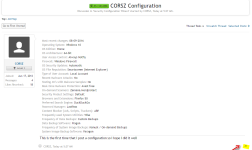
Then you will get this pop up
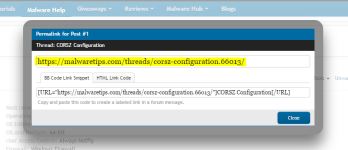
Copy the highlighter URL and paste it in your entry.
Do this for both Introduction & Security configuration threads.
These are the thread links but make sure you understand how to do it by doing it yourself
Hello
PC: SECURE - CORSZ Configuration
Then you will get this pop up
Copy the highlighter URL and paste it in your entry.
Do this for both Introduction & Security configuration threads.
These are the thread links but make sure you understand how to do it by doing it yourself
Hello
PC: SECURE - CORSZ Configuration
Yes you did.Thanks for the help It's something you have to know.I hope I did it right.
I edited it though because all the links were on 1 line
Better to do it like the other entries.
Into Link
Config Link
Social media share link
Just reference the other entries
Last edited:

Well even as a member of the forum for quite some time now, I didn't knew and never realised you could click on that #number to get the link of a certain post in a thread. Learned something new today.Got to your Introduction & Security Configuration threads and click the highlighted #1
 Thanks @Exterminator
W
Wave
Neither! I always right-clicked the date part and copied the address, hahaWell even as a member of the forum for quite some time now, I didn't knew and never realised you could click on that #number to get the link of a certain post in a thread. Learned something new today.
 But the #number method is better IMO, thanks @Exterminator
 - Status
- Not open for further replies.
You may also like...
-
-
Advice Request WhatsApp Group phishing website
- Started by 1man3g0
- Replies: 6
-

-

-
 Serious Discussion Habbo phishing scam, infostealer possibility, could someonen do research of this?
- Started by Moonhorse
- Replies: 42