Question How to prevent files getting automatically deleted from PC?

Please provide comments and solutions that are helpful to the author of this topic.

zkSnark

Level 5
Thread author
Verified
Well-known
Forum Veteran
Jan 13, 2019
241
795
368
Few days back, I had updated my Windows 11 laptop to the latest update "2023-10 Cumulative Update Preview for Windows 11 Version 23H2 for x64-based Systems (KB5031455)" via Windows Update. After few hours, when I used the laptop, found out that all my files and folders in D: drive had been automatically deleted, except for the "Users" folder in there. Nothing was deleted from C: drive.

I use Kaspersky AV as well as the default Windows Security is also enabled all the time. Unfortunately, Kaspersky expired a day before the Windows update. However, Windows Defender was active at that time.
I don't know whether the update deleted all the files in D: drive but nothing in C: drive.

So, after this incident, I am trying to find out if there is any way to prevent files from getting automatically deleted? Beside the AV, do I need to install any other programs or configure my PC so that no files are deleted automatically in future?
 
  1. Opt-out from Optional Updates
  2. Check for Known Issues before updating.

EDIT:
Double-check to see if Files weren't moved from D:/ to C:/ drive.

Can you share more details about the D:/ drive?

Were the files related to OneDrive or another cloud-storage solution?

What types of files were lost? Are you able to recover them from a backup?
 
  1. Opt-out from Optional Updates
  2. Check for Known Issues before updating.

EDIT:
Double-check to see if Files weren't moved from D:/ to C:/ drive.

Can you share more details about the D:/ drive?

Were the files related to OneDrive or another cloud-storage solution?

What types of files were lost? Are you able to recover them from a backup?
I save all files (documents, images, videos) in D: drive. C: drive has only OS programs and files. I was not using One drive, but only Google Drive. No files were moved to C: drive. Luckily, I was able to recover deleted files using a file recovery program.
 
I am trying to find out if there is any way to prevent files from getting automatically deleted?
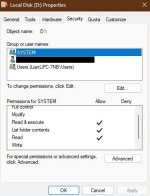
Take ownership of D and deny or remove SYSTEM permissions, but denying WRITE/MODIFY and keeping only READ will do. I always do it, since it can prevent ransomware.
To be 100% sure, you can deny WRITE/MODIFY for all users, but you would have to restore permissions every time you would want to change anything.
Code:
takeown /s %computername% /u %username% /f D: /r /d y
icacls D: /inheritance:r
icacls D: /grant:r %username%:(OI)(CI)F /t /l /q /c
icacls D: /grant "System":(OI)(CI)RX /t /l /q /c
icacls D: /grant "Users":(OI)(CI)RX /t /l /q /c

capture_11222023_161402.jpg
 
Take ownership of D and deny or remove SYSTEM permissions, but denying WRITE/MODIFY and keeping only READ will do. I always do it, since it can prevent ransomware.
To be 100% sure, you can deny WRITE/MODIFY for all users, but you would have to restore permissions every time you would want to change anything.
Code:
takeown /s %computername% /u %username% /f D: /r /d y
icacls D: /inheritance:r
icacls D: /grant:r %username%:(OI)(CI)F /t /l /q /c
icacls D: /grant "System":(OI)(CI)RX /t /l /q /c
icacls D: /grant "Users":(OI)(CI)RX /t /l /q /c

View attachment 279839
So, with this method, do I have to restore permission each time I edit any documents or save any files in D: drive? Seems like inconvenience for a daily use laptop.
 
Also, please check the Google Drive settings, e.g., the drive letter for Google Drive, if your streaming or mirroring, etc.
 
  • Like
Reactions: zkSnark

You may also like...