Hot Take How To Restore The Old Notepad

lokamoka820

Level 43
Thread author
Verified
Top Poster
Well-known
Mar 1, 2024
3,243
3
10,655
4,169
Banana Republic
I saw this article and recalled that some users complained about how the new Notepad app in Windows 11 had changed and that they preferred its previous simplicity (I believe @Sorrento is one of them), so I thought sharing it might be beneficial for them.

Now without further ado, here are the steps to get back to the simplicity of the original Notepad without the need for a third-party app:

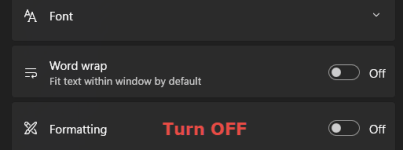
Setting #1: Turn formatting OFF

Notepad-Turn-Off-Formatting.png

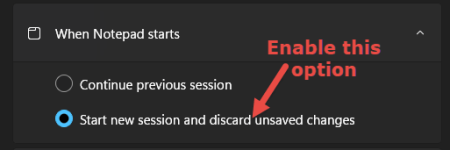
Setting #2: Change Notepad’s startup behavior

Change-Notepad-Startup-Behaviour.png

Setting #3: Disable Copilot (AI) features

Notepad-Disable-Copilot.png
 
I saw this article and recalled that some users complained about how the new Notepad app in Windows 11 had changed and that they preferred its previous simplicity (I believe @Sorrento is one of them), so I thought sharing it might be beneficial for them.

Now without further ado, here are the steps to get back to the simplicity of the original Notepad without the need for a third-party app:

Thanks for sharing that link. The main “win” for people who prefer the old-school Notepad feel is that most of the newer, “word-processor-like” behavior can be disabled from Notepad’s own settings, so it behaves much closer to the classic minimalist editor.

What usually gets you closest to “classic Notepad”
In the current Windows 11 Notepad app, open Notepad and go to Settings (gear icon). Then disable anything you don’t want, typically:

  • Formatting / Rich text (turn it OFF, if your Notepad version has this toggle)
  • Spell check (OFF)
  • Autocorrect (OFF)

That combination generally restores the “plain text first” experience most people associate with the older Notepad.

Important note about availability
Notepad features roll out over time and can differ by Windows 11 version/build and Notepad app version. If you don’t see a “formatting” option, it usually means your Notepad hasn’t received that feature (or it’s named differently) yet—so the exact steps from any article may not match everyone’s UI.

Practical takeaway
For most users who dislike the newer additions, turning OFF formatting (when present) plus spell check/autocorrect is the simplest, lowest-risk way to get back to a no-frills Notepad experience without installing a third-party editor.
 
  • Like
Reactions: franz
You’re right, @oldschool. Getting WordPad back is much trickier than with Notepad because Microsoft has been pretty aggressive about phasing it out, and the system often blocks any attempt to 'resurrect' it.

To be honest, instead of fighting with Windows protections like SAC, the most practical move nowadays is to just use a lightweight editor like Notepad++. It gives you that simplicity we’re all looking for, it doesn't clash with the system, and at the end of the day, it gets the job done without the headaches. 🛠️📝🤝
 
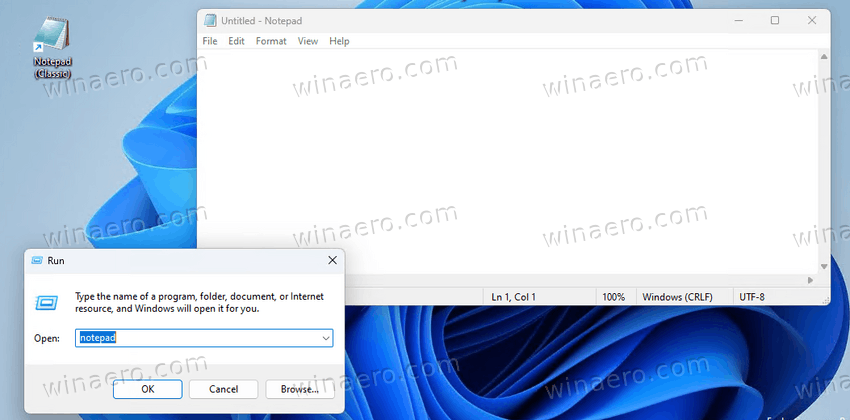
I've used classic notepad now for a few months without issues, I haven't removed the new Notepad, as the links above I just use the classic version, if I wanted a word processor for jotting notes down I'd open up a word processor, just in my opinion MS have made a mistake by removing Word-pad & upping the ante with the new Notepad.with search etc in it, anyway the classic works very well here.
 
I've used classic notepad now for a few months without issues, I haven't removed the new Notepad, as the links above I just use the classic version, if I wanted a word processor for jotting notes down I'd open up a word processor, just in my opinion MS have made a mistake by removing Word-pad & upping the ante with the new Notepad.with search etc in it, anyway the classic works very well here.
Couldn't agree more. Notepad and Wordpad were popular due to their classic appearance and basic functionality. If we wanted advanced word processor or text editors, there are plenty of them available.
 
Does SAC block the method of copying WordPad files from an older version of Windows?
Tried it long time ago and worked, but cannot recall if SAC was on or off.
I believe it was on execution, but I have two versions and I forget which it was.
 
It was not a mistake; it is intended; some users who just need non-advanced text editing were satisfied by WordPad; removing it is planned to enhance MS Office subscription.

YEP..... Remember no matter what you are doing, or who you're talking to, listening to, working for, be it the Gov, the system, watching a movie, or talking to your best friend, or even when watching the news. Motive is everything.