How to solve this problem? Google Chrome

Status
Not open for further replies.

Jrs30

Level 11
Thread author
Verified
Honorary Member
Top Poster
Well-known
Feb 4, 2016
549
4,676
977
32
São Paulo - Brasil
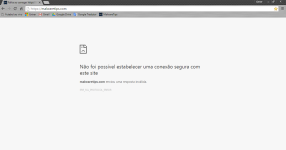
I just installed Google Chrome, Firefox Developer Edition this with some bugs, which is normal because it is a test version, Google Chrome will be my second browser ... I'm trying to get into MT for him, and appears this error , and Mozilla Firefox this all right! And Firefox Developer Edition this all right also.
Another reason to install Chrome is that it has a translator by default that is better than the Firefox add-ons to translate this will help me in MT :)

Could not establish a secure connection to this site

malwaretips.com sent an invalid response.
ERR_SSL_PROTOCOL_ERROR


Thank you :)
1.png
 
ESET + AdGuard
I leave off the Adguard in MT, and it deactivated throughout Chrome. :)

An online search will show that this issue is long-standing - reported as far back as 2009.

Did you try re-loading the Adguard certificate - just to eliminate it as the cause ?

Do you have Adguard Stealth Mode enabled ?
 
An online search will show that this issue is long-standing - reported as far back as 2009.

Did you try re-loading the Adguard certificate - just to eliminate it as the cause ?

Do you have Adguard Stealth Mode enabled ?
Friend I took the Chrome AdGuard to see, and still the same thing :/
 
First of all - clean all cookies regarding MT - it should solve your problem.
 
  • Like
Reactions: Jrs30
I cannot read Portuguesa, but it appears to me that ESET Https scanning might be problem.
sorry, it was for me to have translated :)
I have disabled the ESET web protection and still the same problem.
 
OK. Can you connect to other https - or - is just malwawaretips https blocked ?
 
it is a common problem from ESET 9 firewall settings :)
>> the new "Https scanning" feature <<
I have disabled the firewall and then moved to interactive mode, I accepted Google Chrome, the problem still remains
I will uninstall and install again to see if it solves :)
 
I have disabled the firewall and then moved to interactive mode, I accepted Google Chrome, the problem still remains
I will uninstall and install again to see if it solves :)

Unless I am mistaken you have to disable Https\SSL scanning in ESET firewall settings.

What you are experiencing is common problem with many security softs that scan Https: Bitdefender, Webroot, Kaspersky, etc, etc.
 
  • Like
Reactions: Jrs30
There are reports of ESET Https scanning problems with Chrome, Google, etc on ESET forum:

ESET Smart Security - ESET Security Forum

You have to search for the SSL posts.
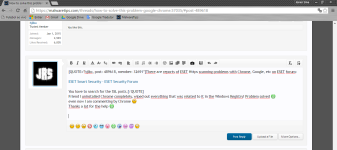
Friend I uninstalled Chrome completely, wiped out everything that was related to it in the Windows Registry! Problem solved :D
even now I am commenting by Chrome :)
Thanks a lot for the help :D

Sem título.png
 
You don't have to thank me as I wasn't much help... LOL.
You paid attention to my problem! This is worth a thank and their tips can help Furuto happen if another such lol :D
Too bad English! Google translator should improve lol
 
  • Like
Reactions: safe1st
Status
Not open for further replies.