I need to detect a kernel rootkit

Status
Not open for further replies.

DanteAlighieri

New Member
Thread author
Nov 1, 2023
17
3
4
Hello, sometime ago a friend of mine has told me about some shady group that has access to a malware which is being used for blackmailing and he also told me that my information was also there but he did not give me details on where to find this group.

From my analysis İ've concluded that it must be a kernel level rootkit and İ really need help on how to fight this threat. Please help me on analysis and capture methods.
 
Hello, Welcome to MalwareTips.
I'm nasdaq and will be helping you.

If you can please print this topic it will make it easier for you to follow the instructions and complete all of the necessary steps in the order listed.
===

Download the Farbar Recovery Scan Tool (FRST).
Choose the 32 or 64 bit version for your system.
and save it to a folder on your computer's Desktop.
Ensure that you are in an Administrator Account
Double-click to run it. When the tool opens click Yes to disclaimer.
Check the boxes as seen here:
L7kNU5y.jpg

Press Scan button.
It will make a log (FRST.txt) in the same directory the tool is run. Please copy and paste it to your reply.
The first time the tool is run, it makes also another log (Addition.txt). Please attach it to your reply.

Please attach the logs for my review.
How to attach a file to your reply:
In the Reply section in the bottom of the topic Click the "more reply Options" button.
[img=[URL]http://deeprybka.trojaner-board.de/eset/eng/attachlogs.png[/URL]]

Let me know what problems persists.

Wait for further instructions

p.s.
This program is updated often.
If it's identified as suspicious by your Anti-Virus program trust it if Downloaded from the link I provided.
OR, you should restore the program from the Quarantine folder.
====
 
  • Like
Reactions: DanteAlighieri
Hello, Welcome to MalwareTips.
I'm nasdaq and will be helping you.

If you can please print this topic it will make it easier for you to follow the instructions and complete all of the necessary steps in the order listed.
===

Download the Farbar Recovery Scan Tool (FRST).
Choose the 32 or 64 bit version for your system.
and save it to a folder on your computer's Desktop.
Ensure that you are in an Administrator Account
Double-click to run it. When the tool opens click Yes to disclaimer.
Check the boxes as seen here:
L7kNU5y.jpg

Press Scan button.
It will make a log (FRST.txt) in the same directory the tool is run. Please copy and paste it to your reply.
The first time the tool is run, it makes also another log (Addition.txt). Please attach it to your reply.

Please attach the logs for my review.
How to attach a file to your reply:
In the Reply section in the bottom of the topic Click the "more reply Options" button.
[img=[URL]http://deeprybka.trojaner-board.de/eset/eng/attachlogs.png[/URL]]

Let me know what problems persists.

Wait for further instructions

p.s.
This program is updated often.
If it's identified as suspicious by your Anti-Virus program trust it if Downloaded from the link I provided.
OR, you should restore the program from the Quarantine folder.
====

Okay i will try this and update my findings
 
Hi,

Please download the attached Fixlist.txt file to the same folder where the Farbar tool is running from.
The location is listed in the 3rd line of the FRST.txt log you have submitted.

Run FRST and click Fix only once and wait.

The Computer will restart when the fix is completed.

It will create a log (Fixlog.txt) please post it to your reply.
===

Please post the Fixlog.txt and let me know what problem persists.
 

Attachments

Okay but for the record I do want to find the CNC panel for this. İs there a way to access that? I believe if i Clear myself i will gey infected again
 
Okay this is the fixlog, there are some characters which are unreadable because OS language is Turkish tell me if there is something I can help.
 

Attachments

Hi,

I was able to translate the Turkish message.

In all you look good. If you have any remaining issues please let me know what and will take it from there.
 
Thank you very much, do you know if i can do a similar analysis for android phone? And is there a way to detect which service, process the attack originated from. I cannot always make my own fixlixts
 
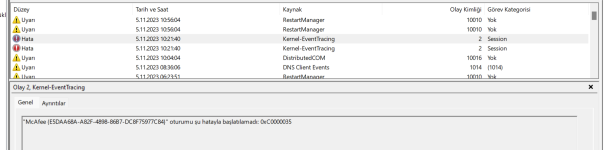
Hello again, in event tracer it says that mcafee could not be started. Is this something I should be worried about?
 

Attachments

  • Event Tracer.png
    Event Tracer.png
    143.1 KB · Views: 5
Hi,

I suggest you remove and reinstall the McAfee protection.


How to manually reinstall the latest McAfee app on a Windows PC

<<<>>>

Thank you very much, do you know if i can do a similar analysis for android phone? And is there a way to detect which service, process the attack originated from. I cannot always make my own fixlixts

1 - Android Phone
Questions should be directed to this Forum.


2 - detect which service, process the attack originated from

Sorry no.

3 - I cannot always make my own fixlixts

You should not do any fixlist unless you have been trained and qualified as a Trainee Helper on Malware.
 
Status
Not open for further replies.