

The MalwareTips app
Your community, one tap away.
Open MalwareTips from your Home Screen or desktop. Follow discussions, find answers and pick up where you left off.
- Home Screen access
- Optional push alerts
- Your community
You're ready to explore.Explore what's new
Installation instructions
iPhone & iPad
- Open MalwareTips in Safari and tap Share. You may need to open the Page Menu first.
- Choose Add to Home Screen. If it is not listed, use Edit Actions to add it.
- Keep Open as Web App enabled if shown, then tap Add.
Android
- Open MalwareTips in Chrome or another browser that supports app installation.
- Open the browser menu and look for Install app, Install and create shortcut, or Add to Home screen.
- Choose Install and confirm. Wording varies by browser.
Desktop
- Chrome: use the install icon in the address bar, or the menu under Cast, save and share.
- Edge: open the menu, then More tools, Apps and Install this site as an app.
- Safari on Mac: choose Share or File, then Add to Dock. Firefox on Windows: look for the web apps button in the address bar.
If you cannot find an install option, update your browser or use its bookmark option to keep MalwareTips close.
Keep up with your conversations
After installation, open the app and sign in. Enable push notifications in Preferences if you want alerts. On iPhone and iPad, push requires a Home Screen web app and iOS or iPadOS 16.4 or later.
Sign in to manage notificationsInstallation is optional. Your notification settings stay under your control.
You are using an out of date browser. It may not display this or other websites correctly.
You should upgrade or use an alternative browser.
You should upgrade or use an alternative browser.
ICE Cyber Crimes Virus

Please download Farbar Recovery Scan Tool and save it to your desktop.
Note: You need to run the version compatibale with your system. If you are not sure which version applies to your system download both of them and try to run them.
Only one of them will run on your system, that will be the right version.
Note: You need to run the version compatibale with your system. If you are not sure which version applies to your system download both of them and try to run them.
Only one of them will run on your system, that will be the right version.
- Double-click to run it. When the tool opens click Yes to disclaimer.

- Press Scan button.
- It will make a log (FRST.txt) in the same directory the tool is run. Please attach it to your reply.
- The first time the tool is run, it makes also another log (Addition.txt). Please attach it to your reply.
When I clicked on the link above, it took me to a site to download 7-Zip to download Farbar.
The download loaded asked if I wanted other items also downloaded. I declined the other items
and continued. It then loaded 7-zip, slo-pc fighter and then tried to open internet explorer and
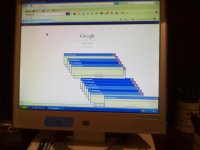
proceeded to hang in a loop with a window titled "wecarereminder' and the box stated that
it could not find the Reminder Helper window. It kept duplicating that window constantly and I
could not cancel it. I rebooted my system and it loaded slo-pc fighter and then got into the same
IE and wecarereminder loop. I rebooted my system again and deleted 7-zip and the slo-pc fighter
programs, but my system still gets in the wecare loop.
The download loaded asked if I wanted other items also downloaded. I declined the other items
and continued. It then loaded 7-zip, slo-pc fighter and then tried to open internet explorer and
proceeded to hang in a loop with a window titled "wecarereminder' and the box stated that
it could not find the Reminder Helper window. It kept duplicating that window constantly and I
could not cancel it. I rebooted my system and it loaded slo-pc fighter and then got into the same
IE and wecarereminder loop. I rebooted my system again and deleted 7-zip and the slo-pc fighter
programs, but my system still gets in the wecare loop.
Download from here --> http://www.bleepingcomputer.com/download/farbar-recovery-scan-tool/dl/81/
Not good, you attached fresh scan, and I wanted fix. Is my instruction really so hard to understand?
Last edited:
Ok, we removed all virus remnants. How is the situation now?
In normal windows mode, I still get the "wecarereminder" box when I try to connect to the internet
via internet explorer. As I incated before this came up when I tried to download FRST and I got a
prompt to download 7-zip.
When this happens, it keeps displaying multiple boxes and I have to shut down the system manually.
via internet explorer. As I incated before this came up when I tried to download FRST and I got a
prompt to download 7-zip.
When this happens, it keeps displaying multiple boxes and I have to shut down the system manually.
Can you make a picture?
Please download zoek.zip or zoek.rar by smeenk (
 ) from here or here and save it to your Desktop.
Unpack the archive...
Unpack the archive...
- Close any open browsers
- Temporarily disable your AntiVirus program. (If necessary)
If you are unsure how to do this please read this or this Instruction.
- Double click on zoek.exe to run the tool .
Please wait while the tool does not start...
- Copy the text present inside the code box below and paste it into the large window in the zoek tool:
Code:createsrpoint; StandardSearch; emptyfolderscheck; installer-list; installedprogs; uninstall-list; - Click on button.

Please wait until a logreport will open (this can be after reboot)
- Save notepad to your Desktop and attach here zoek-results.log
Note: It will also create a log in the C:\ directory named "zoek-results.log"
> Re-run zoek with this script and attach here fresh zoek log results.
Code:
autoclean;
emptyclsid;
emptyalltemp;
emptyfolderscheck;delete
shortcutfix;
resetIEproxy;
netsh int ip reset >> %temp%\log.txt;b
ipconfig /flushdns >> %temp%\log.txt;b
resethosts;
iedefaults;Recently browsing
Members who viewed this thread in the last 5 minutes
You may also like...
-

-

-
 Software Review WardWiz Antivirus Essentials Plus 2026
 -
Software Review Panda Dome Advanced Antivirus 2026
-