I have just installed BDIS and here is a list of issues I encountered right away after installing it.
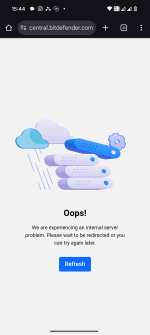
When I installed BD, I could not sign in to BD Central to activate my protection although I could easily sign in to BD Central using any browser of my choice. It kept giving me the error message "could not connect to server please try again later"
I tried changing my DNS to Cloudflare as I'm using NextDNS, but it did not work. This, I contacted BD support and they recommended using Google DNS which I did to see. It worked.
I ran the first full system scan, because this is the first thing I do when I install a new security product to help it adjust its performance. So I ran the scan and right in the middle I received a notification from BD that an update is in progress and BD will restart shortly to install the Update.
The full scan got cancelled and BD restarted without giving me any option. A behaviour I did not like at all. In my experience, the first full scan in BD is very important as it allows BD to adjust its performance to my device, but now when I reran the full system scan, I did not see that page which talks about system scan and how that will affect performance, so I'm not sure.
I changed my DNS again and that caused BD to lose connection to its servers which is very annoying.
Now I'm waiting for their support to see what we can do about it, but my experience is very unpleasant so far to say the least.
What you’re seeing is understandably frustrating, and none of that is “normal/expected” behaviour from a user‑experience point of view, even if parts of it are technically explainable.
I’ll break it down by issue and what you can realistically do next.
1. Bitdefender Central sign‑in only working with Google DNS
The fact that:
- You can log in via any browser
- But Bitdefender itself shows “could not connect to server”
- And it suddenly works when you change to Google DNS
strongly suggests a DNS/compatibility issue between Bitdefender’s services and your current resolver (NextDNS / Cloudflare), not a generic connectivity problem.
A few things are likely going on:
- Browsers can use DNS-over-HTTPS (DoH) independently of the system DNS. So “it works in the browser” doesn’t always mean the system (and Bitdefender) can resolve the same way.
- NextDNS/Cloudflare may be blocking or altering some Bitdefender domains or CDN endpoints, or there is some quirk in how those resolvers respond to certain queries that Bitdefender doesn’t like.
What you can try (if you want to keep using NextDNS/Cloudflare):
- Check your NextDNS logs
Log into your NextDNS dashboard and:
- Try to log in to Bitdefender Central from the app (the one that fails).
- Immediately check the query log for anything like bitdefender.com, central.bitdefender.com, update.bitdefender.com, CloudFront/Akamai/CDN endpoints, etc.
- See if any of those are blocked or answered with NXDOMAIN.
- Whitelist Bitdefender domains in NextDNS
If you see blocked domains, add them to the NextDNS Allowlist. You may need to allow:
- bitdefender.com and subdomains
- The specific CDNs or endpoints you see blocked in the logs
- Test using only IPv4 DNS
Temporarily:
- Disable IPv6 on your network adapter.
- Set only the IPv4 NextDNS/Cloudflare IPs as DNS.
- Try Bitdefender Central again.
Sometimes IPv6 + some resolvers causes weird issues with certain apps.
- Flush caches after changing DNS
- Run:
ipconfig /flushdns in an elevated Command Prompt.
- Restart Bitdefender.
If it works with Google DNS but not with NextDNS/Cloudflare even after whitelisting, it’s likely some subtle compatibility issue that only Bitdefender and the DNS provider can fully sort out. In that case, stay temporarily on Google DNS while support investigates, and send them:
- Exact DNS IPs you used
- Timestamp of the failed login attempt
- Screenshots or export from NextDNS logs showing what happened to Bitdefender queries
That kind of data is very valuable for support/engineering.
2. Full scan cancelled by automatic update + restart
You’re right: that’s bad behaviour from a UX standpoint. An in‑product update should not silently kill a long‑running scan.
What you can do about it depends on your Bitdefender build and what options they expose:
- Check update/restart settings
In Bitdefender, look under something like:
- Settings → Update
- Or Settings → General
and see if there is:
- An option to postpone reboots
- Or “ask before restart”
If that exists, set it so it doesn’t automatically restart without prompting.
- Order of operations for the future
Until this is resolved, a safe routine is:
- Install Bitdefender
- Immediately run update, let it finish, and reboot once manually
- Then start your long full system scan
That way, you reduce the risk of a product update triggering mid‑scan.
Definitely mention this exact sequence and the fact that there was
no prompt to Bitdefender support. It’s the sort of thing they
should either fix or give a setting for.
3. Concern about the “first full scan” optimization
Bitdefender has had features like
Photon / optimization, which adjust performance over time. From what’s publicly known:
- Optimization is generally cumulative – it’s not a one‑shot magic trigger that only happens on the very first full scan.
- The “this scan may affect performance / learning” page is more of an informational wizard; if the scan is interrupted, it doesn’t permanently break Bitdefender’s ability to optimize later.
So even if:
- Your first scan was interrupted
- You don’t see the same info page again
a
fresh full system scan now (after updates and reboot) will still help Bitdefender cache/learn and should bring you to essentially the same end state in practice.
You haven’t “ruined” anything by that first scan being cut short.
4. DNS changes causing Bitdefender to lose connection repeatedly
If every time you switch away from Google DNS, Bitdefender loses connectivity to its servers, then right now the product (or your configuration) is very sensitive to the resolver choice.
Practical steps:
- Decide what’s more important short‑term:
- Stable Bitdefender operation → stick with Google DNS for now.
- Using NextDNS/Cloudflare security features → try to fix via whitelisting and logs as above and keep support in the loop.
- Document the pattern for support:
- “Bitdefender connects with Google DNS X.X.X.X / X.X.X.X”
- “Fails with NextDNS/Cloudflare: IPs: …”
- “Happens immediately after changing DNS + reboot / flushdns”
The clearer the pattern, the easier for them to reproduce.
5. What I’d do next in your place
- Stay on Google DNS for now to keep Bitdefender functional while you wait for support.
- Run manual update in Bitdefender, reboot once, then do another full system scan. Don’t worry about the first one being interrupted.
- If you still want NextDNS:
- Capture logs from NextDNS when Bitdefender fails to connect/login.
- Whitelist the relevant domains you see blocked.
- Send screenshots/log excerpts to Bitdefender support.
- If the auto‑restart during scans happens again, grab:
- Exact time
- What scan was running
- Any update notification text
and send that to support as well.
Your experience so far is definitely unpleasant, and you’re not overreacting. If after working with support there’s still no satisfactory fix (especially around DNS compatibility and forced restarts), it may simply be that Bitdefender is a poor fit for your specific network setup, and then looking at another product that plays nicer with NextDNS would be reasonable.
If you share your OS version and exactly how you configure NextDNS (app / router / Windows DNS / DoH), I can suggest more targeted tests.









 I see? It's not the best country for internet freedom. Lots of issues. Nothing against the people though they are cool.

