Question Is Microsoft Defender Core Isolation Beneficial on Windows 11 Home?

Please provide comments and solutions that are helpful to the author of this topic.

lokamoka820

Level 41
Thread author
Verified
Top Poster
Well-known
Mar 1, 2024
3,072
3
9,862
3,969
Banana Republic
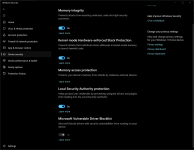
I'm confused about core isolation feature in Windows 11 home edition, it is recommended to enable it by windows security and in the same time it is described as "Security features available on your device that use virtualization-based security" and virtualization-based security is not available in Windows 11 home edition.
Screenshot 2025-09-09 023152.png

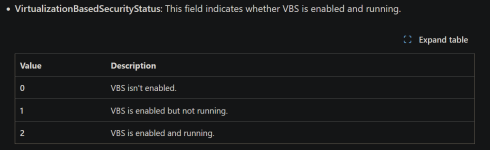
But when I run the following command in terminal Get-CimInstance -ClassName Win32_DeviceGuard -Namespace root\Microsoft\Windows\DeviceGuard the result of "VirtualizationBasedSecurityStatus" shows "2" which means "VBS is enabled and running" based on Microsoft documentation.
Screenshot 2025-09-09 023227.png
source: Enable memory integrity

So can experts explain this and if core isolation working on Windows 11 home edition and how it works and does it have full functionality like Windows 11 pro edition, or it is a limited?
 
There is no reason not to enable it. Available features depend on the type of machine you have, not the the OS, AFAIK. See below, and in the link.
Core isolation provides security features designed to protect core processes of Windows from malicious software by isolating them in memory. It does this by running those core processes in a virtualized environment.

In the Windows Security app on your PC, select Device security > Core isolation details or use the following shortcut:

Note: the features exposed on the core isolation page vary depending on what version of Windows you're running, and the hardware components installed.
Device Security in the Windows Security App - Microsoft Support

I'm running W11 Pro on an older, low-end device, and I have 3 Core Isolation features available:
  • Memory Integrity
  • LSA protection
  • MS Vulnerable Driver Blocklist
 
There is no reason not to enable it. Available features depend on the type of machine you have, not the the OS, AFAIK. See below, and in the link.

Device Security in the Windows Security App - Microsoft Support

I'm running W11 Pro on an older, low-end device, and I have 3 Core Isolation features available:
  • Memory Integrity
  • LSA protection
  • MS Vulnerable Driver Blocklist
I have it enabled, I'm just wondering how it is working on the home edition?
 
I have it enabled, I'm just wondering how it is working on the home edition?
What features do you have? Core Isolation is a broad category that includes the listed features. Available features depend on your machine specs.

@Andy Ful @Shadowra or @Trident could tell you how it works.
 
Last edited:

Memory integrity​

Memory integrity, also known as Hypervisor-protected Code Integrity (HVCI) is a Windows security feature that makes it difficult for malicious programs to use low-level drivers to hijack your PC.
A driver is a piece of software that lets the operating system (Windows in this case) and a device (like a keyboard or a webcam) talk to each other. When the device wants Windows to do something, it uses the driver to send that request.
Memory integrity works by creating an isolated environment using hardware virtualization.
Think of it like a security guard inside a locked booth. This isolated environment (the locked booth in our analogy) prevents the memory integrity feature from being tampered with by an attacker. A program that wants to run a piece of code which may be dangerous has to pass the code to memory integrity inside that virtual booth so that it can be verified. When memory integrity is comfortable that the code is safe it hands the code back to Windows to run. Typically, this happens very quickly.
Without memory integrity running, the security guard stands right out in the open where it's much easier for an attacker to interfere with or sabotage the guard, making it easier for malicious code to sneak past and cause problems.

Memory access protection​

Also known as Kernel DMA protection this security feature protects your device against attacks that can occur when a malicious device is plugged into a Peripheral Component Interconnect (PCI) port like a Thunderbolt port.
A simple example of one of these attacks would be if someone leaves their PC for a quick coffee break, and while they were away, an attacker steps in, plugs in a USB-like device and walks away with sensitive data from the machine, or injects malware that allows them to control the PC remotely.
Memory access protection prevents these kinds of attacks by denying direct access to the memory to those devices except under special circumstances, particularly when the PC is locked, or the user is signed out.

Kernel-mode Hardware-enforced Stack Protection​

Hardware enforced stack protection is a hardware-based security feature that makes it difficult for malicious programs to use low-level drivers to hijack your PC.
A driver is a piece of software that lets the operating system (Windows in this case) and a device (like a keyboard or a webcam) talk to each other. When the device wants Windows to do something, it uses the driver to send that request.
Hardware enforced stack protection works by preventing attacks that modify return addresses in kernel-mode memory to launch malicious code. This security feature requires a CPU that contains the ability to verify the return addresses of running code.
When executing code in kernel-mode, return addresses on the kernel-mode stack can be corrupted by malicious programs or drivers in order to redirect normal code execution to malicious code. On supported CPUs, the CPU maintains a second copy of valid return addresses on a read-only shadow stack that drivers cannot modify. If a return address on the regular stack has been modified, the CPU can detect this discrepancy by checking the copy of the return address on the shadow stack. When this discrepancy occurs, the computer prompts a stop error, sometimes known as a blue screen, to prevent the malicious code from executing.
Not all drivers are compatible with this security feature, as a small number of legitimate drivers engage in return address modification for non-malicious purposes. Microsoft has been engaging with numerous driver publishers to ensure that their latest drivers are compatible with hardware enforced stack protection.
You can turn hardware enforced stack protection On or Off using the toggle button.
To use hardware enforced stack protection, you must have memory integrity enabled, and you must be running a CPU that supports Intel Control-Flow Enforcement Technology or AMD Shadow Stack

Local Security Authority protection​

Local Security Authority (LSA) protection is a Windows security feature to help prevent the theft of credentials used for signing into Windows.
The Local Security Authority (LSA) is a crucial process in Windows involved in user authentication. It’s responsible for verifying credentials during the login process and managing authentication tokens and tickets used to enable single sign-on for services. LSA protection helps prevent untrusted software from running inside LSA or from accessing LSA memory.
Vulnerable Driver Blocklist is self-explanatory. It is enabled by default when a user enables Smart App Control.

MS documentation only gives you so much info. The above info was in my linked source.

You must have a better spec machine as I don't have Memory Access or Kernel Mode Protection.
 
Vulnerable Driver Blocklist is self-explanatory. It is enabled by default when a user enables Smart App Control.

MS documentation only gives you so much info. The above info was in my linked source.

You must have a better spec machine as I don't have Memory Access or Kernel Mode Protection.
What makes me more confused is that "virtualization-based security" was shown as disabled in Wintoys, and when I contact the developer he replied with:
Regarding VBS: there are multiple factors that make VBS work, and Wintoys checks for all of them. That means you were not actually having VBS running. It checks for Windows Defender Core Isolation, Hyper-V, and more.
Screenshot 2025-08-29 172948e.png
 
What makes me more confused is that "virtualization-based security" was shown as disabled in Wintoys, and when I contact the developer he replied with:
That's above my pay grade. You'll have to wait for reinforcements for an answer.
 
Based on the Microsoft official documentation, Virtualization-based security, or VBS, uses hardware virtualization and the Windows hypervisor to create an isolated virtual environment that becomes the root of trust of the OS that assumes the kernel can be compromised. The hypervisor doesn’t point to the Hyper-V, just an isolated environment.

What this mean is Virtualization-Based Security (VBS) does require a hypervisor, but it does not require the full Hyper-V feature to be installed, so the user can enable VBS and Core Isolation on Windows 11 Home, as long as the hardware supports virtualization and Secure Boot, and no need to install or enable Hyper-V as VBS uses a lightweight version of the hypervisor that runs behind the scenes.

Source: Virtualization-based Security (VBS)
 
What this mean is Virtualization-Based Security (VBS) does require a hypervisor, but it does not require the full Hyper-V feature to be installed, so the user can enable VBS and Core Isolation on Windows 11 Home, as long as the hardware supports virtualization and Secure Boot, and no need to install or enable Hyper-V as VBS uses a lightweight version of the hypervisor that runs behind the scenes.
Correct.
 
  • Like
Reactions: lokamoka820