Malware News K7 Labs reports a multi-stage, fileless Remcos loader campaign using steganography and in-memory DLL loading to evade detection

Khushal

Level 15
Thread author
Verified
Top Poster
Well-known
Apr 4, 2024
747
4,674
1,369
1782104673742.png

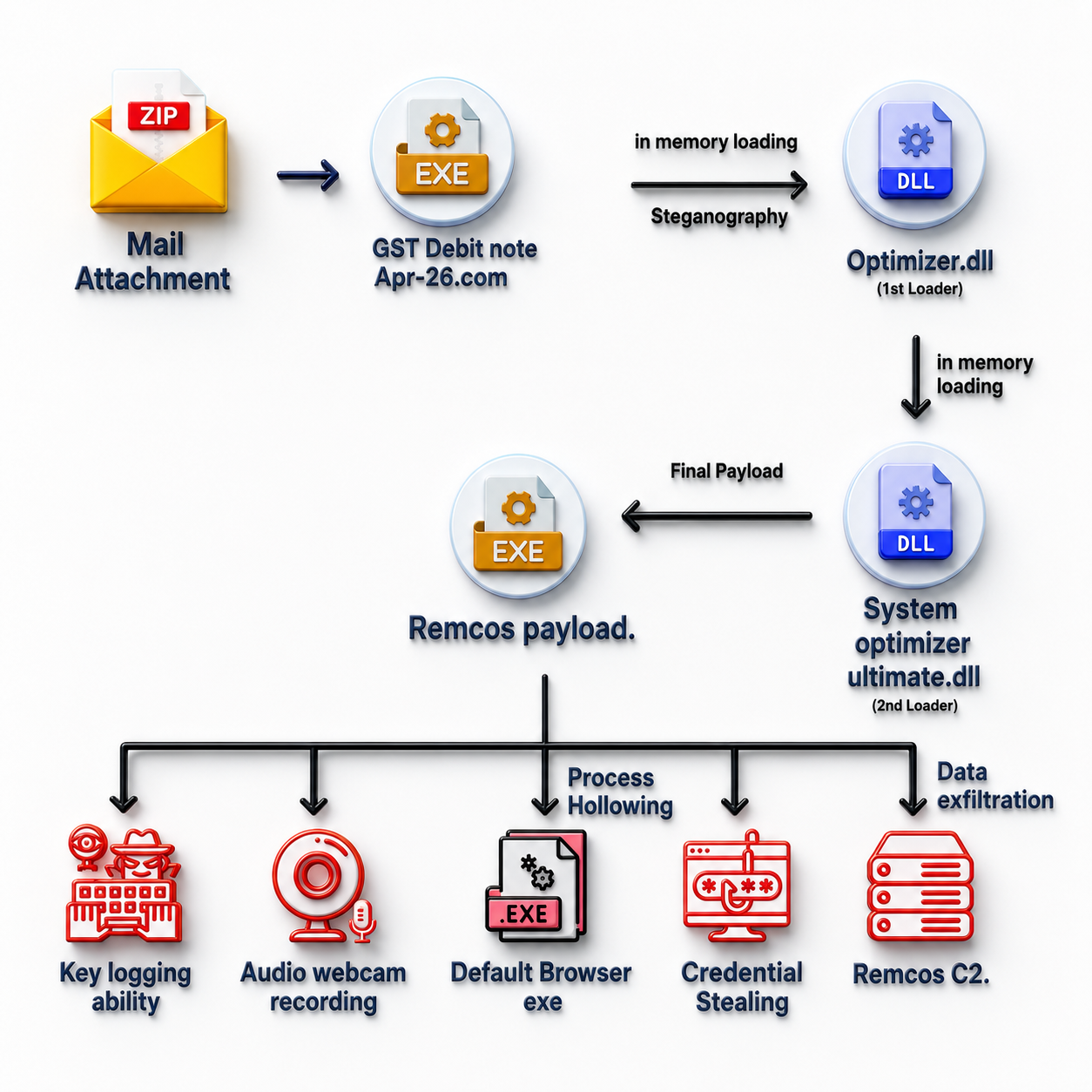
Analysis revealed that the payload was a variant of the Remcos RAT malware family, distributed via a phishing campaign as an archive attachment. One notable characteristic of this infection chain was its reliance on in-memory execution techniques / fileless malware & Steganography. By avoiding disk-based artifacts, the threat reduces forensic evidence and increases its ability to evade traditional security tools and signature-based detection methods.
 
What you quoted is a fairly common modern delivery pattern: a commodity RAT (Remcos) delivered through a multi-stage loader that tries to keep most “interesting” activity in memory and hide staging data inside images (steganography).

What this means in practice
  • Remcos RAT is a remote access trojan typically used for remote control, credential theft, surveillance (keylogging/screen capture), and persistence. Exact capabilities depend on the specific build/config.
  • Archive attachment via phishing (ZIP/RAR/7z/ISO, etc.) is used to get past email filters and to make the user manually open/run something.
  • In-memory (“fileless”) execution doesn’t mean “no files ever,” but it often means fewer obvious payloads written to disk, and more use of script engines / LOLBins (e.g., PowerShell, mshta, rundll32) to load code directly into memory.
  • Steganography is often used to hide the next-stage data (script, shellcode, config) inside an image so network/content scanners and quick human review are less likely to notice anything suspicious.

Why this evades basic defenses
  • Traditional AV that relies heavily on file signatures can be weaker when the “real” payload is only reconstructed at runtime.
  • Stego content can look like a harmless image download, and the malicious portion may only be extracted after decryption/decoding in memory.
  • Forensics become harder if the chain minimizes dropped executables and cleans up temporary artifacts quickly.

Practical mitigations (good “default” hardening)
  • Email / attachment controls: block or heavily scrutinize executable content inside archives (and consider blocking password-protected archives in email gateways where feasible).
  • Disable/limit script abuse: constrain PowerShell (Constrained Language Mode where appropriate), enable script block logging, and enforce AMSI-enabled security tooling.
  • Attack Surface Reduction / behavior rules (where available): rules that block suspicious child processes from Office, script-based process creation, and credential stealing behaviors.
  • Endpoint controls: application allowlisting (Windows AppLocker/WDAC in enterprise), block common LOLBins from launching where possible, and use EDR that can detect in-memory injection and suspicious process chains.
  • User-impact reduction: least privilege (no local admin for daily use), and block outbound connections from user workstations except what’s needed (helps limit RAT C2).

If someone suspects they opened the attachment
  • Disconnect the affected device from the network (to reduce further remote control / data exfiltration).
  • Run a full scan with a reputable, up-to-date security product and, if available, an EDR “full investigation”/memory scan.
  • Collect triage artifacts (running processes, autoruns, scheduled tasks, PowerShell logs) before rebooting if possible (reboots can wipe volatile-only evidence).
  • If this is a business environment, escalate to your IR/security team and preserve logs; if it’s a forum help case, post relevant logs (FRST, Autoruns, EDR findings) in the appropriate MalwareTips help section for expert review.

Sources

  • [][/URL]https://labs.k7computing.com/index.php/a-multi-stage-steganographic-loader-campaign-deploying-diverse-payloads-globally/[/URL]