

Kaspersky 2018 invalid certificates browsing
- Thread starter Aktiffiso
- Start date
You are using an out of date browser. It may not display this or other websites correctly.
You should upgrade or use an alternative browser.
You should upgrade or use an alternative browser.
- Status
- Not open for further replies.

- Apr 28, 2015
- 9,398
- 1
- 84,824
- 8,389
Which product/version of Kaspersky? browser? Does She only get that certificate warning in Netflix or in many others sites? screen-shot of the warning?


I get it constantly  are you using a VPN when you go to Netflix ? With mine, i have put it down to using a service my ISP provides that lets me connect to a public/free wi-fi through my home router (so this doesn't count towards my monthly allowance) and i have just learnt to live with it, it is a pain in the butt though. It doesn't happen when i use my own internet just on the free one, i get it with chrome, internet ex, it also tells me that my browser extensions like Windscribe, Lastpass, etc have invalid certificates
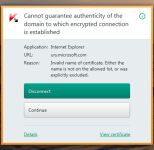
@harlan4096 , i will leave a screen shot for you to give you an idea, i know someone else posted the same problem a few weeks ago and you gave a possible solution but i am not clever enough to carry out the instructions you provided ( i think it was to add the certificate name to something, sorry for my ignorance on this)

are you using a VPN when you go to Netflix ? With mine, i have put it down to using a service my ISP provides that lets me connect to a public/free wi-fi through my home router (so this doesn't count towards my monthly allowance) and i have just learnt to live with it, it is a pain in the butt though. It doesn't happen when i use my own internet just on the free one, i get it with chrome, internet ex, it also tells me that my browser extensions like Windscribe, Lastpass, etc have invalid certificates @harlan4096 , i will leave a screen shot for you to give you an idea, i know someone else posted the same problem a few weeks ago and you gave a possible solution but i am not clever enough to carry out the instructions you provided ( i think it was to add the certificate name to something, sorry for my ignorance on this
)
Attachments
- Apr 28, 2015
- 9,398
- 1
- 84,824
- 8,389
@Weebarra: What is: urs.microsoft.com - Knowledge eXchange
And in general for certificates warnings in Kaspersky: Reasons for the Invalid Certificate error in the Safe Money component of Kaspersky Internet Security 2015
About to use VPNs with Kaspersky home products (different than KSeC integrated now in Kaspersky products) may lead to some issues because Kaspersky uses certificate pinning (scan encrypted connexions via its own certificate), a possible solution could be @Bleak one, but disabling completely scanning of encrypted connections You will lose some features although still will be protected.
Others causes of getting certificate warnings with Kaspersky:
1.- A possible adware/pup/pua infection in the system or in browsers (add-on/extensions).
2.- To have more than 1 Kaspersky Root Certificate (older ones from previous Kaspersky installations) installed in system. Only one and the most updated should be installed.
3.- Incorrect BIOS/Windows system Date/Time.
And in general for certificates warnings in Kaspersky: Reasons for the Invalid Certificate error in the Safe Money component of Kaspersky Internet Security 2015
About to use VPNs with Kaspersky home products (different than KSeC integrated now in Kaspersky products) may lead to some issues because Kaspersky uses certificate pinning (scan encrypted connexions via its own certificate), a possible solution could be @Bleak one, but disabling completely scanning of encrypted connections You will lose some features although still will be protected.
Others causes of getting certificate warnings with Kaspersky:
1.- A possible adware/pup/pua infection in the system or in browsers (add-on/extensions).
2.- To have more than 1 Kaspersky Root Certificate (older ones from previous Kaspersky installations) installed in system. Only one and the most updated should be installed.
3.- Incorrect BIOS/Windows system Date/Time.
Last edited:
Thanks @harlan4096 , it will take me some time to digest your provided information but from what i read it makes some sense that is the configuration i have, i will read it in more detail later .
This is the only Kaspersky installation i have ever had on my system and i don't really think i have adware or pup infection but i thank you for trying to explain things to me.
I will give @Bleak suggestions a try too and see how it goes.The reason i use IE to connect to the "free wifi" is because i could pin it to the taskbar and it is quicker for me to launch the page and to log into it (before Kasp gets a chance to invalidate it, lol) if i manage this then all is ok, personally i can live with it but the OP might not be able to and hopefully the suggestions help him.
.This is the only Kaspersky installation i have ever had on my system and i don't really think i have adware or pup infection but i thank you for trying to explain things to me.
I will give @Bleak suggestions a try too and see how it goes.The reason i use IE to connect to the "free wifi" is because i could pin it to the taskbar and it is quicker for me to launch the page and to log into it (before Kasp gets a chance to invalidate it, lol) if i manage this then all is ok
, personally i can live with it but the OP might not be able to and hopefully the suggestions help him.
 I lost parental advisor and safe money but that's cool, when i need safe money, i can just enable it again. Thanks again everyone, hopefully it solves it for @Aktiffiso too.
- Apr 28, 2015
- 9,398
- 1
- 84,824
- 8,389
@Aktiffiso: It seems there is an issue with Netflix and K2018: KIS 2016 invalid certificate: b.scorecardresearch.com

@Weebarra: disabling scanning encrypted connections will "lower the protection", You could try to add the exclusions proposed in this post from KL Forum while the issue is solved
@Weebarra: disabling scanning encrypted connections will "lower the protection", You could try to add the exclusions proposed in this post from KL Forum while the issue is solved
@Weebarra: What is: urs.microsoft.com - Knowledge eXchange
And in general for certificates warnings in Kaspersky: Reasons for the Invalid Certificate error in the Safe Money component of Kaspersky Internet Security 2015
About to use VPNs with Kaspersky home products (different than KSeC integrated now in Kaspersky products) may lead to some issues because Kaspersky uses certificate pinning (scan encrypted connexions via its own certificate), a possible solution could be @Bleak one, but disabling completely scanning of encrypted connections You will lose some features although still will be protected.
Others causes of getting certificate warnings with Kaspersky:
1.- A possible adware/pup/pua infection in the system or in browsers (add-on/extensions).
2.- To have more than 1 Kaspersky Root Certificate (older ones from previous Kaspersky installations) installed in system. Only one and the most updated should be installed.
3.- Incorrect BIOS/Windows system Date/Time.
Ah ok @harlan4096 , in your original post, it sounded like i wouldn't lose any protection, i will go change it back and try your latest method, thanks again.
- Apr 28, 2015
- 9,398
- 1
- 84,824
- 8,389
Well, yes some modules will lose functionality if scan encrypted connections upon request is totally disabled, but still You are protected at traffic level:
Imgur: The most awesome images on the Internet

Imgur: The most awesome images on the Internet
Well, yes some modules will lose functionality if scan encrypted connections upon request is totally disabled, but still You are protected at traffic level:
Imgur: The most awesome images on the Internet
Well, i have no idea what's happened but after re-enabling the scan encrypted ports, the problem appears to have disappeared i'm not complaining but perhaps it has just been a glitch. Hopefully it is the same for @Aktiffiso too.
i'm not complaining but perhaps it has just been a glitch. Hopefully it is the same for @Aktiffiso too.Well, i have no idea what's happened but after re-enabling the scan encrypted ports, the problem appears to have disappeared
Have you disabled/enabled the scanning of 'encrypted port' or 'encrypted connections'? because both are different.
If anyone still having this issue while the encrypted connection scanning is on, try disabling the SSL 2.0 option, in advanced settings of the same menu, or disable 'traffic script injection' and try.
or best option IMO, is to turn these options on, and in 'encrypted connection' scanning add to exclusions your HTTPS websites that you usually visit.

Well, i have no idea what's happened but after re-enabling the scan encrypted ports, the problem appears to have disappeared
Fixed with the well-known "turn it off / turn it" on method
Have you disabled/enabled the scanning of 'encrypted port' or 'encrypted connections'? because both are different.
If anyone still having this issue while the encrypted connection scanning is on, try disabling the SSL 2.0 option, in advanced settings of the same menu, or disable 'traffic script injection' and try.
or best option IMO, is to turn these options on, and in 'encrypted connection' scanning add to exclusions your HTTPS websites that you usually visit.
@Bleak , so sorry, my mistake, i disabled then re- enabled the encrypted connection NOT port as i said earlier. I am not the sharpest tool in the box (as you may have gathered ) the problem is fine for me now and i apologise to the OP for hijacking his thread but hopefully there is an answer in amongst all this that helps him too.
Thanks for your patience with me :notworthy:
@Transhumana , that is normally my first port of call , maybe i can get a job in that IT department,

It's all good, no need for apologizing & glad it works for you and hopefully for the OP@Bleak , so sorry, my mistake, i disabled then re- enabled the encrypted connection NOT port as i said earlier. I am not the sharpest tool in the box (as you may have gathered ) the problem is fine for me now and i apologise to the OP for hijacking his thread but hopefully there is an answer in amongst all this that helps him too.
Thanks for your patience with me :notworthy:
@Transhumana , that is normally my first port of call , maybe i can get a job in that IT department,

Intrusive Pop-ups - Cannot guarantee authenticity of the domainWith the greatest respect to your finding the pop ups aggravating. I would like to share a different outlook, on them.
I think what you are seeing is the enhancement and evolution of the Kaspersky product in a evermore potentially dangerous on line world.
Take look at the URL that is being blocked it is most likely not the one you are trying to view (probably far from it). The KIS software is blocking an identified "rider" connected to your legitimate site.
I am sure the developers wrestle with displaying this as a pop-up or hiding it, at the moment I think they want to be sure we "don't" want the rider by displaying the pop-up and letting us decide. If we had no notices we may miss something we want to view. I do agree that maybe the developers could add a switch for auto bloc for those that want the software to not show notifications. There could even be legal ramifications as ad blockers come under more fire, I am thankful at least we can "throw the switch ourselves" (hitting that disconnect button).
As indicated by others in this thread, I think most of these "pop-ups" are caused by ads and other analytics. I get a few but find it comforting when I read the "URL" that the software is helping me know what I am viewing.
If your favorite browser allows domain blocking this would be an effective way to make your pop-ups subside on your favorite sites (a bit of work but it is effective).
Please understand I am not "defending" the pop-ups just trying to help understand them -- all the best kbill
Thanks for the link @venustus, i read some of these things yesterday before the Kaspersky site went down for maintenance, i'll need to go back and read some more of the threads some day
No problem!Thanks for the link @venustus, i read some of these things yesterday before the Kaspersky site went down for maintenance, i'll need to go back and read some more of the threads some day
- Status
- Not open for further replies.
You may also like...
-
SOpera One R3 arrives with new AI, Google integrations, and more
- Started by Santiago Benavides García
- Replies: 0
-
-
SOpera One updates with new webpage Translator and improved Split Screen
- Started by Santiago Benavides García
- Replies: 0
-
 Expired Keeprix All-in-One Downloader 6month free
- Started by Brownie2019
- Replies: 1
