


Super fast.It's currently blacklisted by their cloud service https://opentip.kaspersky.com/C92E226D39B612785F8CE5074DA03DEEC6618E5C9AAEB4046AD153133B027805/ but the first victim (my VM) hypothetically lost its personal files
App Review Kaspersky Security Cloud Free vs Ransominator (default settings)
- Thread starter bayasdev
- Start date
You are using an out of date browser. It may not display this or other websites correctly.
You should upgrade or use an alternative browser.
You should upgrade or use an alternative browser.
It is advised to take all reviews with a grain of salt. In extreme cases some reviews use dramatization for entertainment purposes.
Can you test Norton, please?
I'm gonna take a guess and say it's not going to protect. I just tested the latest NortonLifeLock (with Data Protector set) with my equivalent binary (also using 7z to encrypt) and it failed -- no reaction at all.

Same as SEP default will be blocked by app control / system lockdownI'm gonna take a guess and say it's not going to protect. I just tested the latest NortonLifeLock (with Data Protector set) with my equivalent binary (also using 7z to encrypt) and it failed -- no reaction at all.
Thanks to application control custom rules, document files were protected in my test.
Advanced disinfection starts, restart the system and all things rolled back.
Cloud Detection:
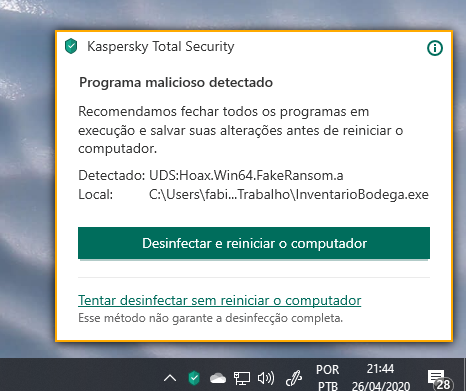
Advanced disinfection starts, restart the system and all things rolled back.
Cloud Detection:
Last edited:
For the purposes of this test, I don't consider an application control feature to be the same as detection and blocking of this attack.Same as SEP default will be blocked by app control / system lockdown
Yes, application whitelisting and reputation control are part of your layered protection, but this is specifically intended to be a test of a ransomware encrypting mechanism. Blocking the POC from running in the first place is not successfully identifying malicious behavior the way we want our dynamic behavior blockers to do so.
well Sonar/bloodhound always suckedFor the purposes of this test, I don't consider an application control feature to be the same as detection and blocking of this attack.
Yes, application whitelisting and reputation control are part of your layered protection, but this is specifically intended to be a test of a ransomware encrypting mechanism. Blocking the POC from running in the first place is not successfully identifying malicious behavior the way we want our dynamic behavior blockers to do so.

Hitman Pro Alert,H_C ,WVSX ,and any av application control module blocked it
So KSFC tweaked paired with H_C will be a good combo I think...
No need for ksfc if you use H_CSo KSFC tweaked paired with H_C will be a good combo I think...
But of course you can use both

An average user need not get into panic mode on seeing these kind of videos because the file will get blocked by Kaspersky before it reaches an average user. But at the same time it also reminds us to have a locked down state in our systems while opening attachments or unknown files.
I’ll go one step further and say to simply not take risks that you don’t have to take! We can feel warm and cozy that we have advanced and well tested AV software and layers of protection but it’s easy to become overconfident. Zero day exploits exist. Modern exploits have demonstrated attackers know how to chain a bunch of exploits together to defeat layers of security.An average user need not get into panic mode on seeing these kind of videos because the file will get blocked by Kaspersky before it reaches an average user. But at the same time it also reminds us to have a locked down state in our systems while opening attachments or unknown files.

This sample isn't special but ones like fun.bat/exe test in the hub did surprise me and some signed sample i tested
But don't think you are safe i few samples i tested bypassed wise vector
The same can be said for all the antiviruses out there. You can bypass any of them (except comodo IMHO). But in general WV has a very very good detection rate and a powerful behavior blocker!

And except Avast with HMThe same can be said for all the antiviruses out there. You can bypass any of them (except comodo IMHO). But in general WV has a very very good detection rate and a powerful behavior blocker!

And except Avast with HM
In my opinion AVAST can be bypassed even in HM.
In my opinion AVAST can be bypassed even in HM.

App Review - Avast Free (Hardened Mode) vs Ransominator
I'm genuinely surprised to see Avast Free blocking my LOLbin inspired ransomware while Kaspersky Free allowed it to execute and encrypt my files. Is this the end of Ransominator?
 malwaretips.com
App Review - Avast Free (Hardened Mode) vs Ransominator
I'm genuinely surprised to see Avast Free blocking my LOLbin inspired ransomware while Kaspersky Free allowed it to execute and encrypt my files. Is this the end of Ransominator?
Unfortunately Ransominator is not the only malware in the world, there are MANY of them that can do the job!
- Apr 18, 2016
- 3,676
- 28,872
- 4,599
yes it can but when you combine it with syshardener with proper settings, it would be very hard to bypass HM aggressive (not moderate mode)In my opinion AVAST can be bypassed even in HM.
Hardened mode only support .exe files so other extensions can easily bypass it. Syshardener will block most scripts and vectors that can bypass HM
I have used and tested avast for 3 years. There was only 1 bypass, which was a PUP
yes it can but when you combine it with syshardener with proper settings, it would be very hard to bypass HM aggressive (not moderate mode)
Hardened mode only support .exe files so other extensions can easily bypass it. Syshardener will block most scripts and vectors that can bypass HM
I have used and tested avast for 3 years. There was only 1 bypass, which was a PUP
Totally agree with you! In case you add syshardener it is almost impossible to bypass it, but it's the same for the other antiviruses as well.
- Apr 18, 2016
- 3,676
- 28,872
- 4,599
I agree. However, there are few AVs which offer something like HM, especially for free.Totally agree with you! In case you add syshardener it is almost impossible to bypass it, but it's the same for the other antiviruses as well.
Kaspersky has TAM
Some AV have HIPS, but this generates too many prompts, does not automatically allow if the file is safe
Windows has Smartscreen, which works almost exactly the same as HM but a file must be downloaded from a web browser or Smartscreen won't check it
Comodo has autosandbox, reputation-based
.......
I agree. However, there are few AVs which offer something like HM, especially for free.
Kaspersky has TAM
Some AV have HIPS, but this generates too many prompts, does not automatically allow if the file is safe
Windows has Smartscreen, which works almost exactly the same as HM but a file must be downloaded from a web browser or Smartscreen won't check it
Comodo has autosandbox, reputation-based
.......
Agree about the HM in AVAST, it must be the only av offering such an option for free! As far as I know Kaspersky 2021 won't have TAM anymore.

Last edited:
You may also like...
-
 Question So... What does Ai say about Eset+Cyberlock VS Bitdefender or Kaspersky.
- Started by annaegorov
- Replies: 15
-
Question What does Kaspersky's default deny/zero trust mode do and how to set it properly?
- Started by nonamebob567
- Replies: 1
-
Hot Take If your security software was never patched or updated would they fail? Yet these 3 would not fail.
- Started by annaegorov
- Replies: 1
-
 Serious Discussion DEBATE | Are security YouTubers misleading people about antivirus effectiveness?
- Started by RoboMan
- Replies: 30