
I also do like @harlan4096's advice of Exiting out of the app, before installing the new version.Also , according my experience Kaspersky installers are mostly handling an on top installation on previous versions without any issue.


Open MalwareTips from your Home Screen or desktop. Follow discussions, find answers and pick up where you left off.
If you cannot find an install option, update your browser or use its bookmark option to keep MalwareTips close.
After installation, open the app and sign in. Enable push notifications in Preferences if you want alerts. On iPhone and iPad, push requires a Home Screen web app and iOS or iPadOS 16.4 or later.
Sign in to manage notificationsInstallation is optional. Your notification settings stay under your control.
 Thread starter
harlan4096
Thread starter
harlan4096
I also do like @harlan4096's advice of Exiting out of the app, before installing the new version.Also , according my experience Kaspersky installers are mostly handling an on top installation on previous versions without any issue.


 support.kaspersky.com

 www.kaspersky.com
 lp.kaspersky.com
 www.kaspersky.com
New version 21.24 should be also now available in K. official downloads section:I'm still on none beta standard, & standard does all I want, so looking forward for some new beta features & changes to trickle down to my final


@Brahman
Being here:
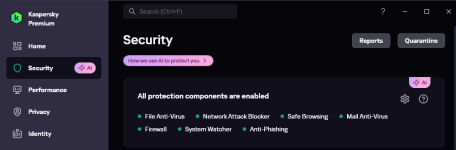
View attachment 295067
Click on "How We use AI..."
Also check:
Kaspersky AI Technology Research Center
Our technologies, products, research, patents and expert teams harnessed for AI.
20 years of expertise in AI cybersecurity: how experience makes a difference
20 years of expertise in AI cybersecurity: how experience makes a difference
AI technologies in Kaspersky SIEM
How and why we deploy artificial intelligence in our SIEM system Kaspersky Unified Monitoring and Analysis.
What does the AI tag on a feature mean?
The AI tag indicates that this feature uses machine‑learning (ML) methods and intelligent data analysis. These technologies improve threat‑detection quality, enable more accurate recognition of new/unknown malicious objects, and reduce false positives.
Classification and detection technologies for malicious activity (e.g., based on object attributes and/or behavioral signals) operate as part of the standard protection mechanisms and complement other methods (signatures, heuristics, rules, reputation checks, etc.). Our AI‑powered features do not use your PC’s resources for external computations: the algorithms run only within the normal operation of the protection (scanning and monitoring).
Is this a new feature?
Intelligent‑analysis technologies have been used in cybersecurity for many years. We have now added an explicit AI label so that users can more easily see which components employ these methods. In other words, the approaches themselves are not new—the transparency of their labeling has changed.
Can it be turned off?
The AI tag is simply an indication of a technology that helps detect threats. It does not represent a separate operating mode or property of a particular feature. You can enable or disable individual features in the product, but disabling some of them may reduce the overall level of protection.

No, I don't use them. They're inactive! The browser plugin is installed. And if I go to the Network Settings menu and turn off "Do Not Inspect Encrypted Connections," the Hungarian subtitles work on YouTube.Are You using Anti-Banner and/or Private Browsing modules?
Members who viewed this thread in the last 5 minutes

