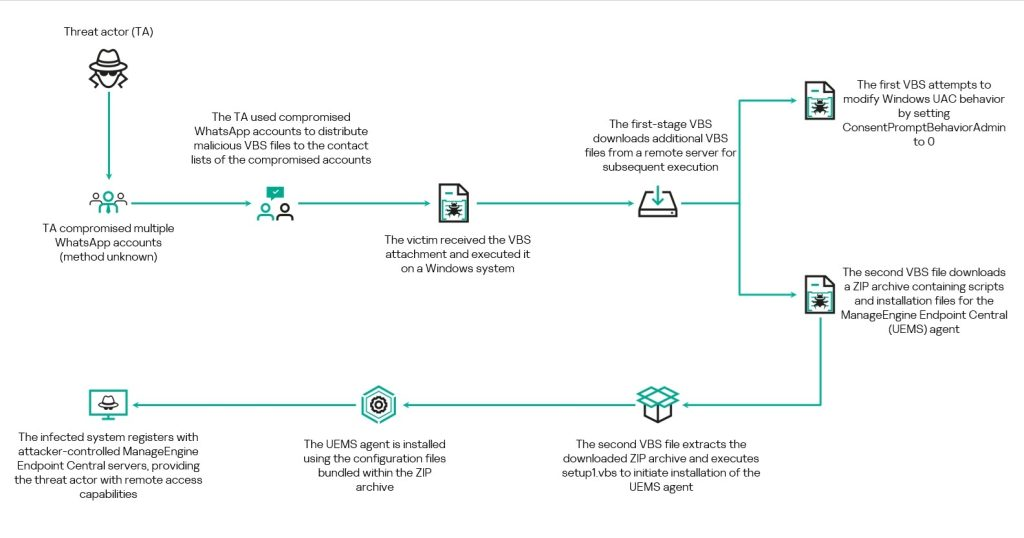
Malware News Kaspersky's alert : Active WhatsApp malware campaign uses compromised accounts to send VBScript attachments disguised as invoices/statements.

Security News
1 Replies 787 Views

Khushal

Level 16
Verified
Top Poster
Well-known
If opened, they trigger a multi-stage chain that installs legitimate RMM software for remote access. So far most victims are in Malaysia – but the impact is global.
1782227863855.png

 
This kind of WhatsApp-delivered VBS lure is a common pattern: the initial script is mainly a “loader” that tries to pull down and install legitimate remote management/remote access software (RMM) so the attacker can control the system.

Why this matters (even if the tool is “legitimate”)
Legitimate RMM apps are often abused because they can provide:
  • Persistent remote access
  • File transfer and command execution
  • Evasion of basic “malware-only” detections (because the binary is signed/legit)

Safe handling / prevention
  • Do not open unexpected script attachments (VBS/JS/WSF/HTA), even if the sender looks familiar (accounts can be hijacked).
  • On Windows, consider disabling Windows Script Host if you don’t need it (common in home environments). In many cases this stops VBS/JS execution entirely. (In business environments, test first because some legacy tools rely on it.)
  • Hide/Block script file types at the email/web gateway where possible, and ensure “show file extensions” is enabled in File Explorer so “.vbs” is visible.
  • Use application control where available (Windows Defender Application Control / AppLocker) to block script interpreters and user-writable execution paths.

If someone already opened the file
Keep it calm and methodical—RMM abuse is recoverable if caught early:
  • Disconnect the affected PC from the internet (to stop remote control).
  • Run a full scan with a reputable AV (Microsoft Defender is fine as a baseline; a second-opinion scanner can also help).
  • Check for newly installed remote access/RMM software and remove it if it was not intentionally deployed.
  • Look for persistence: Startup entries, Scheduled Tasks, Services, and unusual “Run” registry entries (Sysinternals Autoruns is commonly used for this review).
  • Change passwords from a known-clean device (especially email and messaging accounts), because attackers often pivot after gaining remote access.

Key takeaway
Treat unexpected VBS/script files delivered via chat apps as high-risk. If executed, focus on removing any unauthorized RMM tool and associated persistence, then reset credentials from a clean device.

Sources
 
Community
Security tip
Protect confidential samples. Files uploaded to standard VirusTotal may be shared with security partners. Keep private documents, business files, and personal data out of public submissions.
Back
Top