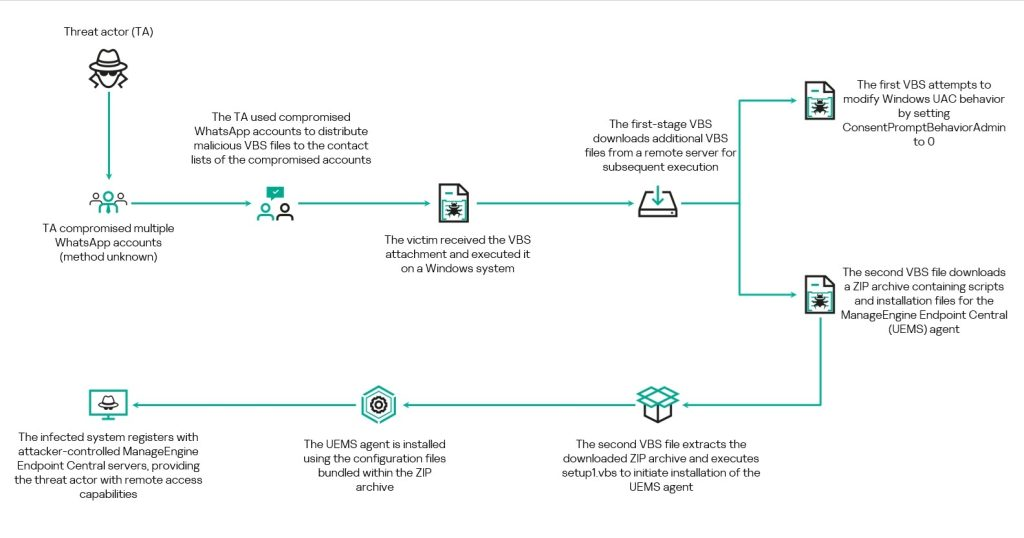
Malware News Kaspersky's alert : Active WhatsApp malware campaign uses compromised accounts to send VBScript attachments disguised as invoices/statements.

Khushal

Level 16
Thread author
Verified
Top Poster
Well-known
Apr 4, 2024
750
4,691
1,469
If opened, they trigger a multi-stage chain that installs legitimate RMM software for remote access. So far most victims are in Malaysia – but the impact is global.
1782227863855.png

 
This kind of WhatsApp-delivered VBS lure is a common pattern: the initial script is mainly a “loader” that tries to pull down and install legitimate remote management/remote access software (RMM) so the attacker can control the system.

Why this matters (even if the tool is “legitimate”)
Legitimate RMM apps are often abused because they can provide:
  • Persistent remote access
  • File transfer and command execution
  • Evasion of basic “malware-only” detections (because the binary is signed/legit)

Safe handling / prevention
  • Do not open unexpected script attachments (VBS/JS/WSF/HTA), even if the sender looks familiar (accounts can be hijacked).
  • On Windows, consider disabling Windows Script Host if you don’t need it (common in home environments). In many cases this stops VBS/JS execution entirely. (In business environments, test first because some legacy tools rely on it.)
  • Hide/Block script file types at the email/web gateway where possible, and ensure “show file extensions” is enabled in File Explorer so “.vbs” is visible.
  • Use application control where available (Windows Defender Application Control / AppLocker) to block script interpreters and user-writable execution paths.

If someone already opened the file
Keep it calm and methodical—RMM abuse is recoverable if caught early:
  • Disconnect the affected PC from the internet (to stop remote control).
  • Run a full scan with a reputable AV (Microsoft Defender is fine as a baseline; a second-opinion scanner can also help).
  • Check for newly installed remote access/RMM software and remove it if it was not intentionally deployed.
  • Look for persistence: Startup entries, Scheduled Tasks, Services, and unusual “Run” registry entries (Sysinternals Autoruns is commonly used for this review).
  • Change passwords from a known-clean device (especially email and messaging accounts), because attackers often pivot after gaining remote access.

Key takeaway
Treat unexpected VBS/script files delivered via chat apps as high-risk. If executed, focus on removing any unauthorized RMM tool and associated persistence, then reset credentials from a clean device.

Sources