Advanced Plus Security Kongo's Computer Security Config 2026

Last updated
Dec 22, 2025
How it's used?
For home and private use
Operating system
Windows 11
On-device encryption
BitLocker Device Encryption for Windows
Log-in security
    • Hardware security key
Security updates
Allow security updates and latest features
Update channels
Allow stable updates only
User Access Control
Always notify
Smart App Control
On
Network firewall
Enabled
About WiFi router
AiProtection Pro by TrendMicro (ASUS ROG Rapture GT-AXE11000)
Real-time security
Deep Instinct Endpoint Protection
CyberLock (Autopilot)
Firewall security
Microsoft Defender Firewall with Advanced Security
About custom security
Hardening tools:
- Cyberlock with Intelligent Firewall set to "Aggressive"
- Cyberlock with Security Posture set to "Aggressive"
- Run by SmartScreen (forces SmartScreen to scan files of choice)

- O&O ShutUp10 (recommended settings)
- O&O AppBuster (removed unecessary Windows 11 apps)
- Windows Sandbox


System settings:
- Reputation Based Protections (all modules enabled)
- Smart App Control enabled

- Data Execution Prevention set to AlwaysOn
- Core Isolation: Memory Integrity enabled
- Kernel-mode Hardware-enforced Stack Protection enabled
- Local Security Authority Protection enabled
- Microsoft Vulnerable Driver Blocklist enabled
- Memory Access Protection enabled
- Secure Boot enabled
- Drives encrypted via TPM (BitLocker)
- Windows Update Delivery Optimization disabled
- AutoPlay disabled
- Network Discovery disabled (Public Firewall profile)
- PowerShell --> Constrained Language Mode
- Hide extensions for known file types --> disabled
- Show hidden files --> enabled
- Virtualization enabled

‎‎‎ㅤ‎ ‎
Periodic malware scanners
Norton Power Eraser
Malware sample testing
I do participate in malware testing. See details about my testing environment below.
Environment for malware testing
‎‎‎ㅤㅤㅤ
VMware Workstation Player + Mozilla VPN on host machine while connected to the guest network.

Online Malware Analysis Platforms that I use:


- FileScan.iO
- Intenzer Analyze
- Hybrid Analysis
- VirusTotal
- Sophos Intelix
- ANY.RUN
-
Triage
- Kaspersky Threat Intelligence Portal
- UnpacMe
- Qianxin Online Sandbox


--> Currently I am barely testing
Browser(s) and extensions

Mozilla Firefox v. 147.0.0

Extensions:
- Ghostery
- Mozilla VPN Extension

- Bitwarden

Browser privacy and security settings:
- Tracking protection: Strict (enables Total Cookie Protection)
- Enable secure DNS using: Max Protection
- HTTPS-only-mode enabled
- DuckDuckGo set as search engine
- Clearing browsing data on exit
- Search suggestions disabled
- Websites overview disabled
- Blocking incoming location, camera and microphone requests
- AutoPlay for audio and video disabled
- Firefox telemetry disabled
- Blocking pop-ups
- Warn when websites try to install addons enabled
- Protection against fraudulent content and dangerous software enabled


about:config tweaks:
- network.dns.echconfig.enabled = true
- pdfjs.enableScripting = false
- network.IDN_show_punycode = true
- security.ssl.require_safe_negotiation = true

- geo.enabled = false
- webgl.disabled = true
- network.lna.blocking = true

- network.lna.block_trackers = true
- network.trr.mode = 3 (NextDNS)
ㅤㅤ
Secure DNS

- NextDNS with DoT + OISD (Network-wide)
- NextDNS with DoH + HaGeZi - Multi Ultimate (only browser)


Desktop VPN
Mozilla VPN
Password manager
Bitwarden Premium
Maintenance tools
PatchMyPC, UniGetUI, HiBit Uninstaller, Process Lasso and Windows built in tools for cleaning and optimization
File and Photo backup
backup to external drive when necessary
Subscriptions
    • Google One Standard 200GB
System recovery
Aomei Backupper
Risk factors
    • Browsing to popular websites
    • Browsing to unknown / untrusted / shady sites
    • Opening email attachments
    • Buying from online stores, entering banks card details
    • Downloading software and files from reputable sites
    • Gaming
    • Streaming audio/video content from shady sites
    • Downloading malware samples
Computer specs
GPU: Nvidia Geforce RTX 3060 TI
CPU: Intel I5 12600K
RAM: 16 GB DDR4-3200 Crucial
Hard disks: 500 GB Samsung 970 EVO Plus + 1 TB Western Digital Blue
Notable changes
- Updated for year 2026
What I'm looking for?

Looking for maximum feedback.

Strange. It's working perfectly fine for me. Did you download it from here?

Yes, not blaming the app, probably user snafu. Will try again a little later tonight. will update. thanks.
 
- decided to go with Netcraft instead of SafeToOpen.

From my personal experience SafeToOpen's performance is really good, but considering the outdated version on Firefox in comparison to the Chrome version, I don't feel comfortable running it at the moment.
 
- decided to go with Netcraft instead of SafeToOpen.

From my personal experience SafeToOpen's performance is really good, but considering the outdated version on Firefox in comparison to the Chrome version, I don't feel comfortable running it at the moment.

Thanks for that heads-up. SafeToOpen on Chrome and Brave is 4.2.8, while FF is 4.0.0.
 
Do you keep it on default settings or make changes? I never used it before.
Screenshot 2023-11-27 170510.png


Those are my settings right now. Basically I activated all the recommended settings. Wonder why they are not active by default tho.
If you decide to give it a try too, then make sure to give it access to your data on all sites under "permissions" in order to make it work correctly (Firefox).
 
@Kongo, Do you truly need a phishing extension? Modern browsers are effective in combating phishing attacks. Have you ever come across a phishing website or failed to recognize one? What's the point of adding an extension that may expand the attack surface but offers little extra protection, particularly for advanced users like yourself?
 
@Kongo, Do you truly need a phishing extension? Modern browsers are effective in combating phishing attacks. Have you ever come across a phishing website or failed to recognize one? What's the point of adding an extension that may expand the attack surface but offers little extra protection, particularly for advanced users like yourself?

Netcraft does offer more than phishing protection, for me personally it's useful to inform about websites data... What's that site running? | Netcraft
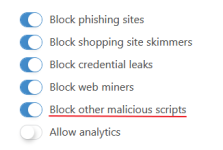
In my VM while testing malware, Netcraft was sometimes effective to detect and block malicious Java Scripts, additional the following:

n#1.png

 
Netcraft does offer more than phishing protection, for me personally it's useful to inform about websites data... What's that site running? | Netcraft
In my VM while testing malware, Netcraft was sometimes effective to detect and block malicious Java Scripts, additional the following:
I comprehend Netcraft's offerings. Netcraft blocks certain elements while testing malicious domains. Have any of you advanced users ever encountered or failed to recognize a phishing website during regular browsing? Have such extensions been beneficial enough for advanced users like yourself in regular browsing to justify their presence on your system?
 
Last edited by a moderator:
I comprehend Netcraft's offerings. Netcraft blocks certain elements while testing malicious domains. Have any of you advanced users ever encountered or failed to recognize a phishing website during regular browsing? Have such extensions been beneficial enough in regular browsing to justify their presence on your system?
And what about a mid-tier user as myself, how much (many add-ons) is too much, and will it hinder F-Secure's web browsing filter from being efficient with Brave's, Brave search, Chrome's filters, and then my adding SafeToOpen over the weekend. That was exactly what was on my mind, when is it overkill, or will it diminish the effectiveness of onboard AV filtering/antiphishing capabilities? And as you mentioned above, creating more attack surface?
 
Last edited:
And what about a mid-tier user as myself, how much (many add-ons) is too much, and will it hinder F-Secure's web browsing filter from being efficient with Brave's, Brave search, Chrome's filters, and then my adding SafeToOpen over the weekend. That was exactly what was on my mind, when is it overkill, or will it diminish the effectiveness of onboard AV filtering/antiphishing capabilities? And as you mentioned above, creating more attack surface?
I have experience managing many average or click-happy users over the years. For real-time protection, I installed an ad blocker and an effective security suite. They never experienced malware or phishing issues. A combination of effective security, an ad blocker, and browser built-in security is sufficient, which is what I use and recommend to users I manage.
 
Last edited by a moderator:
Hardening? whh light mabye ;)
Not necessary with Deep Instinct as it already has malicious script protection included.

@Kongo, Do you truly need a phishing extension? Modern browsers are effective in combating phishing attacks. Have you ever come across a phishing website or failed to recognize one? What's the point of adding an extension that may expand the attack surface but offers little extra protection, particularly for advanced users like yourself?
Definitely a valid point, as NextDNS blocks the NRDs that often are associated with phishing attacks. Still phishing is the only way where you can possibly get me with my guard down when i'm not focused. So i'd rather be on the safe side. And as @silversurfer mentioned, phishing protection is just one feature of Netcraft.
 
- removed many of my about:config entries for Firefox. Keeping my Firefox basic for the year 2024

(My remaining about:config entries are only security related - not privacy related.)
@Kongo, do you have your firefox about:config posted here or somewhere? I find I am using firefox more and more lately.