
New Update Lenovo Legion Toolkit (LLT) Updates Thread

lokamoka820

Level 54
Thread author
Verified
Top Poster
Well-known
Mar 1, 2024
4,365
3
15,748
5,269
Banana Republic
Lenovo Legion Toolkit (LLT) is a utility created for Lenovo Legion (and similar) series laptops, that allows changing a couple of features that are only available in Lenovo Vantage or Legion Zone.

It runs no background services, uses less memory, uses virtually no CPU, and contains no telemetry. Just like Lenovo Vantage, this application is Windows only.
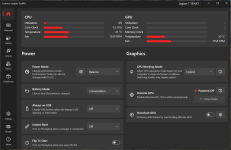
screenshot_main.png

Features​

The app allows to:
  • Change settings like power mode, battery charging mode, etc. that are available only through Vantage.
  • Spectrum RGB, 4-zone RGB and White backlight keyboards support.
  • Monitor dGPU activity (NVIDIA only).
  • Define Actions that will run when the laptop is i.e. connected to AC power.
  • View battery statistics.
  • Control laptop features from command line
  • Check for driver and software updates.
  • Check warranty status.
  • Disable/enable Lenovo Vantage, Legion Zone and Lenovo Hotkeys service without uninstalling them.
  • ... and more!
 
Lenovo Legion Toolkit 2.25.0
Jan 4, 2025
  • Added Hungarian localization
  • Added Play sound Action
  • Increased compatibility with UMA mode
  • Removed warranty information for Chinese models, due to increasing number of issues with resolving warranty information
  • Bug fixes and improvements
 
Last edited:
  • Like
Reactions: Marko :)
The Lenovo Legion Toolkit Development seems to be active again...

Lenovo Legion Toolkit v2.33.0.0 (Stable)
New Features
  • Added VRAM Utilization monitoring to Dashboard and OSD.
  • Added configurable RAM/VRAM display modes for Dashboard and OSD.
  • Added support for IdeaPad Pro 5 Gen 9.
  • Added MakePRI tool integration with automatic PRI generation during builds.
  • Added multi-language support to the installer.
  • Added post-install links to the installer.
Enhancements
  • Improved installer and packaging system, including sparse package identity support.
  • Enhanced .NET runtime detection during installation.
  • Implemented native Authenticode signing for installer executables.
  • Consolidated certificate handling and signing workflow for builds and releases.
  • Migrated certificate loading to X509Certificate2 and improved certificate error handling.
  • Improved autorun validation logic based on version and path task-data checks.
  • Updated package and application manifest configuration.
  • Updated GitHub workflows for Node.js 24 compatibility.
Bug Fixes
  • Fixed sparse package registration issues.
  • Fixed WPF shutdown thread affinity issue.
  • Fixed multiple LampArray issues, including:
    • Compatibility issues with Spectrum.
    • Incorrect behavior during initial startup.
    • General functionality issues.
    • Aft Ambient Zone visual glitches.
    • Missing localization.
  • Fixed localization values altered by Crowdin updates.
  • Reverted the change “Dynamic Boost and GPU CTGP are affected by Max Offset” after confirming it was not a bug.
UI & Behavior Changes
  • Restored VRAM utilization support in Dashboard and OSD.
  • Adjusted VRAM total calculation logic and removed unused VRAM sensor references.
Localization
  • Added missing localization keys.
  • Applied latest Crowdin translation updates.
Build & Infrastructure
  • Added certificate generation helper script.
  • Improved certificate handling in build and release workflows.
  • Cleaned up local build artifacts that change between builds.
  • Updated .gitignore to exclude .cer files.
  • Adjusted PowerShell module handling to prevent PowerShell 7 conflicts during installer signing.
Project & Repository
  • Updated documentation.
  • Updated project version numbers.
  • Updated project credits.
  • Updated installer scripts.
  • Updated scripts and identity certificate configuration.
Good news for @Marko :)
 
The Lenovo Legion Toolkit Development seems to be active again...

Lenovo Legion Toolkit v2.33.0.0 (Stable)

Good news for @Marko :)
This is actually a fork of original project which development stopped some time ago. But it's great to see that someone took over the job of developing this great tool.
 
Lenovo Legion Toolkit v2.34.0.0 (Stable)
New Features
  • Introduced a new Compact Mode to significantly improve layout responsiveness.
  • Implemented a complete Key Discovery system featuring improved UX with a listening overlay, dot tooltips, and confirmation states.
  • Added full Airplane Mode implementation, including on/off notifications and related automation steps.
  • Added ITS Mode Notification toggle and popup, alongside per-type notification appearance customization.
  • Implemented a new DeviceInformation class to fetch highly accurate system hardware info, accompanied by a redesigned Device Information Window.
  • Added a reset settings feature and updated the backup/restore system to support all configuration types.
  • Added the ability to independently switch Power Modes in the Balanced Power Plan for both AC and DC power states.
  • Added context menus to rename and delete custom keys.
  • Added Pin to Top and remember window position functionality to various UI elements.
  • Introduced blur/dim sliders and a stretch toggle to the background image settings.
Hardware & Device Support
  • Added full, independent implementation of ITSMode without relying on external DLLs.
  • Added support for Lenovo XiaoXin, IdeaPad Gaming series, and Legion 5 15AHP11 (83Q7) (Thanks to @Brofalo!).
  • Resolved detection and ITSMode compatibility issues unique to Motobook models.
  • Added preliminary support tracking for Yoga models.
  • Implemented UMA (Unified Memory Architecture) support for specific models, including a prompt requesting a system restart to apply UMA changes.
  • Added power plan and mode sync support, as well as Touchpad key support, for non-gaming series laptops.
  • Added Fn + Q hotkey and DriverKey support for ThinkBook models.
  • Implemented Fn Hotkey LED and Microphone LED synchronization for DriverKey and non-gaming series via WMI.
  • Added hardware capability checks for spectrum/white backlight notifications and added new spectrum keyboard support for Legion 5 Gen 11.
Enhancements & Refactoring
  • Separated Caps Lock & Nums Lock toggles and standardized localization and code references for Num Lock notification settings.
  • Reworked Always on Top (AOT) notifications to prevent overlapping; removed the legacy AOT window and ensured the OSD remains topmost in full-screen games.
  • Redesigned Windows Power Modes and Plans settings utilizing a new segmented control tab style.
  • Decoupled SensorsControlV2 refresh intervals from legacy dashboard settings, introduced 0.5s and 4s sensor refresh options, and synchronized them with the Status Window.
  • Refactored, restored, and generalized double-press smart key actions across all hotkeys.
  • Suppressed the Custom mode warning message that inadvertently appeared when trying to access AI Engine settings.
  • Added LZService support to the LegionZoneDisabler tool components.
  • Migrated the UpdateChecker to new API endpoints and obfuscated the server URL.
  • Added a UIAccess pipeline with certificate trust flows and ensured EXE signing for local builds.
Automation & Macros
  • Added new automation steps: Hardware Sensors, OSD Lock Position, Cycle Custom Mode Presets, and Wi-Fi/Airplane Mode toggles.
  • Added a battery percentage trigger to the automation pipeline.
  • Added a multi-select mode with a Back button to step and trigger creation windows.
  • Added the No Logic (Separate) option to multi-trigger handling to allow distinct trigger paths.
  • Replaced the smart keys "show app" toggle with a dedicated Show App step, and refactored the Close App step for consistency.
  • Exposed the Custom mode preset name as $RUN_OUTPUT$ and added an explanatory tooltip for variable usage.
Bug Fixes
  • Fixed Autorun and elevation launch failures on built-in administrator accounts, UAC-disabled systems, and post-restore flows (Error 740) by utilizing a rundll32 ShellExecute proxy in the Task Scheduler.
  • Fixed OSD polling deadlocks, prevented FPS re-entrancy loops, and patched a major MessagingCenter memory leak.
  • Fixed Battery Mode desync for laptops below Gen 11 and resolved several power event propagation bugs.
  • Fixed the global power plan sync bug and Balanced mode synchronization, preventing inactive UI dropdowns from aggressively triggering Windows power state refreshes.
  • Fixed an issue where the OSD window showed in the taskbar and Alt+Tab menu by properly enforcing ShowInTaskbar and overriding Windows style injections.
  • Fixed an issue where Acrylic backdrops caused errors on Windows versions below build 22523.
  • Fixed missing backup files occurring during fresh installations.
  • Fixed an issue where the PawnIO link was unable to call/open the default system web browser.
  • Fixed Updater error handling crashes and repaired a recurring update settings persistency bug.
  • Fixed an issue where God Mode presets failed to persist or correctly populate the AC/DC dropdown menus.
  • Fixed false Caps Lock notifications triggering on IME shortcuts by deferring the state check (Thanks to @Ace-Radom!).
  • Fixed a race condition on plugin settings cache initialization using double-checked locking with SemaphoreSlim.
  • Fixed Hybrid UMA mode, ITSMode enum stability, and multiple WMI exception handling errors on unsupported graphics configurations.
  • Fixed max fan speeds not registering in the fan manager and the OSD not showing fan RPM.
  • Fixed an issue where the hardware copy button copied asterisks (***) instead of the actual serial number.
  • Fixed killing background instances when a debugger is attached (Thanks to @Ace-Radom!).
Localization
  • Localized UI unit strings and corrected hardcoded key display strings by moving them to dedicated resource files.
  • Used proper resource keys for Windows Power Mode display names instead of hardcoded fallback strings.
  • Applied massive translation overhauls via Crowdin updates, including a complete Russian translation of the README contributed by @IRobotRob.
Build & Infrastructure
  • Added a GitHub Action for automated CodeRabbit commit reviews (subsequently deactivated due to platform subscription limitations).
  • Bumped LibreHardwareMonitor to resolve silent hardware polling crashes.
  • Bumped System.Management to version 10.0.7.
  • Replaced inline namespaces with explicit using aliases across the entire codebase to resolve ambiguities and improve readability.
  • Cleaned up dead registry code and simplified notification duration logic.
  • Updated project READMEs with new screenshots, compatibility matrices, and environment variable documentation.
  • Redesigned and updated the project's Donate page.

Critical Upgrade Instructions (Read Before Installing)​

Due to the extensive architectural overhauls in how power modes, plan overrides, and plugin caches are handled in this version, legacy configuration files are highly likely to conflict with the new system. To avoid erratic behavior, power state desyncs, or the side effects of unbalanced configurations, you must follow one of the two paths outlined below when upgrading.

Option 1: Clean Installation (Recommended)​

  1. Completely uninstall your existing version of the application.
  2. Manually delete all leftover configuration files and directories.
  3. Install the new version fresh.

Option 2: In-Place Upgrade with Reset​

  1. Install the new version directly over your existing installation.
  2. Open the application and immediately navigate to Settings.
  3. Use the newly added Reset Settings option to wipe your old profile and revert the app to its safe, default configuration.
Failure to perform a reset or a clean installation will result in configuration conflicts that can cause unintended power and sensor behavior. Please do not skip this step.
 
Lenovo Legion Toolkit v2.36.0.0 (Stable)

Release Highlights​

  • Windows 11 Dynamic Refresh Rate (DRR) & Display Controls: Added native support for Windows 11 Dynamic Refresh Rate (DRR) directly in the refresh rate selector, alongside Auto Color Management (ACM) toggling and modernized Win32 HDR state handling that preserves your selected refresh rate.
  • GPU Voltage Capping & Enhanced Overclocking: Added dynamic GPU voltage capping via V/F curve flattening, voltage curve locking, P-State locking, and an optional setting to keep the dGPU awake when needed.
  • dGPU Sleep & Power State Stability: Fixed dGPU sleep-wake power state looping on RTX 50-series and newer driver branches, added GC6 sleep blocker diagnostics to the Discrete GPU status view, and synchronized NVPCF power target offsets across power mode switches.
  • AMD Curve Shaper & Overclocking Redesign: Overhauled the AMD Overclocking interface with a unified profile format, master toggle switch, AMD Curve Shaper support, configurable power and current limits, and an option to apply profiles across all power modes.
  • Customizable Fn + Q Loop: Introduced the ITS Mode Configuration window, allowing you to customize the Fn + Q loop sequence and disable specific power modes from the cycle, alongside Geek and Creator mode support for older and non-gaming models.
  • Redesigned Boot Logo & Startup Customization: Redesigned the Boot Logo utility with a live boot screen preview, animated GIF support (including automatic alpha flattening and proportional scaling), and the ability to toggle the Windows Startup Animation.
  • Game Detection & Process Rules Overhaul: Added a Manual Game Detection mode, an Included Processes whitelist, and preserved Windows Game Mode processes across Alt+Tab until the game is closed.

Release Notes​

New Features

  • Added support for Windows 11 Dynamic Refresh Rate (DRR) in the refresh rate selector.
  • Added Auto Color Management (ACM) toggle support for compatible displays.
  • Added dynamic GPU voltage capping via V/F curve flattening and aligned voltage locking with driver V/F curves.
  • Added GPU Performance State (P-State) locking control and P-State readout to the Discrete GPU management window.
  • Added an optional "Keep dGPU awake" toggle to prevent the discrete GPU from entering low-power sleep states when desired.
  • Added AMD Curve Shaper support alongside configurable power limits (PPT) and current limits (EDC/TDC).
  • Added the ITS Mode Configuration Window, allowing users to customize the Fn + Q loop order and exclude specific power modes.
  • Added animated GIF boot logo support with automatic alpha flattening, proportional scaling, and a live preview.
  • Added a toggle for the Windows Startup Animation in the Boot Logo window.
  • Added an embedded Roslyn C# Script Engine with an interactive AvalonEdit console featuring syntax highlighting and theme integration.
  • Added a "Within time range" trigger to Automation.
  • Added an AI Engine step to Automation.
  • Added a Manual Game Detection mode and an Included Processes whitelist.
  • Added Precision Touchpad Lock.
  • Added Remember Window Position with multi-monitor coordinate support.

Hardware & Device Support

  • Added support for Legion 5 15IPH (83RW) and IdeaPad / Legion 17ITL models.
  • Added Geek Mode / Creator Mode support for older Legion and ThinkBook models.
  • Added XiaoXin series support to ITS Mode.
  • Implemented BIOS Hybrid Mode abstraction for improved UMA device management.
  • Added automatic cTGP-to-offset conversion for Non-Gaming series laptops.
  • Added Breath, ColorPulse, Random Color, and custom color selection for 1-Zone RGB keyboards.
  • Fixed 24-Zone RGB keyboard filtering so all zones are accessible.
  • Prevented background hardware probing from locking external USB storage devices.

Discrete GPU & Display

  • Added GC6 sleep blocker diagnostics to the Discrete GPU status view to display why the dGPU is prevented from entering sleep.
  • Fixed dGPU sleep-wake power state looping on RTX 50-series and newer driver branches.
  • Expanded discrete GPU memory clock offset adjustment limits up to ±3000 MHz.
  • Synchronized NVPCF power target offsets to baseline across power mode switches and application shutdown.
  • Fixed an issue where Custom Mode power limits were overridden when reconnecting the AC power adapter.
  • Refactored HDR state handling to use native Win32 / WindowsDisplayAPI display screen APIs.
  • Preserved display refresh rates when toggling HDR or Auto Color Management (ACM) to prevent unwanted mode resets.
  • Fixed display refresh rate and resolution settings not persisting across system reboots.
  • Fixed false-positive Dynamic Refresh Rate (DRR) detection on certain high-refresh-rate displays.
  • Fixed discrete GPU telemetry reporting when virtual displays or dummy plugs are connected.

AMD Overclocking & Custom Mode

  • Redesigned the AMD Overclocking interface with a master toggle and unified profile format.
  • Added an Apply to All Power Modes option for AMD Overclocking.
  • Fixed an issue where enabling CPU Overclocking unexpectedly restored PBO settings.
  • Gated AMD Overclocking shutdown persistence by hardware capability and active state.
  • Redesigned the Custom Mode and God Mode settings windows with improved tab navigation and layout spacing.
  • Fixed an issue where Custom Mode failed to apply mapped power options.
  • Fixed fan table EC race conditions and delays to ensure custom fan curves apply reliably.
  • Gated fan state messages on active FanControl provider capabilities and routed custom fan curve diagnostics to dedicated logs.
  • Set AMD CPU Tctl as default temperature sensor with Intel Package fallback, and added CPU Voltage readout to the OSD.

Automation & Game Detection

  • Preserved Windows Game Mode process state across Alt+Tab, releasing game mode hooks only when the game executable exits.
  • Hardened game detection process monitoring to prevent Access Denied exceptions on kernel processes.
  • Improved game detection lifecycle handling and removed child process pinning to eliminate false detections.
  • Fixed discrete GPU game detection pausing when navigating away from the Dashboard.
  • Added visible AND / OR logic indicators for multi-trigger pipelines in automation subtitles.
  • Allowed external plugins to register custom automation steps and triggers.
  • Fixed God Mode automation step failing to save the selected preset ID.

Disabler Tools

  • Updated the Lenovo Vantage Disabler process list with modern add-in hosts, toolbar daemons, and desktop widgets.
  • Updated the Legion Space Disabler with missing background workers, scheduled tasks, and services.
  • Updated the Legion Zone Disabler with updated background services, scheduled tasks, and processes.

UI & UX Improvements

  • Added smooth scrolling and pixel virtualization across list views and settings panels.
  • Redesigned the Exclude Processes window with real-time process search and collapsible sections.
  • Redesigned the Discrete GPU Overclocking window with improved input controls and real-time status feedback.
  • Added progress bar animations and accent colors to the New Sensors Dashboard, alongside drag-and-drop sensor card reordering.
  • Prevented mouse wheel events from scrolling parent containers when interacting with open ComboBox dropdown menus.
  • Standardized modal dialog ownership across OSD Settings and Customize Dashboard windows.
  • Pre-warmed localization resources on application startup to eliminate UI lag when opening settings.

Bug Fixes & Stability

  • Fixed an issue where the OSD window appeared in the Windows taskbar and Alt+Tab menu after Windows Explorer restarted.
  • Prevented UIAccess privileges from causing the OSD to draw over the Windows Lock Screen.
  • Fixed OSD settings corruption caused by rapid disk writes during window dragging by deferring saves until dragging completes.
  • Fixed Smart Fn Lock system freezes and DPC latency spikes by debouncing driver toggling and serializing hardware settle times.
  • Fixed an issue where Windows Power Mode synchronization was unavailable on Windows 10 and Windows 11 builds prior to 24H2.
  • Fixed application crashes caused by deleted log directories or missing configuration files at runtime.
  • Fixed an audio endpoint exception in VolumeListener when connecting Bluetooth devices.
  • Fixed an exception thrown by Special Key LED synchronization on unsupported laptop models.
  • Fixed empty tooltip boxes appearing on startup from the notification tray icon.
  • Fixed HWiNFO integration PCH/System fan 0 RPM reporting and startup registration.
  • Fixed Precision Touchpad pop-up displaying reversed toggle status.

Localization

  • Updated translations across all supported languages via Crowdin.
  • Replaced hardcoded UI strings in AMD Overclocking, Display settings, and Automation with centralized resource keys.
  • Updated installer translations for InnoSetup.

Build & Infrastructure

  • Implemented an automated development release workflow with dynamic odometer versioning and changelog generation.
  • Upgraded package dependencies, including WindowsDisplayAPI, NvAPIWrapper, and LibreHardwareMonitor etc.
  • Optimized process memory footprint and enabled background timer throttling via SetEfficiencyMode.
  • Cleaned up redundant using directives and project namespace references.
 
  • Like
Reactions: harlan4096