

Lindows security Configuration(updated)
- Thread starter Lindows
- Start date
You are using an out of date browser. It may not display this or other websites correctly.
You should upgrade or use an alternative browser.
You should upgrade or use an alternative browser.

RE: Lindows security Configuration
ESET and Malwarebytes, I like the sound of them together. Good config.
Yes what are your browser extensions, Do you use your ISP's DNS server or have you changed it?
Do you use any password managers or use browsers built in manager?
ESET and Malwarebytes, I like the sound of them together. Good config.
Yes what are your browser extensions, Do you use your ISP's DNS server or have you changed it?
Do you use any password managers or use browsers built in manager?

RE: Lindows security Configuration
Is that Comodo Firewall and D+ or just Firewall?
Which is your primary OS?
Is that Comodo Firewall and D+ or just Firewall?
Which is your primary OS?

RE: Lindows security Configuration
I don't use any DNS services......
In IE 9 I use WOT and tracker protection, In Google chrome I use add block plus and WOT...
I use keepass...
I use comodo firewall with Firewall security config ie without sandbox but HIPS only i play games a lot so i don't want auto sandbox to interfere i it...
Windows 7 64 bit is my primary but during browsing i use Linux Ubuntu 11.04...
I don't use any DNS services......
In IE 9 I use WOT and tracker protection, In Google chrome I use add block plus and WOT...
I use keepass...
I use comodo firewall with Firewall security config ie without sandbox but HIPS only i play games a lot so i don't want auto sandbox to interfere i it...
Windows 7 64 bit is my primary but during browsing i use Linux Ubuntu 11.04...
RE: Lindows security Configuration
So you have the Defense+ with autosandboxing disabled? I do the same thing.
So you have the Defense+ with autosandboxing disabled? I do the same thing.

RE: Lindows security Configuration
Adding Enhanced Mitigation Experience Toolkit (EMET) for protection against exploit.
Then also under on demand scanning you can add Hitman Pro (can be a portable too).
Adding Enhanced Mitigation Experience Toolkit (EMET) for protection against exploit.
Then also under on demand scanning you can add Hitman Pro (can be a portable too).

RE: Lindows security Configuration
Real-time protection:
Looks good. I don't like to have to real-time in my configs but as far as I know MBAM will work great with NOD32.
On-demand scanners:
Hitman Pro (Trial) - link
An on-demand scanner using multiple anti-malware engines and cloud technology. It offers unlimited free scanning but once you use it to remove detected malware it switches to a 30-day trial version. I recommend using it after you've scanned your hard-drive with the other products you have installed.
Emsisoft Emergency Kit (Free) - link
With the Emsisoft Emergency Kit Scanner you have got the powerful Emsisoft Scanner including graphical user interface. Search the infected PC for Viruses, Trojans, Spyware, Adware, Worms, Dialers, Keyloggers and other malign programs.
Run the Emsisoft Emergency Kit Scanner with a double click on a2emergencykit.exe. Found Malware can be moved to quarantine or finally deleted.
Browser(s) Add-ons:
Ghostery (Free) -link
Ghostery is your window into the invisible web – tags, web bugs, pixels and beacons that are included on web pages in order to get an idea of your online behavior.
Ghostery tracks the trackers and gives you a roll-call of the ad networks, behavioral data providers, web publishers, and other companies interested in your activity.
You can read here a review on Ghostery
Extras:
Add Sandboxie to your configuration, start your browser in Sandbox Mode when you do some dangerous surfing or trying to open unknown executables.
Virtualization:
Sandboxie (Free/Paid) - link
Sandboxie runs your programs in an isolated space which prevents them from making permanent changes to other programs and data in your computer.


Real-time protection:
Looks good. I don't like to have to real-time in my configs but as far as I know MBAM will work great with NOD32.
On-demand scanners:
Hitman Pro (Trial) - link
An on-demand scanner using multiple anti-malware engines and cloud technology. It offers unlimited free scanning but once you use it to remove detected malware it switches to a 30-day trial version. I recommend using it after you've scanned your hard-drive with the other products you have installed.
Emsisoft Emergency Kit (Free) - link
With the Emsisoft Emergency Kit Scanner you have got the powerful Emsisoft Scanner including graphical user interface. Search the infected PC for Viruses, Trojans, Spyware, Adware, Worms, Dialers, Keyloggers and other malign programs.
Run the Emsisoft Emergency Kit Scanner with a double click on a2emergencykit.exe. Found Malware can be moved to quarantine or finally deleted.
Browser(s) Add-ons:
Ghostery (Free) -link
Ghostery is your window into the invisible web – tags, web bugs, pixels and beacons that are included on web pages in order to get an idea of your online behavior.
Ghostery tracks the trackers and gives you a roll-call of the ad networks, behavioral data providers, web publishers, and other companies interested in your activity.
You can read here a review on Ghostery
Extras:
Add Sandboxie to your configuration, start your browser in Sandbox Mode when you do some dangerous surfing or trying to open unknown executables.
Virtualization:
Sandboxie (Free/Paid) - link
Sandboxie runs your programs in an isolated space which prevents them from making permanent changes to other programs and data in your computer.
RE: Lindows security Configuration
If you're willing to pay for software Sandboxie is the best you can get.
If you're willing to pay for software Sandboxie is the best you can get.
RE: Lindows security Configuration

All the software that I've recommend won't run in real time. They are programs that will help you better secure your system without having any kind of impact on your system.
Anyway..Take a look at them..and try each one.If you don't like one...just uninstall it.
The free version is good enough... BufferZone is working on 64bit support...so soon we should have a real option for SandboxieHungry Man said:If you're willing to pay for software Sandboxie is the best you can get.
Lindows said:I think my configuration is enough for me...... I play games a lot so, I don't want to load my computer with huge software's and reduce my computer performance...
Thanks for the suggestion guys.......
All the software that I've recommend won't run in real time. They are programs that will help you better secure your system without having any kind of impact on your system.
Anyway..Take a look at them..and try each one.If you don't like one...just uninstall it.
RE: Lindows security Configuration
Currently I use Virtual box for sand-boxing..... If something is suspicious i execute inside a Virtual machine and see.....
And maybe i will try emsisoft emergency kit.........
and a don't know what is Ghostery cant you explain it to me its kind of new....
All the software that I've recommend won't run in real time. They are programs that will help you better secure your system without having any kind of impact on your system.
Anyway..Take a look at them..and try each one.If you don't like one...just uninstall it.
Currently I use Virtual box for sand-boxing..... If something is suspicious i execute inside a Virtual machine and see.....
And maybe i will try emsisoft emergency kit.........
and a don't know what is Ghostery cant you explain it to me its kind of new....
RE: Lindows security Configuration
Ghostery is an addon that was used for blocked trackers like Google Analytics, DoubleClick, Quantcast and others. (When its blocked, Advertisement, script and others were not appeared)
Since those trackers are always on the website and it was visited always sometimes we didn't notice and our activity was tracked. Simply to be called as web bug.
So this addon can be useful.
Ghostery is an addon that was used for blocked trackers like Google Analytics, DoubleClick, Quantcast and others. (When its blocked, Advertisement, script and others were not appeared)
Since those trackers are always on the website and it was visited always sometimes we didn't notice and our activity was tracked. Simply to be called as web bug.
So this addon can be useful.
RE: Lindows security Configuration
Ok , ill try this one..... Its new.........
Thanks for the info.......
jamescv7 said:Ghostery is an addon that was used for blocked trackers like Google Analytics, DoubleClick, Quantcast and others. (When its blocked, Advertisement, script and others were not appeared)
Since those trackers are always on the website and it was visited always sometimes we didn't notice and our activity was tracked. Simply to be called as web bug .
So this addon can be useful.
Ok , ill try this one..... Its new.........
Thanks for the info.......

RE: Lindows security Configuration
Do you dual boot Windows and Ubuntu on the same machine?
Which do you use for every day browsing?
What do you use the other for?
Do you dual boot Windows and Ubuntu on the same machine?
Which do you use for every day browsing?
What do you use the other for?
RE: Lindows security Configuration
Yes i dual booted ubuntu with windows 7.....
I use ubuntu for browsing and i use windows for gaming and other stuff......
What is Kubuntu heard of it what are its features.........!
elliotcroft said:Do you dual boot Windows and Ubuntu on the same machine?
Which do you use for every day browsing?
What do you use the other for?
Yes i dual booted ubuntu with windows 7.....
I use ubuntu for browsing and i use windows for gaming and other stuff......
What is Kubuntu heard of it what are its features.........!
RE: Lindows security Configuration
You can get the KDE Plasma Desktop Environment from the Ubuntu Software Centre.
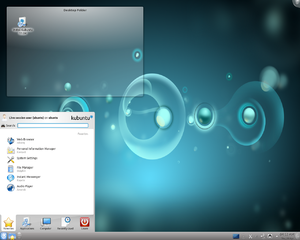
Kubuntu is just Ubuntu with the KDE Plasma Desktop Environment as opposed to the standard GNOME / Unity desktop environment.Lindows said:elliotcroft said:Do you dual boot Windows and Ubuntu on the same machine?
Which do you use for every day browsing?
What do you use the other for?
Yes i dual booted ubuntu with windows 7.....
I use ubuntu for browsing and i use windows for gaming and other stuff......
What is Kubuntu heard of it what are its features.........!
You can get the KDE Plasma Desktop Environment from the Ubuntu Software Centre.
RE: Lindows security Configuration
Yup. You're fairly safe from Malware I'd say. I think it's pretty easy to configure a computer to be malware-free. The issue is:
a) Protecting computers from users (not an issue in your case since you had enough common sense to come to this site =p)
b) Protect users from hackers -- less of an issue since personal computers are rarely direct targets from a motivated hacker.
Yup. You're fairly safe from Malware I'd say. I think it's pretty easy to configure a computer to be malware-free. The issue is:
a) Protecting computers from users (not an issue in your case since you had enough common sense to come to this site =p)
b) Protect users from hackers -- less of an issue since personal computers are rarely direct targets from a motivated hacker.
RE: Lindows security Configuration
Thanks for the reply.........Hungry Man said:Yup. You're fairly safe from Malware I'd say. I think it's pretty easy to configure a computer to be malware-free. The issue is:
a) Protecting computers from users (not an issue in your case since you had enough common sense to come to this site =p)
b) Protect users from hackers -- less of an issue since personal computers are rarely direct targets from a motivated hacker.
You may also like...
-
 Multiple Oracle VM VirtualBox Vulnerabilities Enable Complete Takeover Of VirtualBox
- Started by Brownie2019
- Replies: 1
-

-
-
