


Advanced Plus Security Linux Mint Cinnamon Wayland setup
- Thread starter LinuxFan58
- Start date
You are using an out of date browser. It may not display this or other websites correctly.
You should upgrade or use an alternative browser.
You should upgrade or use an alternative browser.
- Last updated
- Sep 14, 2026
- How it's used?
- For work or educational use
- Operating system
- Linux
- Other operating system
- Linux Mint 22.3 Zena Cinnamon Wayland
- On-device encryption
- Other full-disk drive encryption software
- Log-in security
- Biometrics (Windows Hello PIN, TouchID, Face, Iris, Fingerprint)
- Security updates
- Allow security updates and latest features
- Update channels
- Allow stable updates only
- User Access Control
- N/A - Linux / Mac / Other operating system
- Smart App Control
- N/A - Linux / Mac / Other operating system
- Network firewall
- Enabled
- About WiFi router
- TP-Link triband with IPv6 disabled, We use the three WIFI-networks seperately. The 2.4 Ghz is used for IoT-devices and guest (SPI-, NAT, ARP-filtering and intrusion detection enabled). The two 5 Ghz networks are for my wife and I (each uses his/her own) with additionally IP-MAC binding and MAC filtering enabled. I have set the e-mail log message level to critical events (acting as a rudimentary NIDS). The 5Ghz network has eternal lease time while 2.4 Ghz has short lease time (8 hours) and network partitioning enabled.
- Real-time security
- Non root user using build-in Linux sandboxing (AppArmor, Firejail, Flatpak) as extra protection layer.
- Firewall security
- Built-in Firewall for Mac/Linux
- About custom security
- Using only official package sources from verified publishers and de-installed all unused accessoires and applications.
- Installed fapolicyd denying normal users to execute something which does not come from above repositories
- Mildly hardened Linux by disabling P2P, remote access, old TLS versions and enabling ASLR system wide.
- Created additional Firejail profiles with firecfg and reduced Flatpak permissions with flatseal.
- Added OpenSnitch outbound application firewall to compliment inbound GuFW.
- Installed logcheck with e-mail warning for security alerts & events
- Using Wayland (experimental) on Cinnamon desktop.
- Periodic malware scanners
- When I receive files from others I scan them with Virus Total. My half yearly data backups to external USB are scanned with Microsoft Defender

- Malware sample testing
- I do not participate in malware testing
- Environment for malware testing
- None
- Browser(s) and extensions
- Brave-Origin policies and site-pernissions with Brave adShield enabled
on aggressive, but disabled all filters (and in flags the cosmetic, procedural and CSP filtering, so only network/DNR rules apply)
- Added Hagezi's Most Abused TLD's in Brave AdShield
- uBlock-Stripped (worry-free safe surfing at startup)
- Download Sentinel (sneaky download warning)
- Secure DNS
- NextDNS in the Router with OISD and telemetry blocklists enabled (for IOT devices), allowing only common TopLevelDomains to connect.
- We use Quad9 as default DNS (at OS-level and DoH) for our Laptops and smartphones
- Cloudflare Zero Trust Free with account as DOH in the browser.
- Desktop VPN
- Proton VPN free for Linux on-demand (out of home). At home I have little use for VPN because our IP and IP location are changed regularly
 .
.
- Password manager
- Build-in (OS and Browser)
- Maintenance tools
- None
- File and Photo backup
- FreeFileSync quick on-demand backups to a partition on my internal SSD to which sandboxed utilities, desktop accessoires and applications have no access to.
- The half yearly full backup saves to an external USB-SSD which is checked (afterwards) by Microsoft Defender on my wife's laptop (which has triple USB protection).
- Subscriptions
- None
- System recovery
- TimeShift (to another partition on 1 TB SSD)
- Risk factors
- Browsing to popular websites
- Working from home
- Making audio/video calls
- Opening email attachments
- Logging into my bank account
- Streaming audio/video content from trusted sites or paid subscriptions
- Coding and development
- Computer specs
- AMD Ryzen 7 (5700U) laptop with 1 TB SSD and 16GB RAM
- Notable changes
- To many
After jumping back and forth, I finally decided for:
- Changed from ControlD free to Cloudflare free ZT
- Replaced 7-zip (unsandboxed) with PeaZip in Flatpak
- Moved from LibreOffice in Flatpak to LibreOffice in Firejail
- Moved from Thunderbird to Evolution (both in Flatpak sandbox)
- Moved from Xfce desktop with X11 to Cinnamon desktop with Wayland
- Installed fapolicyd (simular to WDAC on Windows) application control (see post)
- What I'm looking for?
Looking for maximum feedback.

I checked the AG rules work, either it is silently blocked (third-party) or throw a AG block page (first-party), I tested with abuse.ch entriesAdd an exe rule to your rules.
If that doesn't work, none of the others will provide the protection you need.
Out of curiosity, if you press the button,
"proceed anyway"
on the AG block page (now), does it work?

This first sample URL is already blocked by the uBlock Origin filter "Online Malicious URL Blocklist" If you proceed with uBO, it is immediately blocked by McAfee WebAdvisor and Kaspersky, as you can see in the second screenshot below.One last thing, otherwise I'll be rocking the boat too much, but I don't think your rules for blocking downloads from GitHub (etc.) are correct for blocking malicious executable downloads.
URLhaus | Checking your browser
This second sample URL was even more incredible. The block was performed again by the uBlock "Online Malicious URL Blocklist" filter list, and then by uBlock, followed by a block by McAfee WebAdvisor. Although McAfee WebAdvisor blocked it, it failed and did not prevent me from downloading the malware sample. Even so, when I clicked to save it, Norton Safe rose from the ashes and sprang into action, preventing me from downloading the sample, as you can see in the third screenshot below this post.
This was the first time I saw Norton Safe spring into action, and I was surprised that it prevented me from downloading the zip file.
From version 1.86 Brave browser allows you to disable the default blocklists (when you enable brave://flags/#brave-adblock-show-hidden-components) .
Finalized tweaking extensions and filter usage for best compatibility and performance (work profile with 19.1 score on Speedometer 3.1) and best blocking and security (surfing profile with 18.5 score on Speedometer 3.1). I disabled Brave's tracking filter (replaced it with Peter Low's) and first-party filter (replaced it with Custom rules).
Finally achieved same speedometer 3.1 benchmarks in Linux with Brave in Flatpak sandbox as my wife (on same HP laptop) on Windows 11 running standard user with Chrome and only Avira Safe Browsing extension (with its conservative anti-tracking) enabled.
Peter Lowe's Ad and tracking server list is excellent (same total rules) for use at the DNS level.
If you still have OISD and change your choice with HaGeZi, Peter Lowe's list is in the sources used.
@Sampei.Nihira
I prefer to block malware at DNS level and advertising and tracking in the browser. By replacing Brave's build-in anti-tracking filter with Peter Low's and Brave's build-in first party filter with custom cosmetic rules (in Brave), the rule count should have been reduced to a 1/3 (and Speedometer benchmark upped from 18.1 to 18.7).
I am fine as it is now and start applying the "don't fix what ain't broken rule"
I prefer to block malware at DNS level and advertising and tracking in the browser. By replacing Brave's build-in anti-tracking filter with Peter Low's and Brave's build-in first party filter with custom cosmetic rules (in Brave), the rule count should have been reduced to a 1/3 (and Speedometer benchmark upped from 18.1 to 18.7).
I am fine as it is now and start applying the "don't fix what ain't broken rule"
Last edited:

The same policy; Hagezi TIF at DNS level and Easylist at browser level.I prefer to block malware at DNS level and advertising and tracking in the browser
Work in progress !!!
When you have finished customizing, please change what still says AG.
It's quite difficult for me to follow...
I assume it's the same for other forum members.
Thank you.
When you have finished customizing, please change what still says AG.
It's quite difficult for me to follow...
I assume it's the same for other forum members.
Thank you.
Yes, you are right (tried to cheat against the "don't fix what ain't broken" rule by editing the posts, which you as elite investigator noticed immediately
Switched back to AdGuard again, because it is easier to trouble shoot (using log) and has a blockpage (triggered by $document for first-party)
View attachment 294751
I also split the $all rule for hosting services known to host malware phishing (like GoDaddy, Weebly, Hostinger and NameCheap). Bij splitting the $all rule in document and third-party, any website blocked has a fair chance of functioning after choosing 'Proceed anyway' button.
I still use $all for blocking file sharing services often hosting malware (e.g. anonfiles, discord.com/attachments, file.io. gofile.io, hastebin, ix.io, pastebin.com, pixeldrain. tmpfiles.org, ufile.io, uploadfiles.io, volafile.org, zippyshare) and Linux executable and script formats hosted on popular coding platforms (like bitbucket, github, githubusercontent, gitlab and sourceforge).
Latest 10 https links on phishtank: AG blocked 7, Cloudflare ZT 2, Google safe browsing 1
View attachment 294753
I had opened a problem in October 2025, but......
[investigate] $document block rules malfunction · Issue #3338 · AdguardTeam/AdguardBrowserExtension

@LinuxFan58
After lunch is better...
Let's analyze your fourth rule, which I also use (with only 9 TLDs).
Block 3p + 3p scripts + 3p frames (Hard Mode effect) + list of allowed TLDs.
The third rule blocks all websites outside the list.
I prefer to block 1p scripts from all websites outside the TLD list.
Because, in my opinion, my choice is more consistent.
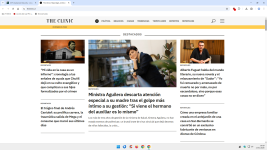
Let's take a website outside your TLD list, for example, Chilean (.cl).
In my case, a Chilean website finds Hard Mode + 1p script block, probably usable, depending on the websites, but with very strong protection.
In your case, the third rule that completely blocks the Chilean website renders the fourth rule useless, as it will never apply Hard Mode outside the TLD list.
Think about it.
The Clinic | Reportajes, columnas, entrevistas, humor, memes y más.
After lunch is better...
Let's analyze your fourth rule, which I also use (with only 9 TLDs).
Block 3p + 3p scripts + 3p frames (Hard Mode effect) + list of allowed TLDs.
The third rule blocks all websites outside the list.
I prefer to block 1p scripts from all websites outside the TLD list.
Because, in my opinion, my choice is more consistent.
Let's take a website outside your TLD list, for example, Chilean (.cl).
In my case, a Chilean website finds Hard Mode + 1p script block, probably usable, depending on the websites, but with very strong protection.
In your case, the third rule that completely blocks the Chilean website renders the fourth rule useless, as it will never apply Hard Mode outside the TLD list.
Think about it.
The Clinic | Reportajes, columnas, entrevistas, humor, memes y más.
Last edited:
When I click on the link, the Top Level Domain firewall rule in AdGiard shows a blockpage
After I choose Proceed anyway, I can acces the website
While third-party connections outside Schengen and 5 Eyes are blocked
,Above behavior is exactly what I want, what am I missing, please explain?
Last edited:
As you can see, your image is identical to mine, but I also have the 1p script block.
So total protection against XSS clients.
Total protection against JS fingerprinting.
First-party tracker blocking...
Ask the AI this simple question:
"Does blocking only 3p + 3p scripts + 3p frames eliminate all possible privacy/security issues?"
Of course, I occasionally have to write a 1p script exception rule.
But with only 9 TLDs, there are only 5 exception rules so far.
It's not a big deal for me.
Have a good evening.
So total protection against XSS clients.
Total protection against JS fingerprinting.
First-party tracker blocking...
Ask the AI this simple question:
"Does blocking only 3p + 3p scripts + 3p frames eliminate all possible privacy/security issues?"
Of course, I occasionally have to write a 1p script exception rule.
But with only 9 TLDs, there are only 5 exception rules so far.
It's not a big deal for me.
Have a good evening.
After six days od no False Positive (AdGuard TLD firewall breaking websites), I replaced AG by uBol (is a tad faster in Speedometer 3.1 than AG, 18.8 in stead of 18.7)
EDIT and yes the 8th day I encounter a TLD block again, so reverted back to AdGuard (using the log function I see what is blocked)
In the past I had two classic bikes and could spend saturdays fiddling with carburetors, needles, yets and pre-ignition to optimize the engine. I recognize the same tweaking frenzy with uBol and AG in my two Brave profiles.
EDIT and yes the 8th day I encounter a TLD block again, so reverted back to AdGuard (using the log function I see what is blocked)
In the past I had two classic bikes and could spend saturdays fiddling with carburetors, needles, yets and pre-ignition to optimize the engine. I recognize the same tweaking frenzy with uBol and AG in my two Brave profiles.
Last edited:
I hadn't read about this recently added trick.
With two profiles, it's perfect with minimal effort.
Congratulations.
With two profiles, it's perfect with minimal effort.
Congratulations.
.........and uses invert allow list feature of AdGuard........
Added policy specific explanation to personalized Cloudflare block page.
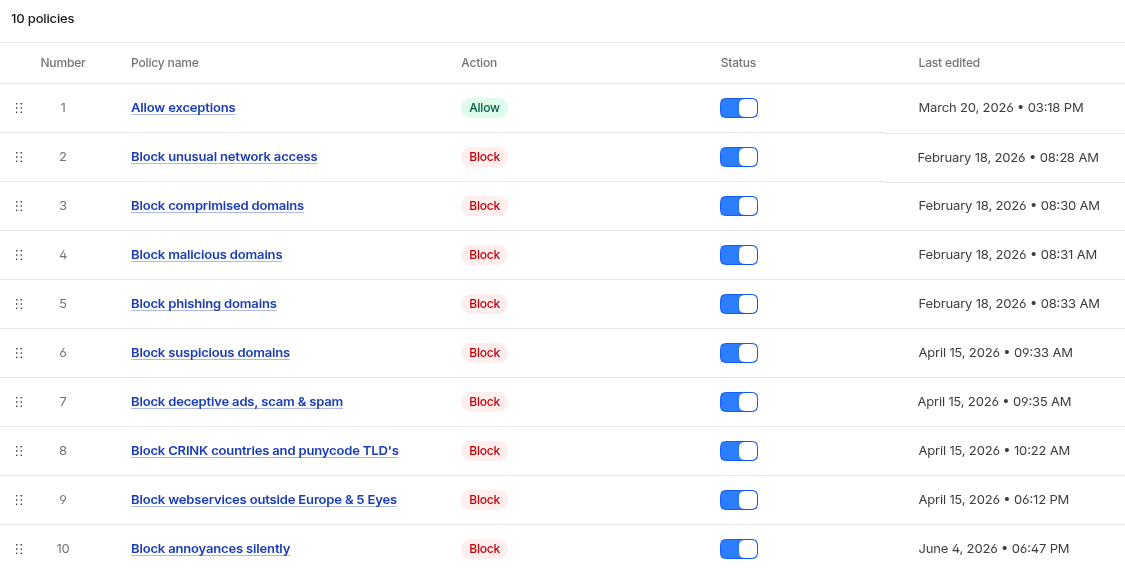
Rule 8 (partly), 9 are only effective when the bad-guys don't use a Content Delivery Network with server hubs in the whitelisted resolved IP geo locations. According to latest data nearly 80% of the "advanced" attacks from well known adversaries use trusted services (bypassing these rules). Reversely 80% of the unsophisticated attacks are delivered locally (that is why these rules often trigger block screens when playing with URLhaus links).
Rule 8 (partly), 9 are only effective when the bad-guys don't use a Content Delivery Network with server hubs in the whitelisted resolved IP geo locations. According to latest data nearly 80% of the "advanced" attacks from well known adversaries use trusted services (bypassing these rules). Reversely 80% of the unsophisticated attacks are delivered locally (that is why these rules often trigger block screens when playing with URLhaus links).
Last edited:
Added Microsoft Defender Browser Protection as only extension to my work profile.
It seems to me that it is no longer actively supported.
The last update was almost a year ago.
Back to 1 profile in Brave again added Advertisements content category in Cloudflare Zero Trust with uBlockOriginLight in basic mode with all filters disabled and only (at the moment) 35 Custom cosmetic rules and 35 DNR rules. I occasionally enable Brave Adshields for a website (which Brave forgets when closing the browser).
uBol has a problem that when disabling protection somtimes DNR rules are still applied through Chromium mechanisms (the rules which are only updated when the extension is updated). I discovered that this is not the case when using custom DNR rules because these are implemented as dynamic rules (of Chromium is something totally different than Mv2 uBO's dynamic filtering).
So I copied the Kees1958 EU + US most used (around 1700 ABP-rules) into Custom DNR and they converted to ONLY 1 DNR rule
added Advertisements content category in Cloudflare Zero Trust with uBlockOriginLight in basic mode with all filters disabled and only (at the moment) 35 Custom cosmetic rules and 35 DNR rules. I occasionally enable Brave Adshields for a website (which Brave forgets when closing the browser).uBol has a problem that when disabling protection somtimes DNR rules are still applied through Chromium mechanisms (the rules which are only updated when the extension is updated). I discovered that this is not the case when using custom DNR rules because these are implemented as dynamic rules (of Chromium is something totally different than Mv2 uBO's dynamic filtering).
So I copied the Kees1958 EU + US most used (around 1700 ABP-rules) into Custom DNR and they converted to ONLY 1 DNR rule
Last edited:
Back to 1 profile in Brave again
uBol has a problem that when disabling protection somtimes DNR rules are still applied through Chromium mechanisms (the rules which are only updated when the extension is updated). I discovered that this is not the case when using custom DNR rules because these are implemented as dynamic rules (of Chromium is something totally different than Mv2 uBO's dynamic filtering).
So I copied the Kees1958 EU + US most used (around 1700 ABP-rules) into Custom DNR and they converted to ONLY 1 DNR rule
Even when selected:
"Automatically reload the page when you change the filter mode".
__________________________________________________________________________________
Can you explain the filtering method better within/outside TLDs?
Even when selected:
1 "Automatically reload the page when you change the filter mode".
__________________________________________________________________________________
2 Can you explain the filtering method better within/outside TLDs?
1. Yes, but it seems to happen in basic mode mostly (then uBol has no running processes of itself, only uses Chromium)
2. Not using TLD filtering at the moment (because I went back to 1 profile for all).
uBol used to get my the highest Speedometer 3.1 benchmarks, but after latest update it fell back to 18.5 to 18.6. So I tried Adguard again and Brave Shields. When I disable CSP and Procedural filtering in Brave://flags for Brave shields and I enable only Brave AdShield (with Kees1958 and my custom rules), I am getting the highest speedometer 3.1 benchmarks (18.9 to 19.1).
I know it is useless tweaking, but when I have to wait for some jobs to finish in the evening every fortnight, I either play a game of chess or kill the time with some benchmarks every fortnight when there is nothing interesting to read on MT and my bookmarked news websites.
I know it is useless tweaking, but when I have to wait for some jobs to finish in the evening every fortnight, I either play a game of chess or kill the time with some benchmarks every fortnight when there is nothing interesting to read on MT and my bookmarked news websites.
Read this:
https://forums.linuxmint.com/viewtopic.php?t=462863
Perhaps without making these constant changes if you set "performance" permanently, and not temporarily as in the link.
It's just an idea, think about it...

What Power Plan do you use in your PC?
- Sampei.Nihira
- Replies: 17
- Forum: Member Chat
https://forums.linuxmint.com/viewtopic.php?t=462863
Perhaps without making these constant changes if you set "performance" permanently, and not temporarily as in the link.
It's just an idea, think about it...
You may also like...
-
 New Update Linux Mint’s Cinnamon 6.8 Desktop Environment Will Fully Support Wayland
- Started by lokamoka820
- Replies: 5
-
New Update Linux Mint Devs Prep Wayland-Native Cinnamon Screensaver for Linux Mint 23
- Started by lokamoka820
- Replies: 1
-
Technology Linux Mint Will Adopt a Longer Development Cycle Starting with Linux Mint 23
- Started by lokamoka820
- Replies: 1
-
Technology Ubuntu, Fedora, Linux Mint Eye Age Verification Amid California Law Backlash
- Started by lokamoka820
- Replies: 1
-
New Update Cinnamon 6.6 Desktop Environment Released with Redesigned Application Menu
- Started by lokamoka820
- Replies: 41