Advanced Security Linux Mint Cinnamon Wayland setup

Last updated
Jun 1, 2026
How it's used?
For work or educational use
Operating system
Linux
Other operating system
Linux Mint 22.3 Zena Cinnamon Wayland
On-device encryption
Other full-disk drive encryption software
Log-in security
    • Biometrics (Windows Hello PIN, TouchID, Face, Iris, Fingerprint)
Security updates
Allow security updates and latest features
Update channels
Allow stable updates only
User Access Control
N/A - Linux / Mac / Other operating system
Smart App Control
N/A - Linux / Mac / Other operating system
Network firewall
Enabled
About WiFi router
TP-Link triband with IPv6 disabled and all security features enabled (TP-link home care, SPI-firewall, IP-MAC binding). E-mail log message level is set to critical.
Real-time security
Sticking to trusted package sources and using Linux sandboxing (AppArmor, Firejail, Flatpak) to contain utilities, accessoires and applications.
Firewall security
Built-in Firewall for Mac/Linux
About custom security
  • Using only official package sources from verified publishers and de-installed all unused accessoires and applications.
  • Mildly hardened Linux by disabling P2P, remote access, old TLS versions and enabling ASLR system wide.
  • Created additional Firejail profiles with firecfg and reduced Flatpak permissions with flatseal.
  • Added OpenSnitch outbound application firewall to compliment inbound GuFW.
  • Installed logcheck with e-mail warning for security alerts & events
  • Using Wayland (experimental) on Cinnamon desktop.
  • Enhanced browser security with flags.
Periodic malware scanners
When I receive files from others I scan them with Virus Total. My half yearly data backups to external USB are scanned with Microsoft Defender :cool:
Malware sample testing
I do not participate in malware testing
Environment for malware testing
None
Browser(s) and extensions
Brave with two profiles, one for surfing and one for work. Privacy wise I have Brave shieds disabled in my work and enabled in my surfing profile (only Ads, Kees1958 and custom rules). Security wise my surfing profile has most site permissions on block and Bitdefender Traffic Light while my work profile has website permission on default with NVT Browser lockdown limiting website access to a few trusted domains and file download to usual office documents.
Secure DNS
  1. NextDNS in the Router with OISD and telemetry blocklists enabled (for IOT devices), allowing only common TopLevelDomains to connect.
  2. We use Quad9 as default DNS (at OS-level) for our Laptops and smartphones (to bypas router TLD firewall restrictions)
  3. Cloudflare Zero Trust Free plan (with malware protection) is used as DNS over HTTPS in the browser.
Desktop VPN
Proton VPN free for Linux on-demand (out of home). At home I have little use for VPN because our IP and IP location are changed regularly :-).
Password manager
Build-in (OS and Browser)
Maintenance tools
None
File and Photo backup
  • FreeFileSync quick on-demand backups to a partition on my internal SSD to which sandboxed utilities, desktop accessoires and applications have no access to.
  • The half yearly full backup saves to an external USB-SSD which is checked (afterwards) by Microsoft Defender on my wife's laptop (which has triple USB protection).
Subscriptions
    • None
System recovery
TimeShift (to another partition on 1 TB SSD)
Risk factors
    • Browsing to popular websites
    • Working from home
    • Making audio/video calls
    • Opening email attachments
    • Buying from online stores, entering banks card details
    • Logging into my bank account
    • Streaming audio/video content from trusted sites or paid subscriptions
Computer specs
AMD Ryzen 7 (5700U) laptop with 1 TB SSD and 16GB RAM
Notable changes
To many :)

After jumping back and forth, I finally decided for:
  • Changed from ControlD free to Cloudflare free ZT
  • Replaced 7-zip (unsandboxed) with PeaZip in Flatpak
  • Moved from LibreOffice in Flatpak to LibreOffice in Firejail
  • Moved from Thunderbird to Evolution (both in Flatpak sandbox)
  • Moved from Xfce desktop with X11 to Cinnamon desktop with Wayland
What I'm looking for?

Looking for maximum feedback.

....So Chrome is faster than Brave.
Just as expected.
Yes but Flatpak (sandbox) is faster than Firejail (sandbox), so the benchmark difference is even more than the difference in posted results, but to put things in perspective ...

Firefox is 30 (Brave) to 40 (Chrome) percent slower in Speedometer benchmark, but that is usually only 0.1 second or less in website load time when testing with page speed insights (and that benchmark is written by Chrome, so probably gives Chrome a slight advantage over other browsers like Firefox and Safari). People probably don't notice a 0.1 second load difference, making Firefox feel as fast as Chrome and when you prefer Firefox you probably think Firefox is faster
 
Last edited:
Considering that you use only 3 filter lists in your surfing profile, but with uBoL,especially EasyList,the filters are updated only when the extension is updated, typically once a week, whereas EasyList is updated on the server side even several times a day, you might consider using the AdGuard Browser Extension in this profile and adding the 3 filter lists you use to the custom filters, while disabling all other filters.

In AG version 4.3.1.4, custom filters update independently of the extension:

Custom filters in MV3 can now update independently from extension updates again, so ad blocking stays accurate and responds to changes more quickly.

Release 5.4.1.3 · AdguardTeam/AdguardBrowserExtension

You would achieve greater efficiency, though you should consider the impact of the extension compared to uBoL.;)

P.S.

I discovered that in AG, you can only import custom filter lists that, in total, do not exceed 30,000 rules.
 
Last edited:
@Sampei.Nihira

Thanks for the AI model dowload prevention tip, I will add that to my Chrome policy when I am back.

These 30.000 are what Google calls dynamic rules and can be updated any time. The static rules are only updated when the extension is updated. So the EasyList still won't update on AG because they are static.

The thing with Kees1958 rules for uBol is that it is only 1 DNR rule which does not update often, so I have copied it in the custom DNR section in uBol by simoly copying and pasting.
 
Last edited:
@Sampei.Nihira

Thanks for the AI model dowload prevention tip, I will add that to my Chrome policy when I am back.

These 30.000 are what Google calls dynamic rules and can be updated any time. The static rules are only updated when the extension is updated. So the EasyList still won't update on AG because they are static.

The thing with Kees1958 rules for uBol is that it is only 1 DNR rule which does not update often, so I have copied it in the custom DNR section in uBol by simoly copying and pasting.

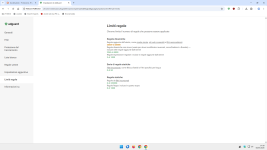
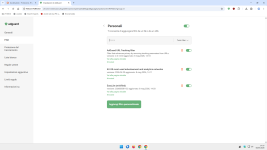
That’s not the case; take a look at these two images:

1.png
2.png


I deleted all the filter lists and added only these three filter lists to the custom filters.
Keep in mind that I also have 138 custom rules added to my rules.
But as you can see in the second image, there are 0 static rules.

So it seems that the filter lists added to the custom filters are treated as dynamic rules—that’s the trick that allows them to update independently.

The problem for you is that you can’t even add the Easylist Optimized, because that single filter list alone exceeds the allowed number of dynamic rules.;)
 
Custom filters are treated as dynamic rules, that is what I intended to explain, so we are talking about same thing
 
Last edited:
  • Like
Reactions: Sampei.Nihira
My wife went to visit some friends and it rained all day, so one friend after another whatsapped in our dynosaurus oldies (rugby) group-app that they cancelled the food truck / music event which was in our town, so I started a discussion with ChatGPT and Chat convinced me to move from X11 to Wayland, which meant switching desktop. Switching the desktop is a breeze, but resetting my tweak (to make it look like Windows 7) took me all afternoon, biut Wayland eperimental now supports international (dead) characters and seems to run well with all my applications. So I am no on Wayland (which has security advantages compared to X11).
 
My wife went to visit some friends and it rained all day, so one friend after another whatsapped in our dynosaurus oldies (rugby) group-app that they cancelled the food truck / music event which was in our town, so I started a discussion with ChatGPT and Chat convinced me to move from X11 to Wayland, which meant switching desktop. Switching the desktop is a breeze, but resetting my tweak (to make it look like Windows 7) took me all afternoon, biut Wayland eperimental now supports international (dead) characters and seems to run well with all my applications. So I am no on Wayland (which has security advantages compared to X11).
Which desktop environment did you install?
 
My wife went to visit some friends and it rained all day, so one friend after another whatsapped in our dynosaurus oldies (rugby) group-app that they cancelled the food truck / music event which was in our town, so I started a discussion with ChatGPT and Chat convinced me to move from X11 to Wayland, which meant switching desktop. Switching the desktop is a breeze, but resetting my tweak (to make it look like Windows 7) took me all afternoon, biut Wayland eperimental now supports international (dead) characters and seems to run well with all my applications. So I am no on Wayland (which has security advantages compared to X11).
funny because I installed fedora kinoite atomic KDE Plasma last night, and chatGPT was trying to get me off Wayland and onto X11 but my isp was having issues last night. funny copy / paste only worked from Host to Guest but not from the Guest to Host. Expect to tweak Kinoite when my isp settles down.
 
I thought you had installed GNOME or KDE Plasma because they support Wayland, while Cinnamon and XFCE support is still in experimental stage.
It is experimental fase, but everything seems to run nicely. Although yesterday I watched a movie on my laptop and at the end the system froze (could not escape the browser anymore, but luckily the movie kept playing, so I watched it to the, before using Alt+F2 & xkill :-) ).

I have to develop a few courses (retired but still teaching sales for fun) so I am curious how Wayland handles 2 heavy PowerPoint open at the same tie while reading large PDF's and having opened many browser tabs). I will allow calling home in Opensnitch for problem reporting, so maybe my "edge case" usage might help developers to iron out some bugs (unless it becomes undo-able).

I already found a minor bug, it seems that (on battery) after 10 minutes the monitor goes black. After changing time out to 3 hours (in power management) that is gone. Apparently due to Wayland separation either screensaver or powermanagement are not aware of activity and think I am doing nothing.
 
Last edited:
What was ChatGPT's reasoning ?
A really valid and interesting question indeed (y) and controversial to the info it provided me ;)

As you posted Wayland prevents windows to communicate with each other. Zypack (in flatpak) weakens the internal sandbox ¨vertical" (between tabs seperation), but adds a strong "horizontal" layer (between browser and OS). Firejail on the other hand applies a ¨loosened/weaker" sandbox with fully functional internal Chrome sandbox. On X11 firejail clearly has the upper-hand (compared to flatpak), but due to Waylandś security benefits the weakened internal sandbox ¨vertical" seperation between tabs has less impact, making flatpak a good alternative because of its better horizontal protection layer (between browser and OS). ChatGPT still gives firejail a little advantage over flatpak in Wayland, but states that the real world use case scenario's (of flatpak) are probably as good as firejail.

I really dug into the pro's and con's over firejail versus flatpak and decided security benefits of firejail were not large enough for the ease of use flatpak offered (ChatGPT helped me to further tighten the flatpak sandbox). In Xfce I had switched to firejail because of the recent flatpak vulnability. But since this was backported, I am confident that the older flatpak version (which is used by Mint 22.3 LTS) will get security updates in the future. ChatGPT explained that flatpak bubblewrap runs as standard user and is much simpler and cleaner than Firejail mechanisms.

Why Wayland is safer than X11​

  • Wayland isolates applications by default, preventing apps from reading other apps’ keyboard input, mouse events, or window contents.
  • Wayland blocks most fake input injection (keyboard/mouse simulation), reducing risks like clickjacking and malicious automation.
  • Wayland works much better with sandboxing systems such as Flatpak because apps cannot freely access the entire desktop
 
Last edited:
