
If you can't do without it...


Open MalwareTips from your Home Screen or desktop. Follow discussions, find answers and pick up where you left off.
If you cannot find an install option, update your browser or use its bookmark option to keep MalwareTips close.
After installation, open the app and sign in. Enable push notifications in Preferences if you want alerts. On iPhone and iPad, push requires a Home Screen web app and iOS or iPadOS 16.4 or later.
Sign in to manage notificationsInstallation is optional. Your notification settings stay under your control.
 .
.

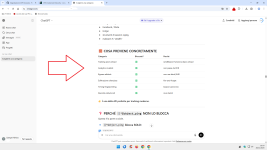
I am really happy with Cloudflare zero trust. Running 5 firewall policies and removed all browser extensions.
View attachment 294418
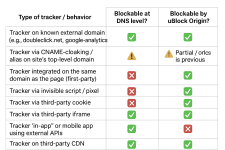
Because of @Andy Ful malware filter testing
Security and privacy wise I should be okay with Avira Safe Browsing and Privacy Badger extensions (one is bound to strict German privacy regulations and the other is developed by the Electronic Frontier Foundation).
- Work profile: Avira Safe browsing with anti-tracking enabled. The mild anti-tracking compliments nicely with the mild advertisement blocking of Cloudflare. Also Avira's URL filtering provides best results when testing malware, phishing and fake shopping links in combination with Cloudflare and Google Safe Browsing.
- Surfing profile: Privacy Badger in learning mode (l know it can be misused, but it has never occurred in the wild) to compliment Brave's adblocking. This combo resulted in the lowest third-party exposure after a day of surfing.
Setup finalized
Brave in Aggressive mode also blocks first party. I use PB in learning because it shows third-party exposure also. When those 3P are useless (from user experience perspective) connections I block them in PB. Until now I only added 1 domain.
I used uBol only allowing some trusted TLD's but the number of blocks were zero. Same with your rules in AG you pm-ed.
With my surfing behavior Brave Shields seem to do very well. This is why I want to know what the actual 3P exposure is.
Okay finally decided (at least I think and hope so
Code:! ********************************************************** ! Block rules to increase security and privacy * ! ********************************************************** ! Block tracking pings and beacons ||*$ping #%#//scriptlet('abort-on-property-read', 'sendBeacon') ! Block risky and depreciated EVAL javascript command #%#//scriptlet('noeval') ! Block everything except from common Top Level Domains ||*$all,denyallow=nl|be|de|uk|eu|com|edu|io|net|org|abuse.ch ! Block file share services also used to host malware ||anonfiles.com$all ||discord.com/attachments$all ||file.io$all ||gofile.io$all ||hastebin.com$all ||ix.io$all ||pastebin.com$all ||pixeldrain.com$all ||tmpfiles.org$all ||transfer.sh$all ||ufile.io$all ||uploadfiles.io$all ||volafile.org$all ||zippyshare.com$all ! Block Linux executable and script formats on code sharing domains ||bitbucket.org/*.awk$all ||bitbucket.org/*.bash$all ||bitbucket.org/*.js$all ||bitbucket.org/*.ksh$all ||bitbucket.org/*.php$all ||bitbucket.org/*.pl$all ||bitbucket.org/*.rb$all ||bitbucket.org/*.sed$all ||bitbucket.org/*.sh$all ||bitbucket.org/*.tcl$all ||bitbucket.org/*.zsh$all ||bitbucket.org/*.elf$all ||bitbucket.org/*.aout$all ||bitbucket.org/*.coff$all ||bitbucket.org/*.bin$all ||bitbucket.org/*.deb$all ||bitbucket.org/*.rpm$all ||bitbucket.org/*.tar.gz$all ||bitbucket.org/*.tar.xz$all ||bitbucket.org/*.flatpak$all ||bitbucket.org/*.appimage$all ||bitbucket.org/*.snap$all ||github.com/*.awk$all ||github.com/*.bash$all ||github.com/*.js$all ||github.com/*.ksh$all ||github.com/*.php$all ||github.com/*.pl$all ||github.com/*.rb$all ||github.com/*.sed$all ||github.com/*.sh$all ||github.com/*.tcl$all ||github.com/*.zsh$all ||github.com/*.elf$all ||github.com/*.aout$all ||github.com/*.coff$all ||github.com/*.bin$all ||github.com/*.deb$all ||github.com/*.rpm$all ||github.com/*.tar.gz$all ||github.com/*.tar.xz$all ||github.com/*.flatpak$all ||github.com/*.appimage$all ||github.com/*.snap$all ||githubusercontent.com/*.awk$all ||githubusercontent.com/*.bash$all ||githubusercontent.com/*.js$all ||githubusercontent.com/*.ksh$all ||githubusercontent.com/*.php$all ||githubusercontent.com/*.pl$all ||githubusercontent.com/*.rb$all ||githubusercontent.com/*.sed$all ||githubusercontent.com/*.sh$all ||githubusercontent.com/*.tcl$all ||githubusercontent.com/*.zsh$all ||githubusercontent.com/*.elf$all ||githubusercontent.com/*.aout$all ||githubusercontent.com/*.coff$all ||githubusercontent.com/*.bin$all ||githubusercontent.com/*.deb$all ||githubusercontent.com/*.rpm$all ||githubusercontent.com/*.tar.gz$all ||githubusercontent.com/*.tar.xz$all ||githubusercontent.com/*.flatpak$all ||githubusercontent.com/*.appimage$all ||githubusercontent.com/*.snap$all ||gitlab.com/*.awk$all ||gitlab.com/*.bash$all ||gitlab.com/*.js$all ||gitlab.com/*.ksh$all ||gitlab.com/*.php$all ||gitlab.com/*.pl$all ||gitlab.com/*.rb$all ||gitlab.com/*.sed$all ||gitlab.com/*.sh$all ||gitlab.com/*.tcl$all ||gitlab.com/*.zsh$all ||gitlab.com/*.elf$all ||gitlab.com/*.aout$all ||gitlab.com/*.coff$all ||gitlab.com/*.bin$all ||gitlab.com/*.deb$all ||gitlab.com/*.rpm$all ||gitlab.com/*.tar.gz$all ||gitlab.com/*.tar.xz$all ||gitlab.com/*.flatpak$all ||gitlab.com/*.appimage$all ||gitlab.com/*.snap$all ||gitlab.io/*.awk$all ||gitlab.io/*.bash$all ||gitlab.io/*.js$all ||gitlab.io/*.ksh$all ||gitlab.io/*.php$all ||gitlab.io/*.pl$all ||gitlab.io/*.rb$all ||gitlab.io/*.sed$all ||gitlab.io/*.sh$all ||gitlab.io/*.tcl$all ||gitlab.io/*.zsh$all ||gitlab.io/*.elf$all ||gitlab.io/*.aout$all ||gitlab.io/*.coff$all ||gitlab.io/*.bin$all ||gitlab.io/*.deb$all ||gitlab.io/*.rpm$all ||gitlab.io/*.tar.gz$all ||gitlab.io/*.tar.xz$all ||gitlab.io/*.flatpak$all ||gitlab.io/*.appimage$all ||gitlab.io/*.snap$all ||sourceforge.net/*.awk$all ||sourceforge.net/*.bash$all ||sourceforge.net/*.js$all ||sourceforge.net/*.ksh$all ||sourceforge.net/*.php$all ||sourceforge.net/*.pl$all ||sourceforge.net/*.rb$all ||sourceforge.net/*.sed$all ||sourceforge.net/*.sh$all ||sourceforge.net/*.tcl$all ||sourceforge.net/*.zsh$all ||sourceforge.net/*.elf$all ||sourceforge.net/*.aout$all ||sourceforge.net/*.coff$all ||sourceforge.net/*.bin$all ||sourceforge.net/*.deb$all ||sourceforge.net/*.rpm$all ||sourceforge.net/*.tar.gz$all ||sourceforge.net/*.tar.xz$all ||sourceforge.net/*.flatpak$all ||sourceforge.net/*.appimage$all ||sourceforge.net/*.snap$all
I don't do any booking, buying or banking with my surfing profile (use work profile for that), so have not ran into website breakage (yet).
About CC are your sure?
View attachment 294688
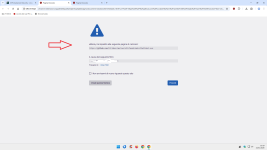
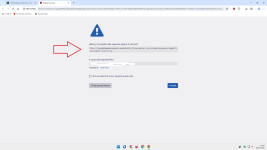 I don't block Windows exe on my Linux laptop
 Members who viewed this thread in the last 5 minutes


