Advanced Security Linux Mint Xfce laptop setup

Last updated
Feb 4, 2026
How it's used?
For work or educational use
Operating system
Linux
Other operating system
Linux Mint Zara
On-device encryption
Other full-disk drive encryption software
Log-in security
    • Biometrics (Windows Hello PIN, TouchID, Face, Iris, Fingerprint)
Security updates
Allow security updates and latest features
Update channels
Allow stable updates only
User Access Control
N/A - Linux / Mac / Other operating system
Smart App Control
N/A - Linux / Mac / Other operating system
Network firewall
Enabled
About WiFi router
TP-Link triband with IPv6 disabled and all security features enabled (TP-link home care, SPI-firewall, IP-MAC binding). E-mail log message level is set to critical.
Real-time security
Using Linux sandboxing: AppArmor for print, Firejail for accessories and Flatpak for applications. Added OpenSnitch outbound application firewall to compliment inbound GuFW.
Firewall security
Built-in Firewall for Mac/Linux
About custom security
Running standard user and sticking to official repo's and verified publishers. Added only a few hardening tweaks (removed execution rights from txt files, only allow admin to view logs/debug/etc, enabled ASLR system wide, set minumim TLS, disabled P2P). Enabled additional firejail profiles with firecfg and stripped flatpak permissions with flatseal.
Periodic malware scanners
None, using VirusTotal when downloading something.
Malware sample testing
I do not participate in malware testing
Environment for malware testing
None
Browser(s) and extensions
Brave with all build-in Ad Shield disabled using two profiles. My work profile has default website permissions and Microsoft Defender Browser Protection as only extension. The (default) surfing profile has most website permissions on block and AdGuard advertising and Kees1958 anti-tracking filters enabled with extra rules to enhance security (TLD firewall).
Secure DNS
  1. NextDNS in the Router with OISD plus telemetry blocklists enabled (for IOT devices) and limited the Top Level Domain scope (by manually blocking them one by one).
  2. We use Quad9 as default DNS for our Laptops and Smartphone (to bypass TLD scope limitations of router) because Quad9 is set & forget and good at malware blocking.
  3. In the browser (DOH) we use Cloudflare Zero Trust free plan with firewall policies and a personalized custom block page.
Desktop VPN
None, because my ISP uses dynamic IP allocation and I use my own router so our IP and IP location are changed regularly :-).
Password manager
Build-in
Maintenance tools
None
File and Photo backup
FreeFileSync
Subscriptions
    • None
System recovery
TimeShift
Risk factors
    • Browsing to popular websites
    • Working from home
    • Making audio/video calls
    • Opening email attachments
    • Buying from online stores, entering banks card details
    • Logging into my bank account
    • Streaming audio/video content from trusted sites or paid subscriptions
Computer specs
AMD Ryzen 7 laptop with 1 TB SSD and 16GB RAM
Notable changes
Keeping my setup as simple as possible. The only extra's I have are themes (for LibreOffice, Thunderbird and Brave).
  • 2025-12-04 Replaced DOH in browser (ControlD free with AppGuard DNS filter) with OS default (Quad9) because of website breakage
  • 2025-12-26 Tried Cloudflare Zero trust free plan in browser (DOH) using security and content categories as DNS firewall policies.
  • 2026-01-08 Finalized Cloudflare Zero Trust setup by adding geo based (resolved IP) policies (and a custom blockpage)
  • 2026-01-16 Finalized extension & filter tweaking (see post)
  • 2026-02-04 Added Microsoft Browsing Protection to work profile
What I'm looking for?

Looking for minimum feedback.

Brave in Aggressive mode also blocks first party. I use PB in learning because it shows third-party exposure also. When those 3P are useless (from user experience perspective) connections I block them in PB. Until now I only added 1 domain.

I used uBol only allowing some trusted TLD's but the number of blocks were zero. Same with your rules in AG you pm-ed.

With my surfing behavior Brave Shields seem to do very well. This is why I want to know what the actual 3P exposure is.

What I wrote in my previous post is that even if you block 1p scripts and therefore also indirectly 3p scripts + PB, you may not achieve a total block of 3p frames.

Dynamic filtering: Benefits of blocking 3rd party iframe tags


However, with uBo, I know this for sure because 3p frames have a separate setting.
With your configuration, I don't know.:unsure:
And I believe there is a reason for this separation.

Ask the AI.
It's just a suggestion.;)
 
Last edited:
Using AdGuard with all filters disabled and only using Custom rules. In this mode AdGuard functions as a Top Level Domain firewall only allowing some common TLDs (com, edu, io, net, org and eu) and the Schengen plus 5 eyes countries. Additionally it blocks some common file servers and Linux executables and scripts within the allowed TLD scope.

Code:
! **********************************************************
! Block rules to increase security                              *
! **********************************************************

! Block risky and depreciated EVAL javascript command
#%#//scriptlet('noeval')

! Block everything except a few common Top Level Domains and (EU) Schengen and 5 Eyes countries
||*$all,denyallow=|com|edu|io|net|org|EU|AT|BE|CZ|DK|EE|FI|FR|DE|GR|HU|IS|IT|LV|LT|LU|MT|NL|NO|PL|PT|SK|SI|ES|SE|CH|HR|LI|US|UK|CA|AU|NZ

! Block file share services also used to host malware
||anonfiles.com$all
||discord.com/attachments$all
||file.io$all
||gofile.io$all
||hastebin.com$all
||ix.io$all
||pastebin.com$all
||pixeldrain.com$all
||tmpfiles.org$all
||ufile.io$all
||uploadfiles.io$all
||volafile.org$all
||zippyshare.com$all


! Block Linux executable and script formats on code sharing domains
||bitbucket.org/*.awk$all
||bitbucket.org/*.bash$all
||bitbucket.org/*.js$all
||bitbucket.org/*.ksh$all
||bitbucket.org/*.php$all
||bitbucket.org/*.pl$all
||bitbucket.org/*.rb$all
||bitbucket.org/*.sed$all
||bitbucket.org/*.sh$all
||bitbucket.org/*.tcl$all
||bitbucket.org/*.zsh$all
||bitbucket.org/*.elf$all
||bitbucket.org/*.aout$all
||bitbucket.org/*.coff$all
||bitbucket.org/*.bin$all
||bitbucket.org/*.deb$all
||bitbucket.org/*.rpm$all
||bitbucket.org/*.tar.gz$all
||bitbucket.org/*.tar.xz$all
||bitbucket.org/*.flatpak$all
||bitbucket.org/*.appimage$all
||bitbucket.org/*.snap$all
||github.com/*.awk$all
||github.com/*.bash$all
||github.com/*.js$all
||github.com/*.ksh$all
||github.com/*.php$all
||github.com/*.pl$all
||github.com/*.rb$all
||github.com/*.sed$all
||github.com/*.sh$all
||github.com/*.tcl$all
||github.com/*.zsh$all
||github.com/*.elf$all
||github.com/*.aout$all
||github.com/*.coff$all
||github.com/*.bin$all
||github.com/*.deb$all
||github.com/*.rpm$all
||github.com/*.tar.gz$all
||github.com/*.tar.xz$all
||github.com/*.flatpak$all
||github.com/*.appimage$all
||github.com/*.snap$all
||githubusercontent.com/*.awk$all
||githubusercontent.com/*.bash$all
||githubusercontent.com/*.js$all
||githubusercontent.com/*.ksh$all
||githubusercontent.com/*.php$all
||githubusercontent.com/*.pl$all
||githubusercontent.com/*.rb$all
||githubusercontent.com/*.sed$all
||githubusercontent.com/*.sh$all
||githubusercontent.com/*.tcl$all
||githubusercontent.com/*.zsh$all
||githubusercontent.com/*.elf$all
||githubusercontent.com/*.aout$all
||githubusercontent.com/*.coff$all
||githubusercontent.com/*.bin$all
||githubusercontent.com/*.deb$all
||githubusercontent.com/*.rpm$all
||githubusercontent.com/*.tar.gz$all
||githubusercontent.com/*.tar.xz$all
||githubusercontent.com/*.flatpak$all
||githubusercontent.com/*.appimage$all
||githubusercontent.com/*.snap$all
||gitlab.com/*.awk$all
||gitlab.com/*.bash$all
||gitlab.com/*.js$all
||gitlab.com/*.ksh$all
||gitlab.com/*.php$all
||gitlab.com/*.pl$all
||gitlab.com/*.rb$all
||gitlab.com/*.sed$all
||gitlab.com/*.sh$all
||gitlab.com/*.tcl$all
||gitlab.com/*.zsh$all
||gitlab.com/*.elf$all
||gitlab.com/*.aout$all
||gitlab.com/*.coff$all
||gitlab.com/*.bin$all
||gitlab.com/*.deb$all
||gitlab.com/*.rpm$all
||gitlab.com/*.tar.gz$all
||gitlab.com/*.tar.xz$all
||gitlab.com/*.flatpak$all
||gitlab.com/*.appimage$all
||gitlab.com/*.snap$all
||gitlab.io/*.awk$all
||gitlab.io/*.bash$all
||gitlab.io/*.js$all
||gitlab.io/*.ksh$all
||gitlab.io/*.php$all
||gitlab.io/*.pl$all
||gitlab.io/*.rb$all
||gitlab.io/*.sed$all
||gitlab.io/*.sh$all
||gitlab.io/*.tcl$all
||gitlab.io/*.zsh$all
||gitlab.io/*.elf$all
||gitlab.io/*.aout$all
||gitlab.io/*.coff$all
||gitlab.io/*.bin$all
||gitlab.io/*.deb$all
||gitlab.io/*.rpm$all
||gitlab.io/*.tar.gz$all
||gitlab.io/*.tar.xz$all
||gitlab.io/*.flatpak$all
||gitlab.io/*.appimage$all
||gitlab.io/*.snap$all
||sourceforge.net/*.awk$all
||sourceforge.net/*.bash$all
||sourceforge.net/*.js$all
||sourceforge.net/*.ksh$all
||sourceforge.net/*.php$all
||sourceforge.net/*.pl$all
||sourceforge.net/*.rb$all
||sourceforge.net/*.sed$all
||sourceforge.net/*.sh$all
||sourceforge.net/*.tcl$all
||sourceforge.net/*.zsh$all
||sourceforge.net/*.elf$all
||sourceforge.net/*.aout$all
||sourceforge.net/*.coff$all
||sourceforge.net/*.bin$all
||sourceforge.net/*.deb$all
||sourceforge.net/*.rpm$all
||sourceforge.net/*.tar.gz$all
||sourceforge.net/*.tar.xz$all
||sourceforge.net/*.flatpak$all
||sourceforge.net/*.appimage$all
||sourceforge.net/*.snap$all
 
Last edited:
Okay finally decided (at least I think and hope so :-) ) on what extensions to use. In my surfing profile I run Brave Shields in aggressive mode (default blocklists plus Bypass paywalls and AdGuard's URL tracking protection). This is the reason why I have disabled all filters in AdGuard. The Custom rules are inspired by Tak

Code:
! **********************************************************
! Block rules to increase security and privacy             *
! **********************************************************

! Block tracking pings and beacons
||*$ping
#%#//scriptlet('abort-on-property-read', 'sendBeacon')

! Block risky and depreciated EVAL javascript command
#%#//scriptlet('noeval')

! Block everything except from common Top Level Domains
||*$all,denyallow=nl|be|de|uk|eu|com|edu|io|net|org|abuse.ch

! Block file share services also used to host malware
||anonfiles.com$all
||discord.com/attachments$all
||file.io$all
||gofile.io$all
||hastebin.com$all
||ix.io$all
||pastebin.com$all
||pixeldrain.com$all
||tmpfiles.org$all
||transfer.sh$all
||ufile.io$all
||uploadfiles.io$all
||volafile.org$all
||zippyshare.com$all


! Block Linux executable and script formats on code sharing domains
||bitbucket.org/*.awk$all
||bitbucket.org/*.bash$all
||bitbucket.org/*.js$all
||bitbucket.org/*.ksh$all
||bitbucket.org/*.php$all
||bitbucket.org/*.pl$all
||bitbucket.org/*.rb$all
||bitbucket.org/*.sed$all
||bitbucket.org/*.sh$all
||bitbucket.org/*.tcl$all
||bitbucket.org/*.zsh$all
||bitbucket.org/*.elf$all
||bitbucket.org/*.aout$all
||bitbucket.org/*.coff$all
||bitbucket.org/*.bin$all
||bitbucket.org/*.deb$all
||bitbucket.org/*.rpm$all
||bitbucket.org/*.tar.gz$all
||bitbucket.org/*.tar.xz$all
||bitbucket.org/*.flatpak$all
||bitbucket.org/*.appimage$all
||bitbucket.org/*.snap$all
||github.com/*.awk$all
||github.com/*.bash$all
||github.com/*.js$all
||github.com/*.ksh$all
||github.com/*.php$all
||github.com/*.pl$all
||github.com/*.rb$all
||github.com/*.sed$all
||github.com/*.sh$all
||github.com/*.tcl$all
||github.com/*.zsh$all
||github.com/*.elf$all
||github.com/*.aout$all
||github.com/*.coff$all
||github.com/*.bin$all
||github.com/*.deb$all
||github.com/*.rpm$all
||github.com/*.tar.gz$all
||github.com/*.tar.xz$all
||github.com/*.flatpak$all
||github.com/*.appimage$all
||github.com/*.snap$all
||githubusercontent.com/*.awk$all
||githubusercontent.com/*.bash$all
||githubusercontent.com/*.js$all
||githubusercontent.com/*.ksh$all
||githubusercontent.com/*.php$all
||githubusercontent.com/*.pl$all
||githubusercontent.com/*.rb$all
||githubusercontent.com/*.sed$all
||githubusercontent.com/*.sh$all
||githubusercontent.com/*.tcl$all
||githubusercontent.com/*.zsh$all
||githubusercontent.com/*.elf$all
||githubusercontent.com/*.aout$all
||githubusercontent.com/*.coff$all
||githubusercontent.com/*.bin$all
||githubusercontent.com/*.deb$all
||githubusercontent.com/*.rpm$all
||githubusercontent.com/*.tar.gz$all
||githubusercontent.com/*.tar.xz$all
||githubusercontent.com/*.flatpak$all
||githubusercontent.com/*.appimage$all
||githubusercontent.com/*.snap$all
||gitlab.com/*.awk$all
||gitlab.com/*.bash$all
||gitlab.com/*.js$all
||gitlab.com/*.ksh$all
||gitlab.com/*.php$all
||gitlab.com/*.pl$all
||gitlab.com/*.rb$all
||gitlab.com/*.sed$all
||gitlab.com/*.sh$all
||gitlab.com/*.tcl$all
||gitlab.com/*.zsh$all
||gitlab.com/*.elf$all
||gitlab.com/*.aout$all
||gitlab.com/*.coff$all
||gitlab.com/*.bin$all
||gitlab.com/*.deb$all
||gitlab.com/*.rpm$all
||gitlab.com/*.tar.gz$all
||gitlab.com/*.tar.xz$all
||gitlab.com/*.flatpak$all
||gitlab.com/*.appimage$all
||gitlab.com/*.snap$all
||gitlab.io/*.awk$all
||gitlab.io/*.bash$all
||gitlab.io/*.js$all
||gitlab.io/*.ksh$all
||gitlab.io/*.php$all
||gitlab.io/*.pl$all
||gitlab.io/*.rb$all
||gitlab.io/*.sed$all
||gitlab.io/*.sh$all
||gitlab.io/*.tcl$all
||gitlab.io/*.zsh$all
||gitlab.io/*.elf$all
||gitlab.io/*.aout$all
||gitlab.io/*.coff$all
||gitlab.io/*.bin$all
||gitlab.io/*.deb$all
||gitlab.io/*.rpm$all
||gitlab.io/*.tar.gz$all
||gitlab.io/*.tar.xz$all
||gitlab.io/*.flatpak$all
||gitlab.io/*.appimage$all
||gitlab.io/*.snap$all
||sourceforge.net/*.awk$all
||sourceforge.net/*.bash$all
||sourceforge.net/*.js$all
||sourceforge.net/*.ksh$all
||sourceforge.net/*.php$all
||sourceforge.net/*.pl$all
||sourceforge.net/*.rb$all
||sourceforge.net/*.sed$all
||sourceforge.net/*.sh$all
||sourceforge.net/*.tcl$all
||sourceforge.net/*.zsh$all
||sourceforge.net/*.elf$all
||sourceforge.net/*.aout$all
||sourceforge.net/*.coff$all
||sourceforge.net/*.bin$all
||sourceforge.net/*.deb$all
||sourceforge.net/*.rpm$all
||sourceforge.net/*.tar.gz$all
||sourceforge.net/*.tar.xz$all
||sourceforge.net/*.flatpak$all
||sourceforge.net/*.appimage$all
||sourceforge.net/*.snap$all

I think you'll need to add .cc to the list of TLDs excluded from the rule, otherwise you won't see some of Tak's images.
Try it.
The general Noeval rule will also require you to add some exceptions.
 
I think you'll need to add .cc to the list of TLDs excluded from the rule, otherwise you won't see some of Tak's images.
Try it.
The general Noeval rule will also require you to add some exceptions.

I don't do any booking, buying or banking with my surfing profile (use work profile for that), so have not ran into website breakage (yet).

About CC are your sure?
1768482551391.png
 
One more warning.
There are some websites that “mix” permitted TLDs with prohibited TLDs.:)
In this case, any exception rules become confusing.
Example

https://www.heraldsun.com.au/

In this case, a pure dynamic rule applied in uBo has the correct effect.
Unfortunately, however, any static exception rules do not have the desired effect.

Applied to AG, where it is not possible to insert dynamic rules but only static rules that simulate the same effect as dynamic rules... the result obtained is unambiguous.

In my case, I never come into contact with such websites.
 
Add an exe rule to your rules.
If that doesn't work, none of the others will provide the protection you need.

Out of curiosity, if you press the button,

"proceed anyway"

on the AG block page (now), does it work?
 
  • Like
Reactions: piquiteco
Add an exe rule to your rules.
If that doesn't work, none of the others will provide the protection you need.

Out of curiosity, if you press the button,

"proceed anyway"

on the AG block page (now), does it work?
I checked the AG rules work, either it is silently blocked (third-party) or throw a AG block page (first-party), I tested with abuse.ch entries
 
One last thing, otherwise I'll be rocking the boat too much, but I don't think your rules for blocking downloads from GitHub (etc.) are correct for blocking malicious executable downloads.
URLhaus | Checking your browser
This first sample URL is already blocked by the uBlock Origin filter "Online Malicious URL Blocklist" If you proceed with uBO, it is immediately blocked by McAfee WebAdvisor and Kaspersky, as you can see in the second screenshot below. :)
1768517666369.png
1768517862217.png
This second sample URL was even more incredible. The block was performed again by the uBlock "Online Malicious URL Blocklist" filter list, and then by uBlock, followed by a block by McAfee WebAdvisor. Although McAfee WebAdvisor blocked it, it failed and did not prevent me from downloading the malware sample. Even so, when I clicked to save it, Norton Safe rose from the ashes and sprang into action, preventing me from downloading the sample, as you can see in the third screenshot below this post. (y)This was the first time I saw Norton Safe spring into action, and I was surprised that it prevented me from downloading the zip file. ;)
1768518105540.png
1768519115085.png
1768519273050.png
 
From version 1.86 Brave browser allows you to disable the default blocklists (when you enable brave://flags/#brave-adblock-show-hidden-components) .
Finalized tweaking extensions and filter usage for best compatibility and performance (work profile with 19.1 score on Speedometer 3.1) and best blocking and security (surfing profile with 18.7 score on Speedometer 3.1). I disabled all Brave adfilters and using AdGuard with AG's base filter, Kees1958 most used, Custom Rules for some bookmarkerd websites and the TLD exposure limitation (com, edu, io, net, org, eu TLD's and the Schengen and 5 Eyes country codes).

1768635060276.png

Finally achieved same speedometer 3.1 benchmarks in Linux with Brave in Flatpak sandbox as my wife (on same HP laptop) on Windows 11 running standard user with Chrome and only Avira Safe Browsing extension (with its conservative anti-tracking) enabled.

:D:cool:(y) :D:cool:(y) :D:cool:(y) :D:cool:(y) :D:cool:(y) :D:cool:(y) :D:cool:(y) :D:cool:(y) :D:cool:(y) :D:cool:(y) :D:cool:(y) :D:cool:(y)
 
Last edited:
From version 1.86 Brave browser allows you to disable the default blocklists (when you enable brave://flags/#brave-adblock-show-hidden-components) .
Finalized tweaking extensions and filter usage for best compatibility and performance (work profile with 19.1 score on Speedometer 3.1) and best blocking and security (surfing profile with 18.5 score on Speedometer 3.1). I disabled Brave's tracking filter (replaced it with Peter Low's) and first-party filter (replaced it with Custom rules).


Finally achieved same speedometer 3.1 benchmarks in Linux with Brave in Flatpak sandbox as my wife (on same HP laptop) on Windows 11 running standard user with Chrome and only Avira Safe Browsing extension (with its conservative anti-tracking) enabled.

:D:cool:(y) :D:cool:(y) :D:cool:(y) :D:cool:(y) :D:cool:(y) :D:cool:(y) :D:cool:(y) :D:cool:(y) :D:cool:(y) :D:cool:(y) :D:cool:(y) :D:cool:(y)

Peter Lowe's Ad and tracking server list is excellent (same total rules) for use at the DNS level.
If you still have OISD and change your choice with HaGeZi, Peter Lowe's list is in the sources used.
 
  • Like
Reactions: simmerskool
@Sampei.Nihira

I prefer to block malware at DNS level and advertising and tracking in the browser. By replacing Brave's build-in anti-tracking filter with Peter Low's and Brave's build-in first party filter with custom cosmetic rules (in Brave), the rule count should have been reduced to a 1/3 (and Speedometer benchmark upped from 18.1 to 18.7). (y)

I am fine as it is now and start applying the "don't fix what ain't broken rule" ;)
 
Last edited:
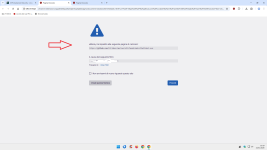
Switched back to AdGuard again, because it is easier to trouble shoot (using log) and has a blockpage (triggered by $document for first-party). I spilt the $all TLD block rule into $domain and $third-party to show a block page for first-party and block third-party outside Schengen and 5 Eyes when I want to proceed.
1770361906058.png

I also split the $all rule for hosting services known to host malware phishing (like GoDaddy, Weebly, Hostinger and NameCheap). Bij splitting the $all rule in document and third-party, any website blocked has a fair chance of functioning after choosing 'Proceed anyway' button.

I still use $all for blocking file sharing services known to host malware abd phishing also (e.g. anonfiles, discord.com/attachments, file.io. gofile.io, hastebin, ix.io, pastebin.com, pixeldrain. tmpfiles.org, ufile.io, uploadfiles.io, volafile.org, zippyshare) and Linux executable and script formats hosted on popular coding platforms (like bitbucket, github, githubusercontent, gitlab and sourceforge).

Latest 10 https links on phishtank: AG blocked 7, Cloudflare ZT 2, Google safe browsing 1, so limiting TLD exposure in surfing profile works well (y)

1768638994945.png
 
Last edited:
  • Like
Reactions: Sampei.Nihira
Yes, you are right (tried to cheat against the "don't fix what ain't broken" rule by editing the posts, which you as elite investigator noticed immediately :-) (y) )

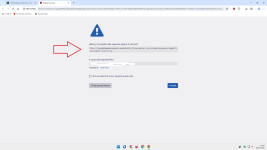
Switched back to AdGuard again, because it is easier to trouble shoot (using log) and has a blockpage (triggered by $document for first-party)
View attachment 294751

I also split the $all rule for hosting services known to host malware phishing (like GoDaddy, Weebly, Hostinger and NameCheap). Bij splitting the $all rule in document and third-party, any website blocked has a fair chance of functioning after choosing 'Proceed anyway' button.

I still use $all for blocking file sharing services often hosting malware (e.g. anonfiles, discord.com/attachments, file.io. gofile.io, hastebin, ix.io, pastebin.com, pixeldrain. tmpfiles.org, ufile.io, uploadfiles.io, volafile.org, zippyshare) and Linux executable and script formats hosted on popular coding platforms (like bitbucket, github, githubusercontent, gitlab and sourceforge).

Latest 10 https links on phishtank: AG blocked 7, Cloudflare ZT 2, Google safe browsing 1

View attachment 294753

I had opened a problem in October 2025, but......:rolleyes::rolleyes::rolleyes::rolleyes:

[investigate] $document block rules malfunction · Issue #3338 · AdguardTeam/AdguardBrowserExtension
 
  • Wow
Reactions: LinuxFan58
@LinuxFan58

After lunch is better...:ROFLMAO:

Let's analyze your fourth rule, which I also use (with only 9 TLDs).
Block 3p + 3p scripts + 3p frames (Hard Mode effect) + list of allowed TLDs.

The third rule blocks all websites outside the list.
I prefer to block 1p scripts from all websites outside the TLD list.

Because, in my opinion, my choice is more consistent.
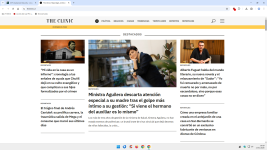
Let's take a website outside your TLD list, for example, Chilean (.cl).

In my case, a Chilean website finds Hard Mode + 1p script block, probably usable, depending on the websites, but with very strong protection.

In your case, the third rule that completely blocks the Chilean website renders the fourth rule useless, as it will never apply Hard Mode outside the TLD list.

Think about it.;)

The Clinic | Reportajes, columnas, entrevistas, humor, memes y más.


1.png
 
Last edited: