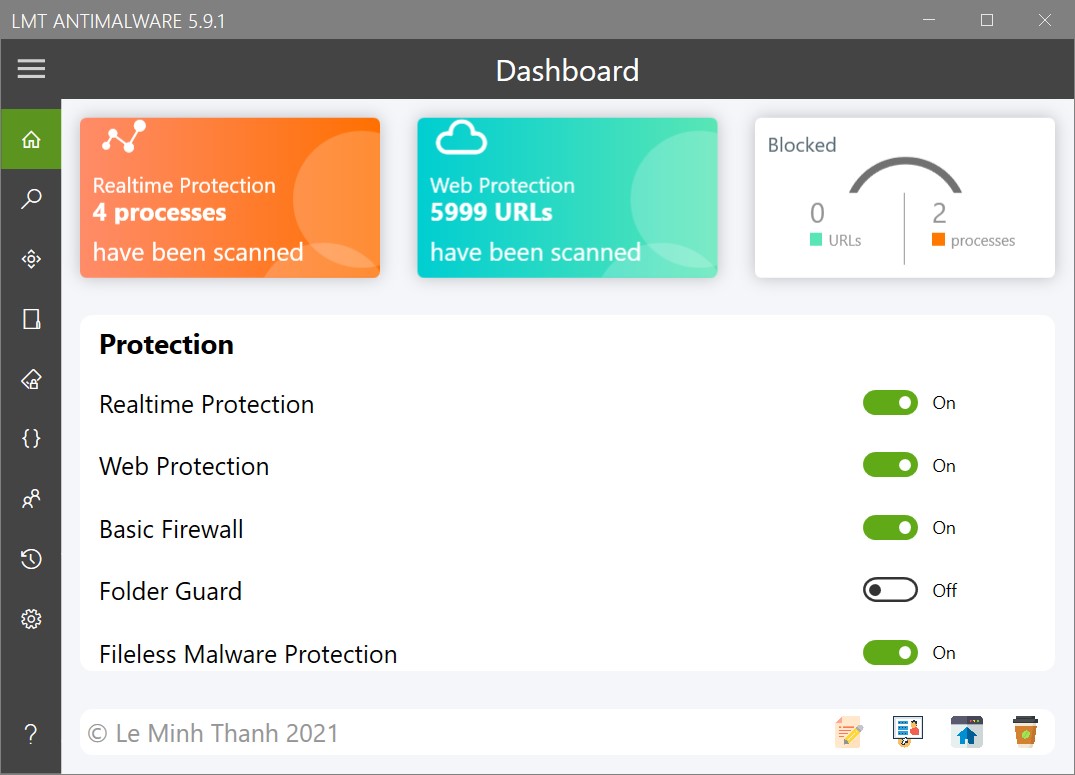
LMT AntiMalware

already tested against spywares real (ardamax, trojansrat...)?
This help promote your excellent antilogger and antimalware...
I think those spyware are all detected by virustotal so my software will block them from executing.
@LeMinhThanh, could you add Hungarian to Crowdin, so I can start working on the translation? Thank you.
Hi, done! Thank you :love:
 
I think those spyware are all detected by virustotal so my software will block them from executing.

Hi, done! Thank you :love:
when say test against spywares, say test only modules antilogger separated...
think than this can better publicize lmt antimalware;
LMT antimalware and comodo internet security prevent against actions de spywares (keylogger, screenlogger...)
 
LMT looks like a very very promising software, just keep on updating it's realtime signature/database regularly to improve the detection rates.
Also get it updated frequently to make it's security features/components more powerful.
God bless & keep up the great work.
 
Faced with the problem that the LMT crashes in my virtual machine with Windows 11. Can someone confirm this problem? Maybe there are problems with my image?

Edition Windows 11 Pro
Version 21H2
OS build 22000.71
Experience Windows Feature Experience Pack 421.18201.0.3

Btw
Added: Folder Encryption, it allows you to safely store data on your hard drive while still being able to access the data as if it were not encrypted. Only apps on the exclusion list can read the encrypted data. Note: Do not save files from Chromium browser directly to an encrypted folder.
looks really great =)
 
Last edited:
i test softwares of security...
i currently only two softwares of security lmt antimalware and comodo internet security (both prevent protect against system of keylogger, screenlogger... );

sorry my english!
 
I just installed LMT AntiMalware on Windows 11 build 22000.71 and it works perfectly fine, except for a few interface bugs like Snap layouts.
@CyberDevil , please make sure you have Visual C++ installed.
1626510224202.png
 
Hi!
LMT AntiMalware 5.7.1 released
Changelog:
  • Basic Firewall: Now this feature will no longer depend on the Windows firewall. You can configure blocking applications from accessing the internet through the Browsing Protection tab in Settings.
  • Fixed: LMT AntiMalware may crash on some systems.
  • Update UI.
Homepage: LMT AntiMalware - A software helps protect you from malware
1627387147048.png
 
Today I tried to install F-secure with LMT AntiMalware and... they couldn't work together. It will crash your computer. So, if you are using F-secure and want to try LMT AntiMalware for fun, please don't :rolleyes:
1627567309700.png
 
Last edited:
Hello

I am pretty new to this software. I was wondering about the antiexe portion. I don't want to look through the entire thread. Does this block all exes or is there a whitelist. The antiexes I have used in the past block all exe executions. Just wondering. Right now I have it set for strict mode. So far it has not blocked any exes I have clicked on.

Thanks
 
Hello

I am pretty new to this software. I was wondering about the antiexe portion. I don't want to look through the entire thread. Does this block all exes or is there a whitelist. The antiexes I have used in the past block all exe executions. Just wondering. Right now I have it set for strict mode. So far it has not blocked any exes I have clicked on.

Thanks
Hello, I just tested it and it works fine. You can try it by double click on LMTAntiMalwareSetup5.7.2.exe file :rolleyes:
1628731648987.png
 
Last edited:
OK I may have worded it wrong. Am I suppose to get that warning no matter what exe I click on? Yes I can click on the setup file and get the warning but say I try a Sysinternals file like Procmon.exe? I get no warming and the program opens fine.
 
  • Like
Reactions: [correlate]