App Review McAfee: how bad is the worst antivirus?

It is advised to take all reviews with a grain of salt. In extreme cases some reviews use dramatization for entertainment purposes.
Content created by
TPSC
Yes, exactly, that's what I thought. Since McAfee relies entirely on the cloud, it's a cloud-based AV, so perhaps this delay is due to some connection made to McAfee servers every time you open the GUI. Maybe that explains the delay in opening the graphical interface. (y)

Yes, that's true. @Trident showed that McAfee registered a lot of patents. :)

Yes, my registered and patented trademark. lol 😂
Maybe Trident can find something related to this Patent . lol
 
My initial full scan of 2 drives with 4 partitions with maybe 3 gig of very varying data took about half an hour, maybe a little more - I wasn't watching it all the time but the percentage didn't seem that accurate but probably because it scanned different data later as the scan progressed, or it maybe a guess? I probably wont do a full scan again as there is a lot of music & photographs that are not going to change so a quick scan will suffice I reckon in future.

Otherwise so far its boringly very good. with no issues, bar the GUI is a bit big.

Edit: Totalling up maybe more like 2.75 TB Not gig :eek: (I am an edjit)
 
Last edited:
I was running McAfee on a PC with a 12th Gen Intel(R) Core(TM) i7-12700T 1.40 GHz processor, 16 GB RAM, and a 400 Mbps Wi-Fi connection. That should have been enough to open the program interface quickly.
However, I also had problems with a full scan of the SSD. After over an hour, only about 50% of the files had been scanned. The SSD contained about 111 GB of data.
Yes, McAfee's full scan is time-consuming, I have to admit. I ran the test yesterday, scanning only the C:\ drive, and it took 5 hours to complete the full scan of the C drive. And that's with 74 GB using SSD. I don't have many programmes, and even so, I found it took a long time to complete a scan of just the C drive.
Since nothing is perfect and no AV is flawless, I don't mind that. If you need to do a full scan, I use a second opinion scanner such as K, NPE, EEK, HitmanPro, Sophos Scan and Clean, ESET Online Scanner, etc. It is very rare for me to do a full scan on my PC or laptop. ;)
 
McAfee's GUI often loads almost instantly on my fairly powerful machine, but other times I also have a surprisingly long delay. It makes me wonder how they implemented it when so many other things have seemed well optimized in my experience.

Scanning seemed pretty fast on my SSD. I'm much more likely just to run quick scans, though.
 
Last edited by a moderator:
Another thing I noticed during the full scan: The scan kept stopping and only continued after a pause of 30-60 seconds. It looked as if McAfee was "getting stuck" on scanning a file.
I think this is the first time that the McAfee scan has taken so long. I ran the scan again and timed it; it took 40 minutes. If that's how it works, then it's fine with me. I assume that the first time, it scans all files, and the second time, it only scans new or changed files. See the screenshot below. I wouldn't switch from McAfee to another AV just because of that. For me, McAfee is perfect. ;)
1752782630817.png
 
I think this is the first time that the McAfee scan has taken so long. I ran the scan again and timed it; it took 40 minutes. If that's how it works, then it's fine with me. I assume that the first time, it scans all files, and the second time, it only scans new or changed files. See the screenshot below. I wouldn't switch from McAfee to another AV just because of that. For me, McAfee is perfect. ;)
Similar to B; the firest full scan is very slow, then the following scans are very fast as it scans only new and modified files; you can adjust K settings to do the same, but I do not.
 
Similar to B; the firest full scan is very slow, then the following scans are very fast as it scans only new and modified files; you can adjust K settings to do the same, but I do not.
Yes, and when I used B for four years, from 2016 to 2020, I had no problems. Sometimes it ran smoothly, and I believe it adapted to my hardware. I was very lucky during the time I used B, but at the very end of the licence, about three months before it expired, I must admit that it started to become problematic, and I apologise for my language here. I continued to use B after that, but it was no longer usable, very bloated, constantly trying to push VPN, the installation alone is over 500MB, and the database updates hourly and takes forever to finish updating. I believe that today I would not even use B not even for free.
 
Yes, and when I used B for four years, from 2016 to 2020, I had no problems. Sometimes it ran smoothly, and I believe it adapted to my hardware. I was very lucky during the time I used B, but at the very end of the licence, about three months before it expired, I must admit that it started to become problematic, and I apologise for my language here. I continued to use B after that, but it was no longer usable, very bloated, constantly trying to push VPN, the installation alone is over 500MB, and the database updates hourly and takes forever to finish updating. I believe that today I would not even use B not even for free.

Definitely not my favorite.
 
Another thing I noticed during the full scan: The scan kept stopping and only continued after a pause of 30-60 seconds. It looked as if McAfee was "getting stuck" on scanning a file.
It does that when it has to unpack composite files, like cabinets, installers and so on. Others count the files that span from composite files as separate files and update the view, which makes it seem like a continuous task, McAfee displays it as one file.

As for the scans, McAfee uses dynamic process criticality scoring to adjust the scan speeds. They will he faster when there is nothing working in the background. And yes, it is patented.
 
It wasn't uncommon to see 4-6-8 hour System scans with BD, there were even a couple of 10+ scans. They did come up with a KB article with tips on how to speed it up. My real concern with these longer type of full scans is what's it doing to your CPU (task manager open) especially if you ran those more often.

I only run a full scan on a AV install, and let the on access and real time protection do the rest, with the occasional quick scan (and 2nd opinion scans) like @Miravi mentioned.

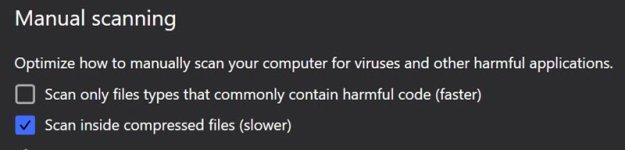
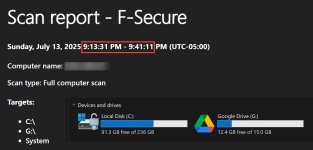
Just a comparison, FWIW. With these settings.
settings.jpg

full scan F Secure.jpg
 
McAfee's GUI often loads almost instantly on my fairly powerful machine, but other times I also have a surprisingly long delay. It makes me wonder how they implemented it when so many other things have seemed well optimized in my experience.

Scanning seemed pretty fast on my SSD. I'm much more likely just to run quick scans, though.
It’s a very standard implementation through WebView. McAfee supplies their own web view host (not sure for what reasons, probably for compatibility).

The UI is based on HTML, CSS and JavaScript.

The WebView host serves as a “browser” loading the UI.

Most of the AVs have their UIs written this way.

The delay is probably because when you don’t open the UI for a certain period of time, McAfee unloads it from memory.
 
Did you guys do a clean install, like fresh no remains of any other av present ? It scanned my 256GB Ssd in 5 mins and totally not slow.. I did a fresh install.
On my system as well, very fast scans and it’s not even one of these mad-fast SSDs (pretty average one). I did leave the scan to run without doing anything else. But I have very little information on this laptop, as it is a testing laptop. I am obviously not gonna put the pictures of my handsome face there on it…

I have Windows, Office Apps, I use the built-in Edge browser, some basic tools (unarchivers and so on) and some research tools. Not even OEM bloatware, as it is all removed.

I also have a gigabit internet connection (with 100mbps upload speeds), not sure if this makes any difference.
 
I think this is the first time that the McAfee scan has taken so long. I ran the scan again and timed it; it took 40 minutes. If that's how it works, then it's fine with me. I assume that the first time, it scans all files, and the second time, it only scans new or changed files. See the screenshot below. I wouldn't switch from McAfee to another AV just because of that. For me, McAfee is perfect. ;)
where'd you get Free Stopwatch? > nevermind
Free Stopwatch
 
Last edited:
where'd you get Free Stopwatch?
I installed it from the Microsoft Store. In Windows 11 I don't install anything outside the Microsoft Store except AVs. :)
> nevermind
Nevermind? Soon there won't be anyone left on the MT forum. @Trident a few years ago he was going to leave MT here for personal reasons, I advised him not to do it for PM, and he listened to me. There are people who are missed on the forum, and he is one of them, full of valuable information that he brings to us and I can't thank him enough. I always share information with everyone here. If I misunderstood you in your words I apologise. (y)