App Review McAfee Protection (Plus Plans, Total Protection, LiveSafe)

It is advised to take all reviews with a grain of salt. In extreme cases some reviews use dramatization for entertainment purposes.
Product name
McAfee Total Protection/Plus Plans
Installation (rating)
5.00 star(s)
User interface (rating)
5.00 star(s)
Performance (rating)
5.00 star(s)
Core Protection (rating)
5.00 star(s)
Proactive protection (rating)
5.00 star(s)
Additional Protection notes
See tests
Browser protection (rating)
5.00 star(s)
Positives
    • Many features
    • Low impact on system resources
    • Lightning fast scans
    • Easy to use
    • Simple and non-intrusive
    • Ransomware protection
    • Strong and reliable protection
    • Detects or blocks in the wild malware
    • Consistently high test scores
    • Accurate results and reliable antivirus engine
    • Effective malicious URL blocking
    • Virus signatures are updated daily
    • Excellent scores in independent tests
    • Great value for money
    • Effective malware removal
    • Well designed, clear and easy to use interface
    • Multi-layer protection approach
Negatives
    • Advanced users may want more control
    • Short on configuration options
    • Includes paid-for components (paywall)
Time spent using product
Reviewed between 1 to 7 days
Computer specs
11th Gen Core i5
16GB RAM
Recommended for
  1. All types of users
Overall rating
5.00 star(s)
TechRadar :sick: also reviewd McAfee

The review correctly states that McAfee is efficient at what it is designed for (protection), citing third-party tests as reference, which have always proven that McAfee is effective.
McAfee did have periods when it was not highly rated, it was accompanied by Bitdefender which before 2010/11 wasn't the best and Eset.
TechRadar did not conduct any tests on their own.

The review then criticises the bells and whistles stating that VPN leaves more to be desired
The addition of a VPN is nice, but it leaves plenty of things to be desired. At times, the performance tends to be poor, especially on distant servers, which eliminates it as a viable solution for streaming.
I would agree to disagree, for 4K streaming, the general recommended speeds are between 25-50 MBPS, per device. As long as McAfee VPN (or tunnelbear) achieves these speeds, users will have no problem even with 4K streaming. It is necessary to mention that streaming services nowadays are very good at detecting VPNs and bypassing geo blocks is gettingf more difficult by the day, whichever VPN you are using.
The biggest stain, though, is the fact that you can only use the full-featured VPN if you turn on auto-renewal. If you disable auto-renewal, McAfee will limit your monthly data to 500MB per month.

This is a common practice for McAfee and is stated in their terms of service. It's a way for the company to incentivize customers to remain subscribed and to protect them against a lapse in their security protection, but such a limitation is puzzling in 2025.


McAfee Essential also lets you dip your toes in identity theft protection, including basic identity monitoring to help you find your personal information online and on the dark web.
Similar practices were used by Norton. You are getting a full package of security tools for the price of 3 months VPN. You can enable auto renewal, add a reminder to your calendar and switch it off on time. Like I've done.

Other than that. the review is sort of shallow, doesn't discuss, praise or criticise any features. It tends to just summarise. It's a reworded copy of the McAfee product page.
 
I just used the built-in uninstaller to uninstall McAfee, it removed the major folders (unlike many that leave a ton in Program Files and ProgramData).
With me too, McAfee left no traces when I had to uninstall it. When I went to uninstall McAfee, I already had Revo Uninstaller installed on my PC, just in case, to see if McAfee would really leave any traces behind after uninstalling it, due to the fact that some people claimed that McAfee left traces after uninstalling the product. Even so, I used Revo Uninstaller to uninstall McAfee because I received a "pump" license from a member who was very kind and cordial and gave me a great gift welcome. Last week, while I was browsing the web, a McAfee pop-up appeared saying that there were 16 hours left before my McAfee would explode, because the clock was counting down less than 16 hours before the license expired and my PC would lose protection, as yous can see in the image below. 👇Fortunately, before everything literally exploded, blew everything up on your way, and contaminated my computer with radiation, I finally uninstalled McAfee using Revo Uninstaller. In conclusion, Revo found no traces, not even in the TEMP folder, Program Files, or ProgramData. Even after carefully analyzing and searching with Revo, it found nothing. Then, I went looking for leftovers, showing hidden system files, and I couldn't find anything from McAfee either. I believe that some people may be a little haunted by McAfee because of what happened in the past. However, I can say that my experience with McAfee was one of the best I've had to date. I only didn't buy a license because I already had a Kaspersky license 1 Year. :)
1755699078439.png
 
I've been looking and mcafee doesn't have any way to send malicious files? They only have an email. The problem with email is that email providers block malicious files from being sent. Why don't they have a page to send malware like any other av? It catches my attention. If anyone knows her, please post her, thank you.
 
I've been looking and mcafee doesn't have any way to send malicious files? They only have an email. The problem with email is that email providers block malicious files from being sent. Why don't they have a page to send malware like any other av? It catches my attention. If anyone knows her, please post her, thank you.
Yes, that's right. In addition, you can send samples directly to McAfee Labs by attaching the file(s) to an email and sending it to virus_research@avertlabs.com. When sending samples by email, you must archive them in a password-protected .zip file with the password "infected" (all lowercase letters). (y)
 
Just my 20 pence worth, I've had McAfee on this desk PC for best part of two months, its been totally unobtrusive & Web Advisor has only blocked a couple of websites so far, I don't get constant vaporous warnings as with some which it often seems the purpose is to let you know you are getting your moneys worth & your AV is protecting you, just so you know - Files are checked in the background & sometimes takes a few seconds before allowing a new file to run which is exactly how I like it, no huge log files telling me each & every event in life has occurred - Seems to me after using virtually every AV there is its pretty ideal at least for me, plus I hardly know its there.
 
I wish it could detect when I scan compressed files or copy a malicious file. I've tested this a few times and it doesn't detect when I scan .rar and .zip containing a known malicious file. It also doesn't scan the file I extracted from the rar it only detects if I right click an scan on it or run the file. I hope they improve this.
 
Just my 20 pence worth, I've had McAfee on this desk PC for best part of two months, its been totally unobtrusive & Web Advisor has only blocked a couple of websites so far, I don't get constant vaporous warnings as with some which it often seems the purpose is to let you know you are getting your moneys worth & your AV is protecting you, just so you know - Files are checked in the background & sometimes takes a few seconds before allowing a new file to run which is exactly how I like it, no huge log files telling me each & every event in life has occurred - Seems to me after using virtually every AV there is its pretty ideal at least for me, plus I hardly know its there.
I totally agree. McAfee's new understated approach fits my more recent inclination towards simplicity. I no longer tinker with or rotate security software the way I used to—a big departure from the days when I was willing to adopt an HIPS as an acceptable layer of security. :LOL:

Total Protection has worked as quiet as a mouse. If not for WebAdvisor's activity, I would barely notice its presence. Scheduled scans run invisibly as they're supposed to. I don't have a McAfee+ or PC Optimizer subscription, but there's no upselling of any kind.
 
Last edited by a moderator:
Bu hangi sürüm? Hakkında bölümünü kontrol edebilir / ekran görüntüsü alabilir misiniz?:)
Adsız.png


Content version: 2253.0
Secure VPN:
Build: 241
Version: 1.32
Tracker Cleaner:
Build: 31
Version: 1.32
Shredder:
Build: 28
Version: 1.32
Advanced Firewall:
Build: 55
Version: 1.32
McAfee® WebAdvisor:
Microsoft Edge extension version: 8.1.0.7058
Video Scams:
Build: 1.32.26
AI content version: 110105_x64_cpu
 
Last edited:
R133 still hasn't been released, if they are integrating the malicious macro malware detection through image recognition (like these images that lure the users to enable macros), we are in for a delayed release. Probably around the 9th or the 10ht... The patent has been granted, so...
 
R133 still hasn't been released, if they are integrating the malicious macro malware detection through image recognition (like these images that lure the users to enable macros), we are in for a delayed release. Probably around the 9th or the 10ht... The patent has been granted, so...
I'm going to end up buying a McAfee license. Did you see the new feature that @Sunqfu mentioned in post #209? It's really good. That's why I say that paid AV products are a different story. You're paying for them, the company is seeing results and the product is thriving, so it makes perfect sense to work hard and improve it even further. ;)
Today's update added email and video scam protection features.
Wow, that's great to hear. McAfee is improving its product every day. I'm glad to hear that. Thanks for sharing. (y)
 
I'm going to end up buying a McAfee license. Did you see the new feature that @Sunqfu mentioned in post #209? It's really good. That's why I say that paid AV products are a different story. You're paying for them, the company is seeing results and the product is thriving, so it makes perfect sense to work hard and improve it even further. ;)

Wow, that's great to hear. McAfee is improving its product every day. I'm glad to hear that. Thanks for sharing. (y)
I had the scam video/deepfake detector and email scam detector. It has removed 32 scam emails from my main inbox already.
 
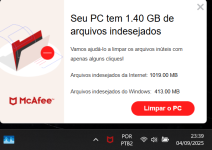
How can I stop this kind of ad (for its PC Optimizer) ? I have seen it sometimes and it is getting annoying.


View attachment 290766
Interesting. It seems to be a notification for the built-in Tracker Remover feature, which removes temporary files, cookies, etc. I disabled the scheduled auto-removal and have never seen any messages like that.

I'm curious if your settings might be different from my version. Have you perused them yet? Any notification or alert settings?
 
Interesting. It seems to be a notification for the built-in Tracker Remover feature, which removes temporary files, cookies, etc. I disabled the scheduled auto-removal and have never seen any messages like that.

I'm curious if your settings might be different from my version. Have you perused them yet? Any notification or alert settings?

I am using the default settings, I will try to disable the auto-removal to see if it stops.

Thanks buddy.