F
ForgottenSeer 94738
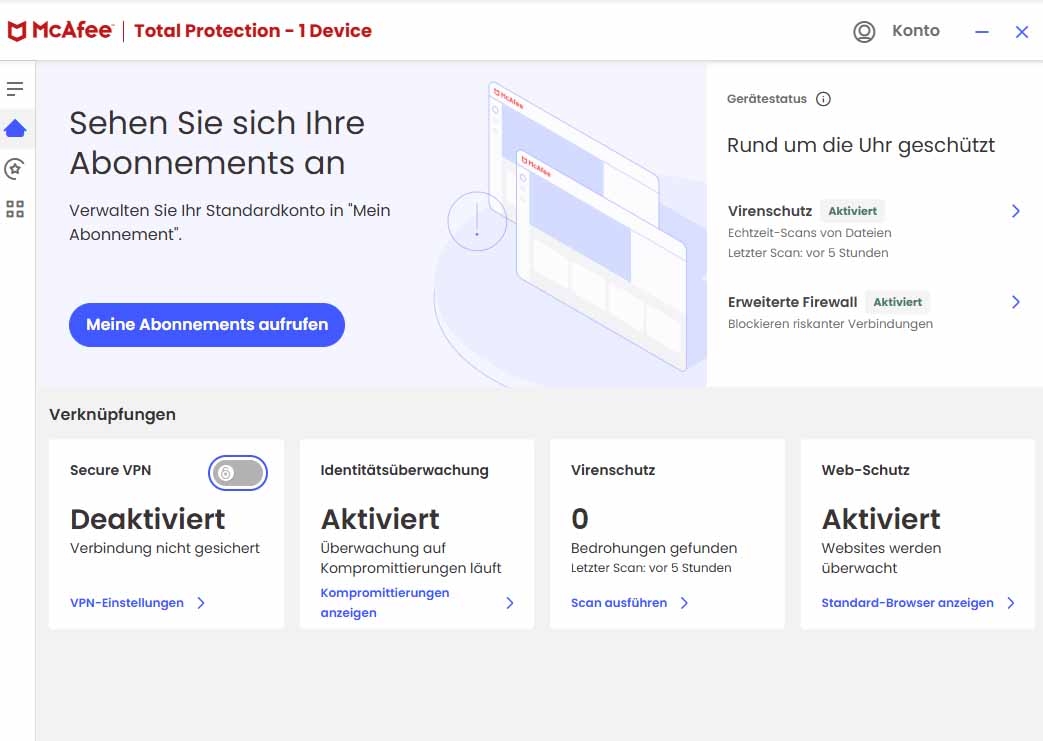
Hmm...I have version R133.152.1, but I can't find a way to enable fraud detection. Or is the EU "protecting" me from a potential protection option again?


Open MalwareTips from your Home Screen or desktop. Follow discussions, find answers and pick up where you left off.
If you cannot find an install option, update your browser or use its bookmark option to keep MalwareTips close.
After installation, open the app and sign in. Enable push notifications in Preferences if you want alerts. On iPhone and iPad, push requires a Home Screen web app and iOS or iPadOS 16.4 or later.
Sign in to manage notificationsInstallation is optional. Your notification settings stay under your control.
 Thread starter
Trident
Thread starter
Trident

On pc I don’t see this optionYou enable through the main UI, under scam detection or something like that. Btw R133 has been released.


Logic; it is a very new feature and must be supporting a limited number of languages at the start, and might not be availabe for all regions, considering the Chinese user will mainly require to detect scam of email messages in Chinese, not in English.If it is not there, either it’s not part of the license, or not supported in this region yet
Im not from Germany ;-) but Holland, and i see this :Normally when you look at these tiles like VPN and so on, Scam Detection is the first option.
In addition, you can check the online portal, protection.mcafee.com
If it is not there, either it’s not part of the license, or not supported in this region yet. I would be very surprised to find out it is not supported in Germany and yeah, could be some EU regulations yet again.
They only support text message detection scams it seems.Im not from Germany ;-) but Holland, and i see this :
View attachment 290788
If i click i see this :
View attachment 290789
View attachment 290790
Is this all, no need to enable ?Im not from Germany ;-) but Holland, and i see this :
View attachment 290788
If i click i see this :
View attachment 290789
View attachment 290790
That’s for the mobile security only.Is this all, no need to enable ?

One of the reasons we're recommending McAfee now is that they no longer flood users with upgrade prompts or extra feature ads. This approach feels fresh (or maybe just new to me), and it's quite interesting. I really hope they stick with it and don't bring back those ad notifications or scare tactics.How can I stop this kind of ad (for its PC Optimizer) ? I have seen it sometimes and it is getting annoying.
View attachment 290766


That's what it looks like for meIm not from Germany ;-) but Holland, and i see this :
View attachment 290788
If i click i see this :
View attachment 290789
View attachment 290790

This situation varies depending on which store the product was purchased from or which region it is used in.That's what it looks like for me
No, I don’t have any large files. I noticed McAfee takes long when it has to scan installers, composite files and all that. I don’t keep any of these on my systems, I download, install and then delete. I still have a fair share of installed software.@Trident
In your original post you've posted that it took McAfee less than 10 minutes to preform full scan.
Do you have any large files on your system? Files like VHD files from virtual machines, system backup files, large video files?
I'm, just running full scan on my system after over 6 hours it's only at 43%. So I expect it to be well over 12 hours before the scan is finished.
When I used resource monitor to check what data is beeing scanned I noticed that it also scans all large file like Macrium backup files, virtual machines storage files.
For instance: it was scanning 80 GB VHD file for one of my virtual machines for almost an hour, during which time it was using 20+ GB of RAM and CPU 10-90+ %.
That's probably the most aggressive scan from any AV solution I've encountered so far.
Yes it seems that it opens up and scans a lot of files and even some filetypes that other AV solutions skip.No, I don’t have any large files. I noticed McAfee takes long when it has to scan installers, composite files and all that. I don’t keep any of these on my systems, I download, install and then delete. I still have a fair share of installed software.

Pre-activated Windows ISO?Trojan:Script/SuspiciousPowershell.K!2
Any option in settings to limit the size of the files transferred to quarantine?It's good that I could restore all of them from quarantine

If you are scanning newly downloaded files, you need only quick scan, either weekly or daily if paranoid.After my first attempt, I decided not to run a full scan on my computers. I don't want flames shooting out of my PC.
Thank you for that info.@Minimalist after running a full scan (or any scan), McAfee maintains 2 types of caches, low and high. The high cache appears to be cleared weekly, the low one seems to be forever.
There is no reason to do full scans anymore.
I suggest also you add exclusions for these folders where you have these large files.
Nope. It was virtual machine with restored image of my live system, so I don't know what it found since it didn't find anything on my system.Pre-activated Windows ISO?
It doesn't have much settings at all and no size limit setting for scanning or moving to quarantine.Any option in settings to limit the size of the files transferred to quarantine?
Members who viewed this thread in the last 5 minutes

