

The MalwareTips app
Your community, one tap away.
Open MalwareTips from your Home Screen or desktop. Follow discussions, find answers and pick up where you left off.
- Home Screen access
- Optional push alerts
- Your community
You're ready to explore.Explore what's new
Installation instructions
iPhone & iPad
- Open MalwareTips in Safari and tap Share. You may need to open the Page Menu first.
- Choose Add to Home Screen. If it is not listed, use Edit Actions to add it.
- Keep Open as Web App enabled if shown, then tap Add.
Android
- Open MalwareTips in Chrome or another browser that supports app installation.
- Open the browser menu and look for Install app, Install and create shortcut, or Add to Home screen.
- Choose Install and confirm. Wording varies by browser.
Desktop
- Chrome: use the install icon in the address bar, or the menu under Cast, save and share.
- Edge: open the menu, then More tools, Apps and Install this site as an app.
- Safari on Mac: choose Share or File, then Add to Dock. Firefox on Windows: look for the web apps button in the address bar.
If you cannot find an install option, update your browser or use its bookmark option to keep MalwareTips close.
Keep up with your conversations
After installation, open the app and sign in. Enable push notifications in Preferences if you want alerts. On iPhone and iPad, push requires a Home Screen web app and iOS or iPadOS 16.4 or later.
Sign in to manage notificationsInstallation is optional. Your notification settings stay under your control.
You are using an out of date browser. It may not display this or other websites correctly.
You should upgrade or use an alternative browser.
You should upgrade or use an alternative browser.
Advice Request McAfee Real Protect. Worth it?
Share practical recommendations that address the author's needs.

Read all about it!

 www.wilderssecurity.com
Regards Eck
McAfee's on-demand Stinger ADDS a new bit of real-time baggage
McAfee Stinger is (or was) a stand-alone, on-demand AV scanner. Nothing ran in real-time, which is the way I like it. However, a recent change to the...
www.wilderssecurity.com
Regards Eck

I checked it out and I have found no evidence of any sort of behavior blocker, nothing in its settings or user interface, nothing in its files, maybe its intentional, but I find it confusing.

I just installed it. Real protect is not in the same folder as Stinger. After opening stinger it creates directory in "C:\Program Files\McAfee\Real Protect" and runs in the background and there's a icon in system tray which lets you check log, quarantine, etc.I checked it out and I have found no evidence of any sort of behavior blocker, nothing in its settings or user interface, nothing in its files, maybe its intentional, but I find it confusing.
Here's Real Protect in action. It detected the exe of Brave portable of portapps but this is a false positive. It couldn't stop the program from running though. Brave working fine before clicking on Clean so not sure how effective it is.
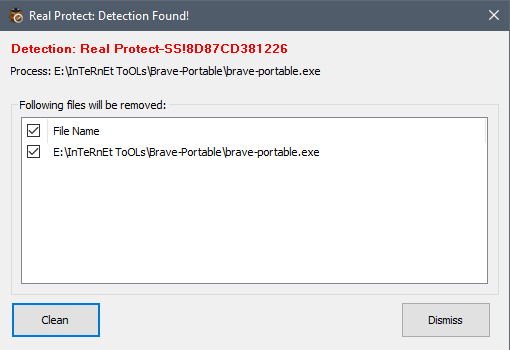
It couldn't stop the program from running though.
Yeah, it's normal. It doesn't stop the malware from running. It does only notifies the user.

Yeah, it's normal. It doesn't stop the malware from running. It does only notifies the user.
Maybe it's a behavior modifier --> yours!

it removes itself. i installed it a couple weeks ago and yesterday it disappeared. winpatrol notified me its startup was removed. so i ran stinger again to get it back.
i don't think this is correct. it has a quarantine.
It doesn't stop the malware from running. It does only notifies the user.
i don't think this is correct. it has a quarantine.
I mean it doesn’t have ‘auto quarantine’ feature. It doesn’t block malware from running in the first place.i don't think this is correct. it has a quarantine

Have you test it with ESET?I just installed it. Real protect is not in the same folder as Stinger. After opening stinger it creates directory in "C:\Program Files\McAfee\Real Protect" and runs in the background and there's a icon in system tray which lets you check log, quarantine, etc.
I'm worried about any conflicts.
I think I did back then and didn't have any conflict. But like I said, it couldn't stop the detected program from running after execution, only did after clicking quarantine. So, not worth it unless they changed this behavior now.Have you test it with ESET?
I'm worried about any conflicts.
Recently browsing
Members who viewed this thread in the last 5 minutes
You may also like...
-
 Serious Discussion Deep Research: McAfee GTI, JTI, Artemis and Other Technologies Explained
-

-

-
Comparison Feb 2026 conclusion?
-
