Question McAfee WebAdvisor service and applications

Please provide comments and solutions that are helpful to the author of this topic.

Minimalist

Level 11
Thread author
Verified
Top Poster
Well-known
Oct 2, 2020
549
5,283
968
Slovenia
I have a question.

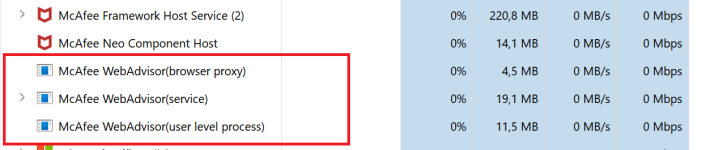
What is a purpose of Webadvisor service and applications that run in background?
It seems that if I uninstall those components and use Firefox extension everything works OK.
Do they offer some additional functionality or only remind users of extension not being installed?

1760770139527.png
 
I have a question.

What is a purpose of Webadvisor service and applications that run in background?
It seems that if I uninstall those components and use Firefox extension everything works OK.
Do they offer some additional functionality or only remind users of extension not being installed?


View attachment 292062

WebAdvisor browser extension blocks known malicious/suspicious links...

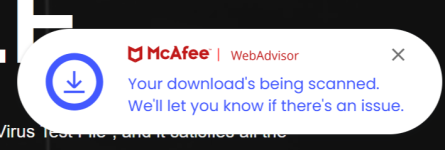
WebAdvisor services has also the purpose for scanning even your downloads:

1760780790620.png


1760780906910.png
 
I have made a test about downloads scanning. I have services uninstalled and only extension enabled. I did a test with eicar test file.
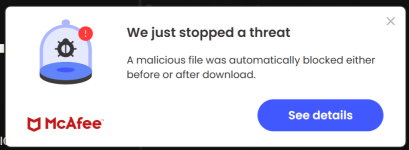
I still got download scanned and detected, even without service:

View attachment 292069

View attachment 292070
Then probably certain other services of McAfee AV... has also the ability for scanning your downloads.

My example #3 was rather for the McAfee WebAdvisor standalone... as useful for MS Defender or other AVs without built-in Web Protection.

 
The background service (identified as ServiceHost.exe and signed by McAfee) runs with system-level permissions outside the browser's sandbox. This allows it to perform security tasks the extension is forbidden from doing.

When you click "download" in the browser, the extension hands off the information to the background service. This service then scans the file as it's being written to your hard drive to ensure it doesn't contain a virus, adware, or spyware. A browser extension cannot, by itself, execute a deep file scan on your system.

This feature, "inspects to see if your firewall and antivirus are activated before you surf". An extension in your browser has no permission to check the status of other applications like Windows Defender or your system firewall. The background service performs this check and reports the status to you.

The background service also acts as the "core" of the application, ensuring the browser extension is installed and active, which is likely where the "reminders" you mentioned originate if the extension is disabled.

The reason "everything works OK" for you is that you are primarily observing the in-browser functions. The color-coded links and site blocking are working because the Firefox extension is active.

You have effectively disabled the second layer of WebAdvisor's defense, the part that protects you from malicious files you download and the part that monitors your system's basic security settings. If you were to download a file containing a new piece of malware that your main antivirus missed, the extension-only version of WebAdvisor would not scan it, whereas the full installation (with the background service) would.
 
Last edited:
@Divergent thank you for extensive explanation.

I have just additional question about this last part of your reply:
You have effectively disabled the second layer of WebAdvisor's defense, the part that protects you from malicious files you download and the part that monitors your system's basic security settings. If you were to download a file containing a new piece of malware that your main antivirus missed, the extension-only version of WebAdvisor would not scan it, whereas the full installation (with the background service) would.
Did you mean that if I use extension only with McAfee Antivirus, then protection from downloaded malware would be lower than if I was using Webadvisor's service also? Or did you mean that difference in protection happens only if I use some other antivirus with Webadvisor installed?
 
  • Like
Reactions: Divine_Barakah
Thnx.
So that would mean that Webadvisor's services can also detect some malware that otherwise would not be detected by AV's main services...
Yes, the WebAdvisor background service can detect and block a threat that the main antivirus service might not, primarily due to timing and detection method.

WebAdvisor's service specializes in blocking threats at the point of entry from the web, using a rapid, cloud-based reputation system. The main AV service performs deeper, more comprehensive analysis of files already on your system using local signature databases and behavioral analysis. A brand-new threat might be added to the cloud database and blocked by WebAdvisor hours or even days before the corresponding signature file is downloaded by your main AV.
 
Yes, the WebAdvisor background service can detect and block a threat that the main antivirus service might not, primarily due to timing and detection method.

WebAdvisor's service specializes in blocking threats at the point of entry from the web, using a rapid, cloud-based reputation system. The main AV service performs deeper, more comprehensive analysis of files already on your system using local signature databases and behavioral analysis. A brand-new threat might be added to the cloud database and blocked by WebAdvisor hours or even days before the corresponding signature file is downloaded by your main AV.
I never thought that those processes preform detection related tasks also. So, I better reinstall it :)

Thanks for clearing things up @Divergent (y)