
Solved Memory Issue

Barbara Brit

New Member
Thread author
Oct 1, 2017
4
1
2
United Kingdom
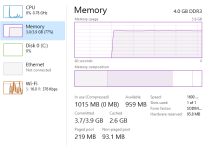
Memory.PNG

Also one more new thing that happened as I was creating this thread, was that the computer got stuck and a message appeared saying that: ''The sign-in process couldn't display security and sign-in option when Ctrl+Alt+Delete was pressed. If Windows doesn't respond, press Esc, or use the power switch to restart.''

...I was forced to press the power button as the computer did not respond when I pressed Esc button.
 

Attachments

The truth is that after I turned off my pc by the power button (for the reason i described above) it was quite normal again, I mean that the memory usage was at around 30%-35%. That is when I did the scan.

Also is there any possibility that it could be a virus or something? As when I checked on the internet for similar problems I found that there could be some viruses or malware (I can't remember exactly which of these two) that uses up your memory.
 
I don't see signs of infection. Let's scan your computer:


51a46ae42d560-malwarebytes_anti_malware.png
Scan with Malwarebytes' Anti-Malware

Please download Malwarebytes Anti-Malware and save it to your desktop.
  • Install the progam.
  • Click the Settings tab, in the left panel choose Protection and tick Scan for rootkits.
  • Click the Scan tab, choose Threat Scan is checked and click Start Scan.
  • If threats are detected, click the Apply Actions button. You will now be prompted to reboot. Click Yes.
  • Upon completion of the scan (or after the reboot), click the Reports tab.
  • Double-click the Scan Log.
  • At the bottom click Export and choose Text file.
Save the file to your desktop and include its content in your next reply.
 
  • Like
Reactions: Barbara Brit
It's just fine now. Thanks for the help!
It was just weird, and i am not quite sure what the cause was of that because the state of the pc changed after the restart like nothing ever happened...
 
  • Like
Reactions: Lambros