Security News Microsoft September 2026 Patch Tuesday fixes 966 flaws, 2 zero-days

Security News
47 Replies 3,626 Views
View attachment 299893

Reinstall actually worked (y) Updates worked. Sadly no videos this time of me blowing up my laptop with a shotgun 😢

Only problem is Intel GPU drivers reinstall every boot through WU. Latest release never installs correctly even with Hard_Configurator reset to default and uninstalled.


@Bot any help? Anyone else?
You can disable driver update in device installation settings somewhere in device manager.
 
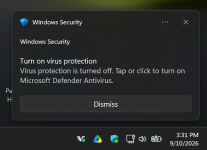
My Microsoft Surface 5 laptop is giving me the WD/Windows Security notice, but not on my HP Envy laptop? Got one just now.

Notification.png
 
For those experiencing issues with MD showing as disabled, you need to run these commands in elevated PS.

Post in thread 'Divine_Barakah's PC Security Config 2026'

MS deliberately sets the beta update channel on some devices.
 
966 flaws fixed - putting MDASH and Mythos to use, putting more staff on it, good job MS ! (y)

Next: find those staffers who coded the flaws and send them to secure coding training, so they don't keep repeating mistakes. At least inform them of the flaw found so they can learn from it.
 
Last edited:
For those experiencing issues with MD showing as disabled, you need to run these commands in elevated PS.

Post in thread 'Divine_Barakah's PC Security Config 2026'

MS deliberately sets the beta update channel on some devices.

Thanks, but is it better to wait for Microsoft to come up with a patch, so this helpful aid doesn't break anything when the patch come out?
I just got a notification on this HP laptop, so now it's happening on both. I'll just disable the notifications for the time being.
 
Thanks, but is it better to wait for Microsoft to come up with a patch, so this helpful aid doesn't break anything when the patch come out?
I just got a notification on this HP laptop, so now it's happening on both. I'll just disable the notifications for the time being.
No need to wait for MS. The commands just change the update channel to "staged" and they reset the security platform to its original state then updates MD using the new update channel.
 
On the Surface 5, it would happen about 2-5 minutes after a restart, then about 1-2 more times while I was using it, about 3-4 hours time.
On this HP laptop, it happened after about 3 hours in using it.
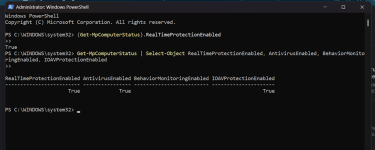
If you check realtime protection in PS, you will find that is running. The issue is purely cosmetic. It is just a sync mismatch at system startup. In my case I received the notification 5 mins after startup.

If you change the update channel to "staged" it is less likely to experience such issues in the future.
 
If you check realtime protection in PS, you will find that is running. The issue is purely cosmetic. It is just a sync mismatch at system startup. In my case I received the notification 5 mins after startup.

If you change the update channel to "staged" it is less likely to experience such issues in the future.

Thanks, I appreciate the help and concern, and it looks good, is running. But, I'll just wait for the patch to come out :)


ps.png
 
Last edited:
No need to wait for MS.
Agreed. Your commands are simply a little housekeeping.
The commands just change the update channel to "staged" and they reset the security platform to its original state then updates MD using the new update channel.
It's clearly a fluke of a bug introduced around a regular WS update. I never had an issue using the Beta channel myself. Go figure ... Windows Security is occasionally buggy, so it seems.
 
Agreed. Your commands are simply a little housekeeping.

It's clearly a fluke of a bug introduced around a regular WS update. I never had an issue using the Beta channel myself. Go figure ... Windows Security is occasionally buggy, so it seems.
The issue was caused by the latest security platform update. I was one of the first to experience the issue. At first I thought there was sth wrong in my config, but taking a look at Reddit showed that many users have reported the same issue. The only thing they had in common is the security platform update. Resetting it, and changing the update channel to staged fixed it for me on two devices.

Edit:

You don't need to be using MD to experience the issue. You can run a 3rd party security solution and still experience the issue.
 
Thanks, I appreciate the help and concern, and it looks good, is running. But, I'll just wait for the patch to come out :)


View attachment 299934
Yes I told you it is a cosmetic issue. But honestly I was worried that sth was wrong in my config. But when I checked real time protection status in PS I realised it was just a glitch that happens only once on system startup.

But to avoid similar future issues, I changed the update channel to Staged. If MS ever issues a corrupted update, you won't be one of the first victims.
 
Back
Top