


I have only text scams option available though I did not set it up.Thank you very much for your reply. That was very detailed.
Could you show me a screenshot of what is available to you under the Scam Protection menu?
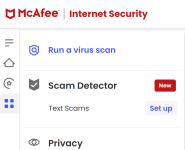
I have only text scams option available though I did not set it up.Thank you very much for your reply. That was very detailed.
Could you show me a screenshot of what is available to you under the Scam Protection menu?
Thank you very much.

I removed eset online scanner just because of that. It detects some program thinking it's malware and quarantines it without even asking, and it always the same file. I absolutely hate that in a security software.- scan without cleaning. Full scan will automatically clean any infection it finds. For me it found something suspicious in my 80 GB VHD file and moved the whole file to quarantine. Luckily, I had enough free space on C partition otherwise I don't know how that would end. Restore from quarantine solved the problem and VHD file was still usable.
- option to configure how to react on malware detection and let user choose what to do.
- option to add folders to exclusion list.

Even if you disabled PUA detection?I removed eset online scanner just because of that. It detects some program thinking it's malware and quarantines it without even asking, and it always the same file. I absolutely hate that in a security software.
Yes.Even if you disabled PUA detection?

Eset is one of my all time favourite products, but it is not reasonably priced in comparison to other competitors.Nice and clean setup. I really like it! NOD32 is a great low resource AV/AM. Just wish ESET had cheaper licenses.
Do you restore a clean system backup before installing a new security product or you just uninstall and install one the same system?It seems that occasional BSODs are not McAfee related so I reinstalled it.
I just uninstall the old one and reinstall new one. Except with Bitdefender after which I had to restore an image since it quarantined some files and registry keys (false positives) which it couldn't restore to original location. With McAfee and Eset I've had no problems so far.Do you restore a clean system backup before installing a new security product or you just uninstall and install one the same system?


