

Guide | How To Missed Features Installer - M F I

The associated guide may contain user-generated or external content.

Exterminator

Level 85
Thread author
Verified
Top Poster
Well-known
Oct 23, 2012
12,527
48,602
8,380
USA
I found an interesting article here How to restore features Microsoft removed from Windows 10 on how to restore features removed form Windows 10 as well as other operating systems.

Missed Features Installer - M F I
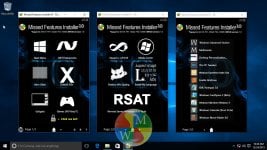
MFI10_web.jpgPage3.jpg

Provides an ISO file download with features that were removed by Microsoft from Windows 10 OS as well as other operating systems.
You will need to burn or mount the ISO file and open it to install those features that have been removed

You can view Missed Features Installer - M F I here http://mfi.webs.com/
Screenshots are available here http://mfi.webs.com/gallery

I have not personally tried this however if you do give this a try you should backup your system.
 
I found an interesting article here How to restore features Microsoft removed from Windows 10 on how to restore features removed form Windows 10 as well as other operating systems.

Missed Features Installer - M F I

View attachment 80781View attachment 80782

Provides an ISO file download with features that were removed by Microsoft from Windows 10 OS as well as other operating systems.
You will need to burn or mount the ISO file and open it to install those features that have been removed

You can view Missed Features Installer - M F I here http://mfi.webs.com/
Screenshots are available here http://mfi.webs.com/gallery

I have not personally tried this however if you do give this a try you should backup your system.
This is as versatile as the integrated Windows 7 updated installation disc.
Great find!
 
  • Like
Reactions: Exterminator
A few questions I just wanna verify this ISO before I mount it. Who makes it and is it safe I went to download it and he's hosting the ISO's on google drive: I usually back away from that lol just b/c google drive is so exploitable. Especially if it's a link anyone with the link has access to. Can anyone verify it? Is it open source?
 
A few questions I just wanna verify this ISO before I mount it. Who makes it and is it safe I went to download it and he's hosting the ISO's on google drive: I usually back away from that lol just b/c google drive is so exploitable. Especially if it's a link anyone with the link has access to. Can anyone verify it? Is it open source?
Backup your system to a system image first, before trying them.
Even so, I would still recommend you test the ISO in a virtual machine first.

The website seems legitimate, more or less.
I haven't tried them personally, though, and I currently do not intend to, so I recommend you proceed with caution anyway.
 
Don't forget about WIMBoot.

Microsoft removed it in Windows 10 and replaced it with per-file compression instead of per-disk compression backed by WIM image files.

The disk space waste due to cluster sizes causes the replacement per-file compression to consume nearly twice as much space as the previous WIM image (WIMBoot) method at the same compression level.

It also leaves your system vulnerable to ransomware, malware, viruses, and trojans. You cannot single-click reset back to the last time you created your compressed boot image that WIMBoot uses - the single WIM file, which is absolutely unmodifiable by any kind of malware.

Use ZIPmagic's WIMBoot Wizard to create a WIM image of any live production Windows system, without requiring any kind of external USB drives, large downloads, or manual command lines.

Use the System Refresh functionality built-in to the ZIPmagic WIMBoot Wizard to revert your system to exactly how it was when you had last compressed it.

Defeat malware by building your own "OEM recovery image" as a WIM file.
 
  • Like
Reactions: DracusNarcrym

You may also like...