

Troubleshoot Missing space on hard disk

shmu26

Level 85
Thread author
Verified
Honorary Member
Top Poster
Content Creator
Well-known
Forum Veteran
Jul 3, 2015
8,148
1
31,237
8,388
Middle Earth
I have a 500 GB partition here, called "P" (Personal Data)
For some reason, it only has 50 GB free, when it really should have 300 GB free.
Can't figure it out. The disk it is on has no errors and no fragmentation.
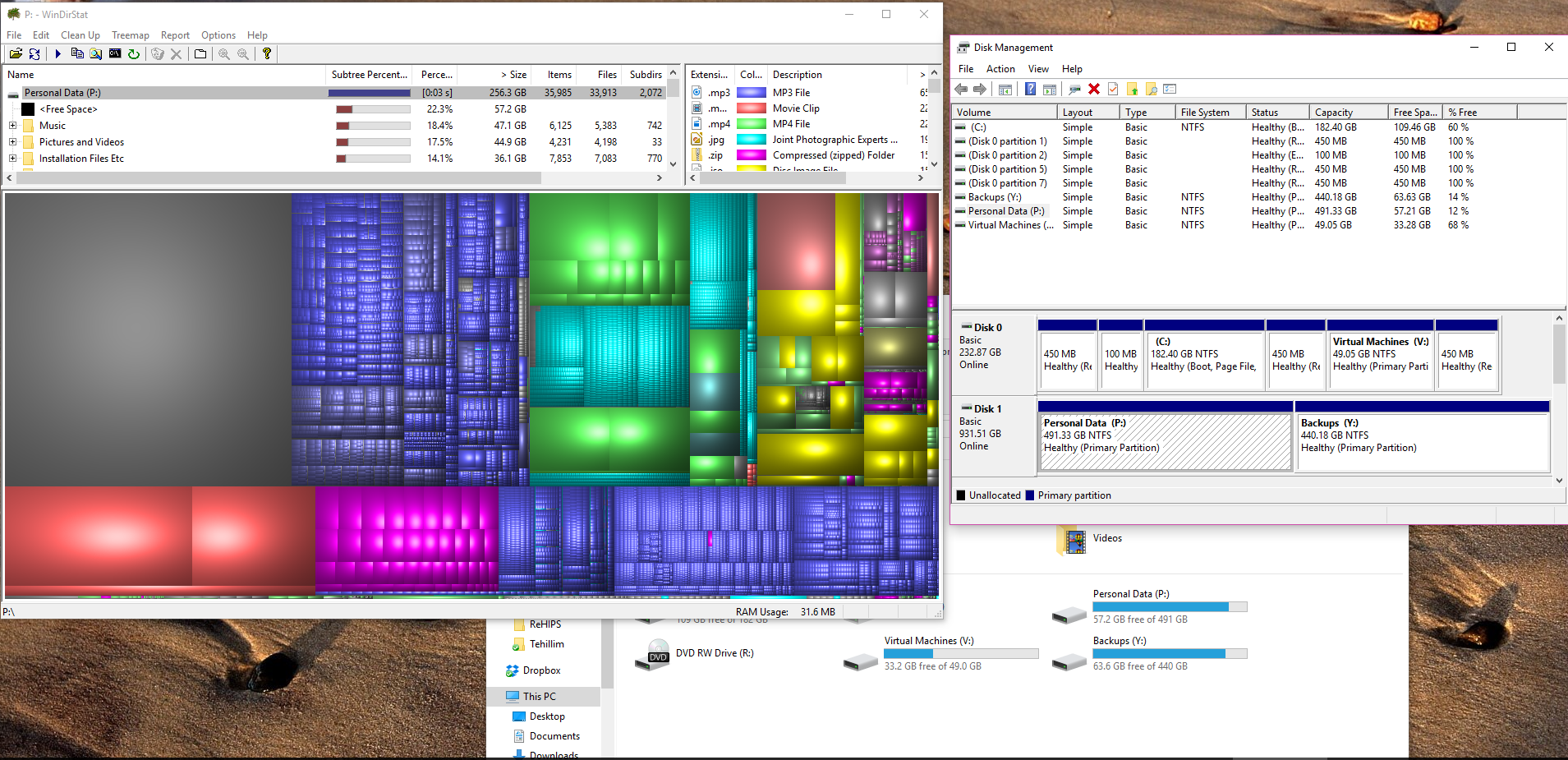
Capture.PNG
 
Last edited:
You must remove the RollBack Rx program, and then reinstall the Windows operating system!
I don't have Rollback installed, and never did, since my last Windows reinstallation.
Please note that this is not my primary partition. It is on a secondary hard disk.
 
  • Like
Reactions: brambedkar59
Upvote 0
You must remove the RollBack Rx program, and then reinstall the Windows operating system!
What? That makes no sense at all! This is a secondary drive. His boot drive has lots of free space available.

Please note that this is not my primary partition. It is on a secondary hard disk.
You are absolutely correct! I would like to assume Evandro thought he was posting to a different thread and that he was not being malicious, or that his account was hijacked as that advice was totally out of line.

Unfortunately, your screen shot does not show us everything because it stops under "Installation Files etc". But note of the 3 folders it does show, it is showing over 120GB consumed.

Have you run Disk Cleanup (or CCleaner) on it?
 
Upvote 0
What? That makes no sense at all! This is a secondary drive. His boot drive has lots of free space available.


You are absolutely correct! I would like to assume Evandro thought he was posting to a different thread and that he was not being malicious, or that his account was hijacked as that advice was totally out of line.

Unfortunately, your screen shot does not show us everything because it stops under "Installation Files etc". But note of the 3 folders it does show, it is showing over 120GB consumed.

Have you run Disk Cleanup (or CCleaner) on it?
Thanks.
Disk Cleanup says there is no space to be gained.
The cut-off part of the screenshot adds some more disk usage, but it just doesn't add up. At the top of the WinDirectStat window, you can see that it totals at 256 GB. But really, it is a 500 GB partition. That's what I can't figure out.
 
Upvote 0
Let's try this:
Open cmd prompt (admin)>
Type 'diskpart' enter
Type 'list disk' enter
Select your disk by typing 'select disk 1' (change disk number here according to your situation)
Type 'list partition'
And Paste a screenshot here.
Here ya go

Capture.PNG
 
Upvote 0
Strange, a possible solution could be to save all the files on the "P" partition, for example, temporarily on external HDD, format the "P" partition, reassign the unallocated space, and finally to transfer the same files on the same partition and checking out.
But this really can take a very long time...
 
Upvote 0
Strange, a possible solution could be to save all the files on the "P" partition, for example, temporarily on external HDD, format the "P" partition, reassign the unallocated space, and finally to transfer the same files on the same partition and checking out.
But this really can take a very long time...

I also wanted to advice him to do like this. Moving necessary files to the external device like HDD and format a partion ,,P,,. But as you have already said it may take a time to move all files.
 
Upvote 0
Strange, a possible solution could be to save all the files on the "P" partition, for example, temporarily on external HDD, format the "P" partition, reassign the unallocated space, and finally to transfer the same files on the same partition and checking out.
But this really can take a very long time...
I am actually in the middle of doing exactly that......
 
Upvote 0