


Lately I am using FF,it's very irritating and I don't know why, but I can't access Malwarebytes.com with FF, 4/5 times.It keeps crushing only on MT.Webrender = faster than chrome, better font rendering, more privacy, customization
Probably lighter cpu wide, but not ram wide
Basic Security Moonhorse's config 2018
- Thread starter Moonhorse
- Start date
You are using an out of date browser. It may not display this or other websites correctly.
You should upgrade or use an alternative browser.
You should upgrade or use an alternative browser.
- Last updated
- Dec 11, 2018
- Windows Edition
- Home
- Security updates
- Allow security updates and latest features
- User Access Control
- Always notify
- Real-time security
- Comodo Cloud Antivirus
- Firewall security
- Periodic malware scanners
- Malwarebytes free
Malwarebytes adwcleaner
Norton power eraser
Zemana antimalware
Roguekiller antimalware
EEK
- Malware sample testing
- I do not participate in malware testing
- Browser(s) and extensions
- Chrome :
- Nano adblocker
- Nano defender
- Netcraft
- Bitwarden
- Maintenance tools
- Geek uninstaller
Bleachbit
Virustotal uploader 2.2
- File and Photo backup
- External hard drive for pictures etc.
- System recovery
- Usb
- Computer specs
- https://malwaretips.com/threads/my-microwave.86080/

hmm sounds weird, i can access that without any problems. Some extensions may cause break on that site?Lately I am using FF,it's very irritating and I don't know why, but I can't access Malwarebytes.com with FF, 4/5 times.It keeps crushing only on MT.
Firefox is nice, as long i keep is as simple as i do with chrome
Update:
+ Comodo internet security replaces windows defender. Im using proactive config, hips enabled
+ Added roguekiller to on demand scannerlist
+ Virustotal uploader to check my downloads as first priority
+ Bleachbit over Privazer
Firefox nightly downgraded to firefox stable, because of mainbrowser;
- ublock origin
- malwarebytes extension ( faster than in chrome imo)
- Netcraft
- Bitwarden
Special:
+ sony wh-1000xm2 as headset
+ Comodo internet security replaces windows defender. Im using proactive config, hips enabled
+ Added roguekiller to on demand scannerlist
+ Virustotal uploader to check my downloads as first priority
+ Bleachbit over Privazer
Firefox nightly downgraded to firefox stable, because of mainbrowser;
- ublock origin
- malwarebytes extension ( faster than in chrome imo)
- Netcraft
- Bitwarden
Special:
+ sony wh-1000xm2 as headset

What do you mean?Firefox nightly downgraded to firefox stable, because of mainbrowser;

to hear if the malware is comingSpecial:
+ sony wh-1000xm2 as headset
Nightly is way too unstable, and i dont like to have them both installed same time so im using the stable version aka release oneWhat do you mean?
exactlyto hear if the malware is coming


Replaced CIS with Comodo Cloud Antivirus ; > deny untrusted files
Removed malwarebytes extension once again due falsepositives
And nano is back to cover ublock
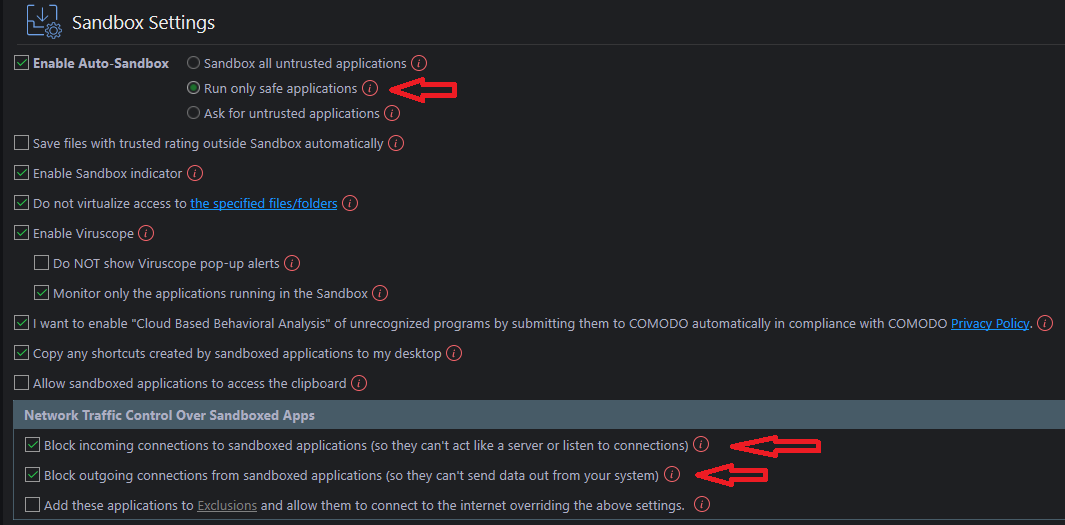
Removed malwarebytes extension once again due falsepositives
And nano is back to cover ublock
Last edited:

Do you use CCAV because it's less buggy than CIS or something else?
For sure and you dont have to play with firewallDo you use CCAV because it's less buggy than CIS or something else?
If i ever mess up somehow , default deny does the work and its better IMO than any default allow antivirus (wich is usually free)
+ no ads, nags, bloat and one of the lightest
Hey friend 27 pages of config? WowReplaced CIS with Comodo Cloud Antivirus ; > deny untrusted files
Removed malwarebytes extension once again due falsepositives
And nano is back to cover ublock
View attachment 203575
Apart of that good update
Yes im very truthful about my configHey friend 27 pages of config? Wow
Apart of that good update
However it's good you feel more secure for MT suggestionsYes im very truthful about my config
You may also like...
-
 New Mic-E-Mouse Attack Shows Computer Mice Can Capture Conversations
- Started by Brownie2019
- Replies: 3
-
 App Review QuickHeal Total Security 2026
- Started by Shadowra
- Replies: 13
-
 Introducing VoodooSoft's RansomGuard EDR - Streamlined EDR for Consumers and SMB
- Started by danb
- Replies: 37
-

