Multiple choice quiz for Visual Basic (Programming)

jamescv7

Level 85
Thread author
Verified
Honorary Member
Forum Veteran
Mar 15, 2011
13,070
17,982
8,379
29
Philippines
Hi guys :), well I'm back for another help basically still not a pro user when doing programming so I need to explore much.

Can you guys help me on how to make a multiple choice quiz program? Its an activity and the deadline will be on Saturday, however I cannot find a research for it

Also one link cannot solved much as its too way complicated.

If anyone knows it just post for detailed steps. I will give a rep+ for giving good suggestion. :D
 
Hi Earth, actually the first link was that I'm referred though was way complicated as it does have error when used the code.
 
Here is how I did it...
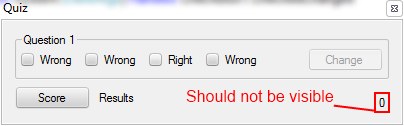
I made a groupbox with the text being the question. I then put four Checkboxes, three wrong answers one right, I put all the checkboxes in the group box. I also put a button that says "Change".

I then put a label in the corner in that has the text "0" this will help with the score system. I then put another button that says Score with a label that says results.

For the wrong answer I had put:
Code:
If CheckBox1.Checked = True Then
CheckBox1.Enabled = False
CheckBox2.Enabled = False
CheckBox3.Enabled = False
CheckBox4.Enabled = False
Button1.Enabled = True

Button one would be enabled for the change. Once you chose all options will be disabled until the change button was pressed.

I coded the correct button the same way I coded the the wrong answer except with:
Code:
Label1.Text += 1

This would add a point if you were to get the right answer.

The code I used for the change button was:

Code:
If CheckBox3.Checked = True Then
Label1.Text -= 1
End If
CheckBox1.Checked = False
CheckBox2.Checked = False
CheckBox3.Checked = False
CheckBox4.Checked = False
CheckBox1.Enabled = True
CheckBox2.Enabled = True
CheckBox3.Enabled = True
CheckBox4.Enabled = True
Button1.Enabled = False

The Label1.Text -= 1 is to subtact from the score if you were to have the correct answer but wanted to change.


When I coded Score I put:
Code:
Label2.Text = Label1.Text + "/1"
Button1.Enabled = False

The Button1 would be disabled so that once you got your result you could not change your answer to the correct one.

I hope I helped. If I didn't I would recommend asking ReviewsAntivirus to help with coding.

I do a little bit of coding :blush:.
 

Attachments

  • Quiz1.PNG
    Quiz1.PNG
    10.7 KB · Views: 3,354