


The MalwareTips app
Your community, one tap away.
Open MalwareTips from your Home Screen or desktop. Follow discussions, find answers and pick up where you left off.
- Home Screen access
- Optional push alerts
- Your community
You're ready to explore.Explore what's new
Installation instructions
iPhone & iPad
- Open MalwareTips in Safari and tap Share. You may need to open the Page Menu first.
- Choose Add to Home Screen. If it is not listed, use Edit Actions to add it.
- Keep Open as Web App enabled if shown, then tap Add.
Android
- Open MalwareTips in Chrome or another browser that supports app installation.
- Open the browser menu and look for Install app, Install and create shortcut, or Add to Home screen.
- Choose Install and confirm. Wording varies by browser.
Desktop
- Chrome: use the install icon in the address bar, or the menu under Cast, save and share.
- Edge: open the menu, then More tools, Apps and Install this site as an app.
- Safari on Mac: choose Share or File, then Add to Dock. Firefox on Windows: look for the web apps button in the address bar.
If you cannot find an install option, update your browser or use its bookmark option to keep MalwareTips close.
Keep up with your conversations
After installation, open the app and sign in. Enable push notifications in Preferences if you want alerts. On iPhone and iPad, push requires a Home Screen web app and iOS or iPadOS 16.4 or later.
Sign in to manage notificationsInstallation is optional. Your notification settings stay under your control.
You are using an out of date browser. It may not display this or other websites correctly.
You should upgrade or use an alternative browser.
You should upgrade or use an alternative browser.
Question NextDns blocks
- Thread starter cartaphilus
- Start date
VPN and DNS
7 Replies
1,840 Views
Help answer the author's question with clear explanations and useful steps.
F
ForgottenSeer 97327
Yes that is normal
Filtering at DNS level can only block stuff which you can also block with host files on your PC. Host file block rules contain only IP addresses or (parts of) URL's
Browser extensions can block host files plus ABP format block rules which can block and hide ads. The block part alone has a lot more granular options related to the content (say 10 times as powerful than host file block rules). On top of that some adblockers have very powerful advanced options to change nearly everything on a website (say 100 times more powerful than host block rules).
Most members use them in combination, where the DNS does the heavy lifting with lots of simple block rules (focused on malware and tracking protection), and use the browser extension for the smart advanced stuff (focused on blocking and hiding advertisements).
In the past I did some testing and on the websites I used for reference (15 news websites) enabling all filters in uBlockOrigin (A) was as efficient as enabling (B) all malware protection in NextDNS plus OISD.nl and Adguard DNS filter for tracking (privacy) protection in combination with uBO using only a few filters. In uBO I disabled all filters and enabled only AdGuard Ads and Annoyances for advertisements and AdGuard URL tracking protection and Kees1958 MV3 list for tracking protection and no uBO malware protection lists (because I used NextDNS for tracking and malware protection, I only needed the advanced URL parameter blocking filter and a small anti-tracking list of Kees1958). When you try this it is also advised to enable your country specific EasyList filter (in my case EZ Dutch).
Because the bulk of the rules are processed at the DNS servers and you use less rules in your extension, the browsing is a tiny bit faster (for me with a 10 year old CPU that mattered).
Filtering at DNS level can only block stuff which you can also block with host files on your PC. Host file block rules contain only IP addresses or (parts of) URL's
Browser extensions can block host files plus ABP format block rules which can block and hide ads. The block part alone has a lot more granular options related to the content (say 10 times as powerful than host file block rules). On top of that some adblockers have very powerful advanced options to change nearly everything on a website (say 100 times more powerful than host block rules).
Most members use them in combination, where the DNS does the heavy lifting with lots of simple block rules (focused on malware and tracking protection), and use the browser extension for the smart advanced stuff (focused on blocking and hiding advertisements).
In the past I did some testing and on the websites I used for reference (15 news websites) enabling all filters in uBlockOrigin (A) was as efficient as enabling (B) all malware protection in NextDNS plus OISD.nl and Adguard DNS filter for tracking (privacy) protection in combination with uBO using only a few filters. In uBO I disabled all filters and enabled only AdGuard Ads and Annoyances for advertisements and AdGuard URL tracking protection and Kees1958 MV3 list for tracking protection and no uBO malware protection lists (because I used NextDNS for tracking and malware protection, I only needed the advanced URL parameter blocking filter and a small anti-tracking list of Kees1958). When you try this it is also advised to enable your country specific EasyList filter (in my case EZ Dutch).
Because the bulk of the rules are processed at the DNS servers and you use less rules in your extension, the browsing is a tiny bit faster (for me with a 10 year old CPU that mattered).
Last edited by a moderator:
Makes sense.Yes that is normal
Filtering at DNS level can only block stuff which you can also block with host files on your PC. Host file block rules contain only IP addresses or (parts of) URL's
Browser extensions can block host files plus ABP format block rules which can block and hide ads. The block part alone has a lot more granular options related to the content (say 10 times as powerful than host file block rules). On top of that some adblockers have very powerful advanced options to change nearly everything on a website (say 100 times more powerful than host block rules).
Most members use them in combination, where the DNS does the heavy lifting with lots of simple block rules (focused on malware and tracking protection), and use the browser extension for the smart advanced stuff (focused on blocking and hiding advertisements).
In the past I did some testing and on the websites I used for reference (15 news websites) enabling all filters in uBlockOrigin (A) was as efficient as enabling (B) all malware protection in NextDNS plus OISD.nl and Adguard DNS filter for tracking (privacy) protection in combination with uBO using only a few filters. In uBO I disabled all filters and enabled only AdGuard Ads and Annoyances for advertisements and AdGuard URL tracking protection and Kees1958 MV3 list for tracking protection and no uBO malware protection lists (because I used NextDNS for tracking and malware protection, I only needed the advanced URL parameter blocking filter and a small anti-tracking list of Kees1958). When you try this it is also advised to enable your country specific EasyList filter (in my case EZ Dutch).
Because the bulk of the rules are processed at the DNS servers and you use less rules in your extension, the browsing is a tiny bit faster (for me with a 10 year old CPU that mattered).
One thing I love about NextDns is the ability to block the stupid LG TV ads that come with the webos. There is no adblocker app for webos so the only thing to block the LG AI spying and random forced ads is via the NextDns redirect and it works wonders.
Attachments
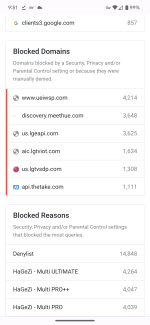

Please tell me that I only see all three HaGeZi Multi lists because you tried all three, and then decided on one of them? 
Eh it's not my resources. I didn't notice any slowdown. It's not like pihole or ublock.Please tell me that I only see all three HaGeZi Multi lists because you tried all three, and then decided on one of them?

has nothing to do with resources. They are just overlapping. Hagezi Ultimate has all the blocklists that Multi Pro ++ and Multi Pro offer. So using Multi Pro ++ and Multi Pro while using Hagezi Ultimate makes no sense.Eh it's not my resources. I didn't notice any slowdown. It's not like pihole or ublock.
Eh it's not my resources. I didn't notice any slowdown. It's not like pihole or ublock.
I believe you, but you do not need all 3 lists. Pro++ has everything that Pro has plus more, and Ultimate has everything that Pro++ has... plus a truck load more than that. So you only need one of them, (At least that is my advice.) but it is up to you. I just wanted to let you know.

EDIT: Ninja'd by Kongo
Gotcha
Recently browsing
Members who viewed this thread in the last 5 minutes
You may also like...
-
 Serious Discussion Nextdns locked me out of nextdns's own management website
 -

-

-

-
